Is Instagram Safe for My Child? A Parent’s Guide

Is Instagram safe for kids? For under-13s, no. It isn’t allowed, and a child who lies about their age loses the teen protections. For 13 to 17-year-olds, it’s much safer than it was. Teen Accounts now switch on private settings, message limits and a 13+ content filter automatically. What remains, including contact with people they choose to follow, comparison and late nights, depends on your child’s age, readiness and a few family rules.
- Minimum age 13. In Australia, 16 since December 2025.
- Teen Accounts do a lot by default, and under-16s can’t loosen them without a parent.
- They can’t vet the people your child chooses to follow back, and that’s where most serious harm starts.
- Readiness matters more than the birthday. Use the questions below to decide between yes, not yet, and yes with conditions.
Benefits and risks, weighed honestly
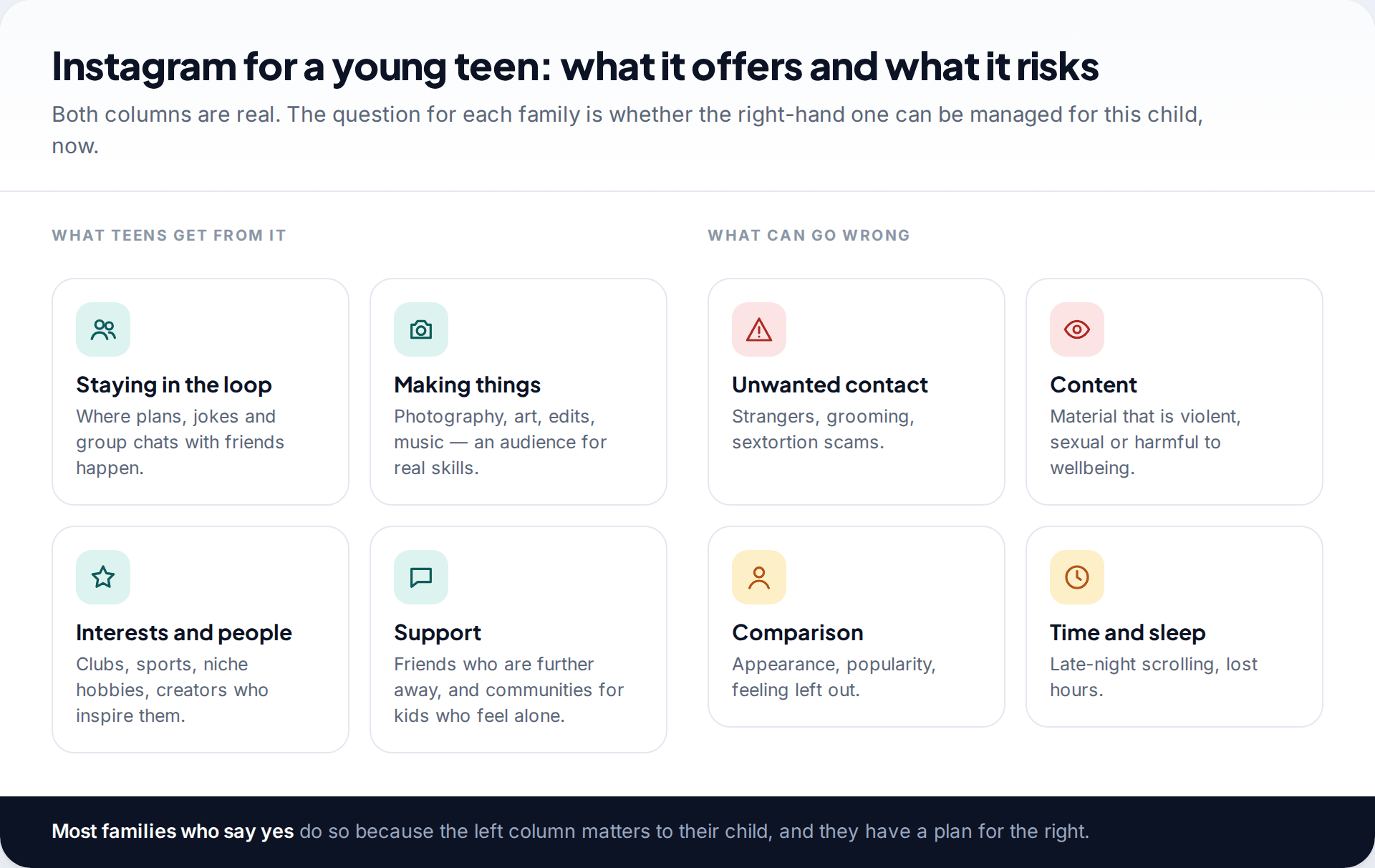
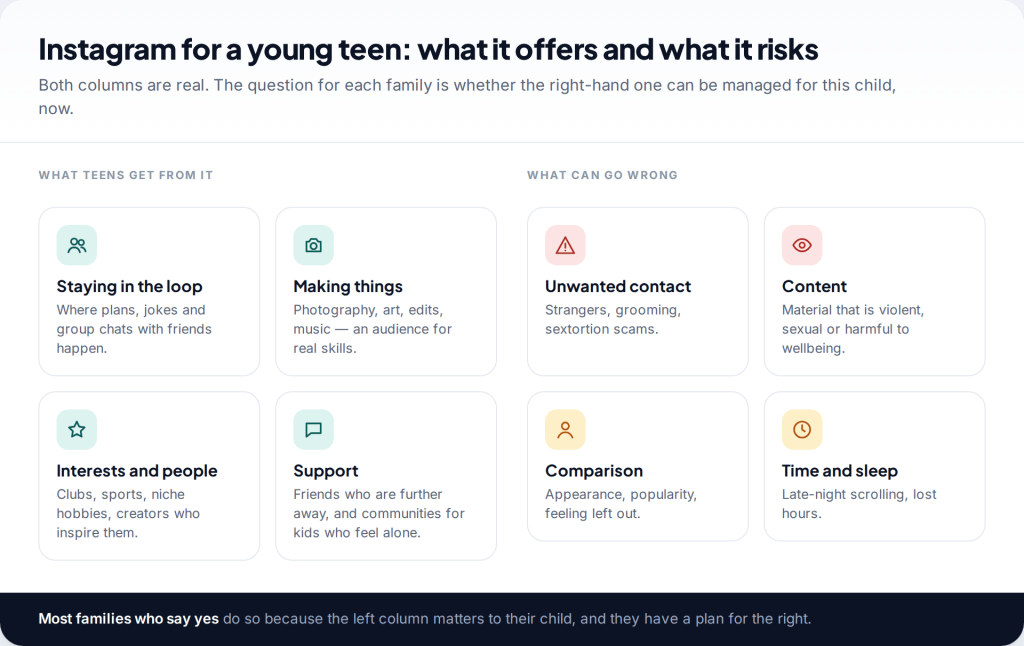
Parents often come to this question expecting a yes or no, and the honest answer is “it depends on the child”. Instagram is where many teenagers make plans, share jokes and find people who share their interests. For some, especially those into photography, art or a niche hobby, it’s a real creative outlet. Keeping a child off it while their friends are on it has costs too, mostly social ones.
The risks are also real, and they fall into four groups: unwanted contact, harmful content, comparison, and time and sleep. The good news is that Instagram’s defaults for teens now tackle the first two quite hard. The other two are mostly left to families.
What Instagram’s minimum age is, and why it matters
Instagram’s terms require users to be at least 13. That’s not a guideline you can waive by supervising closely. An under-13 account breaks the rules and can be removed. More importantly, it almost always carries a false adult birthday, which means none of the teen protections apply. A 10-year-old on a “19-year-old’s” account is less protected than a 14-year-old on their own.
Australia has gone further. Since 10 December 2025, major social platforms including Instagram must take reasonable steps to stop under-16s in Australia holding accounts. The penalties fall on the platforms, not on children or parents. Elsewhere, 13 remains the minimum, and Meta says it uses age-prediction technology to place teens who claim to be adults into Teen Account protections.
How much safer Instagram has become since 2024
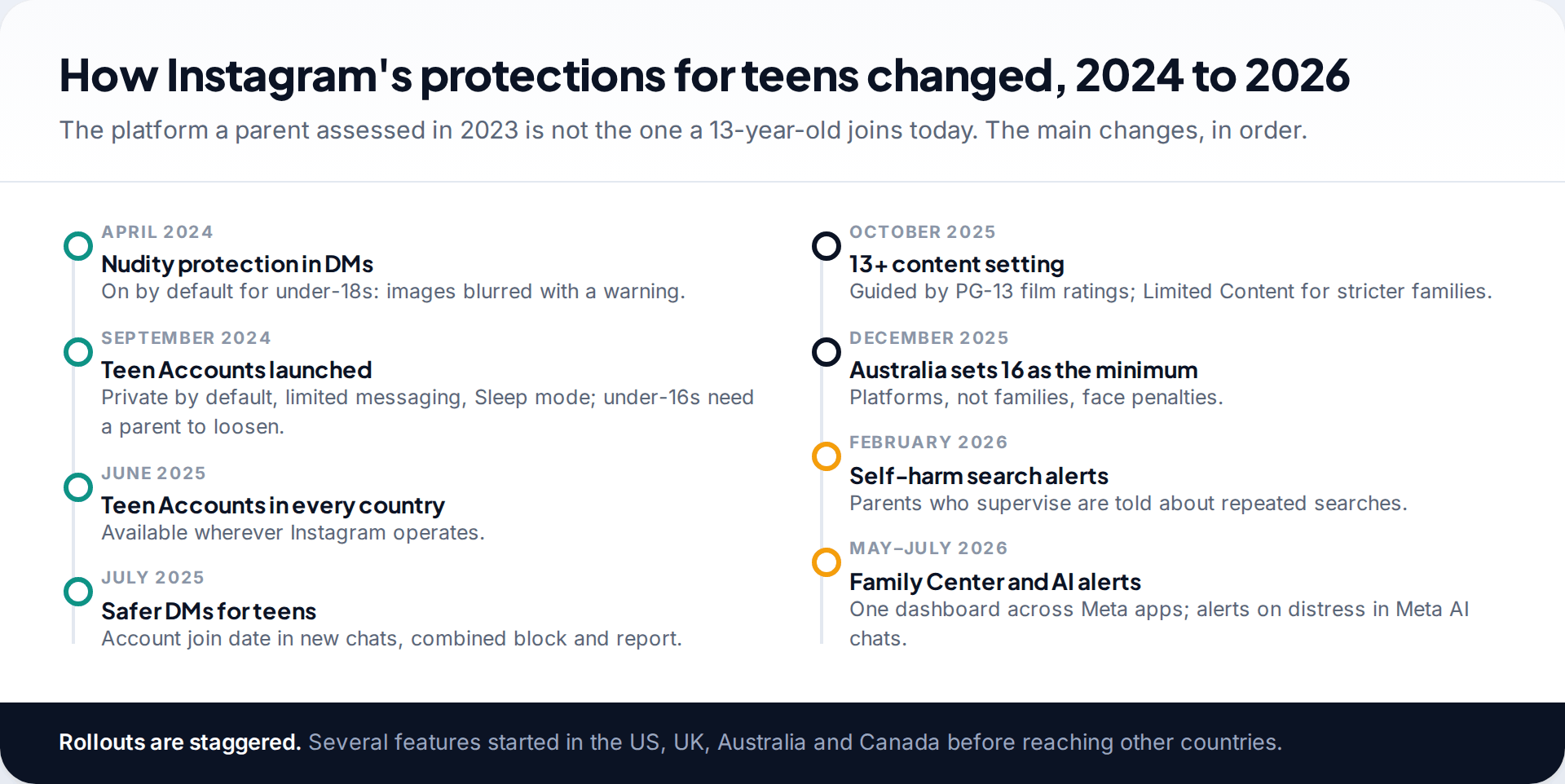
If you last looked at Instagram’s safety a few years ago, it has changed a lot. Nudity protection, which blurs such images in DMs, has been on by default for under-18s since 2024. Teen Accounts arrived in September 2024 and reached every country by June 2025. They make accounts private by default, limit messages to people your teen follows or is connected to, turn on Hidden Words, and add Sleep mode and an hour reminder. Under-16s need a parent’s approval, through Supervision, to relax any of it.
In October 2025 Meta added a 13+ content setting, modelled on PG-13 film ratings. It blocks mature search terms and stops teens following accounts that regularly post mature content. A stricter Limited Content option also turns comments off. In 2026, parents who supervise began receiving alerts when a teen repeatedly searches for suicide or self-harm terms, and, in some countries, when a teen’s conversation with Meta AI suggests they may be at risk.
These are meaningful changes. They also have limits, which the next section sets out.
Is Instagram safe for kids? Each risk in turn
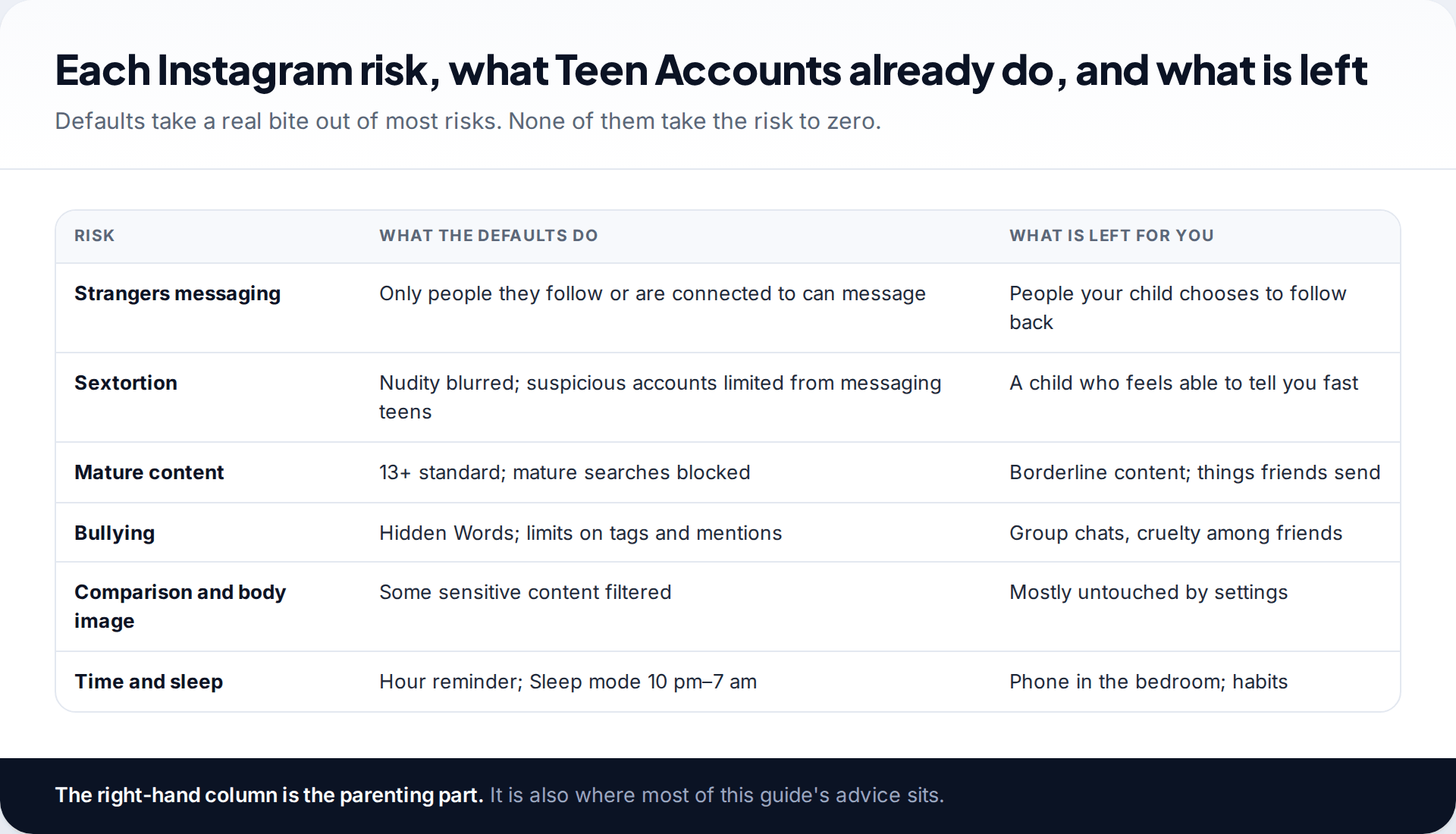
Unwanted contact. Strangers can no longer message a teen directly, so they send follow requests instead. If your child approves one and follows back, that person can message them. The single most protective family rule is simple: only follow and approve people you know offline.
Sextortion. Scammers pose as a peer, obtain an intimate image, then demand money. Instagram blurs nudity by default for teens and restricts accounts showing signs of this behaviour from messaging them. What stops these scams in practice is a child who tells a parent quickly, because the scammer relies on shame and panic. Tell your child in advance that they will never be in trouble for telling you. Our guide to what parents can see of Instagram DMs covers what to do if it happens.
Content. The 13+ standard filters a great deal, and Meta says it may still let some suggestive material through, as a PG-13 film can. Friends can also send things directly. Bullying is reduced by Hidden Words and limits on who can tag and mention teens, but cruelty inside a friendship group doesn’t depend on settings.
Comparison and body image are the risks settings touch least. A feed full of friends’ best moments and polished creators can leave some teens feeling worse, particularly around appearance. Watch for mood rather than minutes. Time and sleep are partly covered by Sleep mode and the hour reminder, which nudge but don’t stop. A scheduled break through Supervision, or the phone charging outside the bedroom, does more.
The age-by-age answer
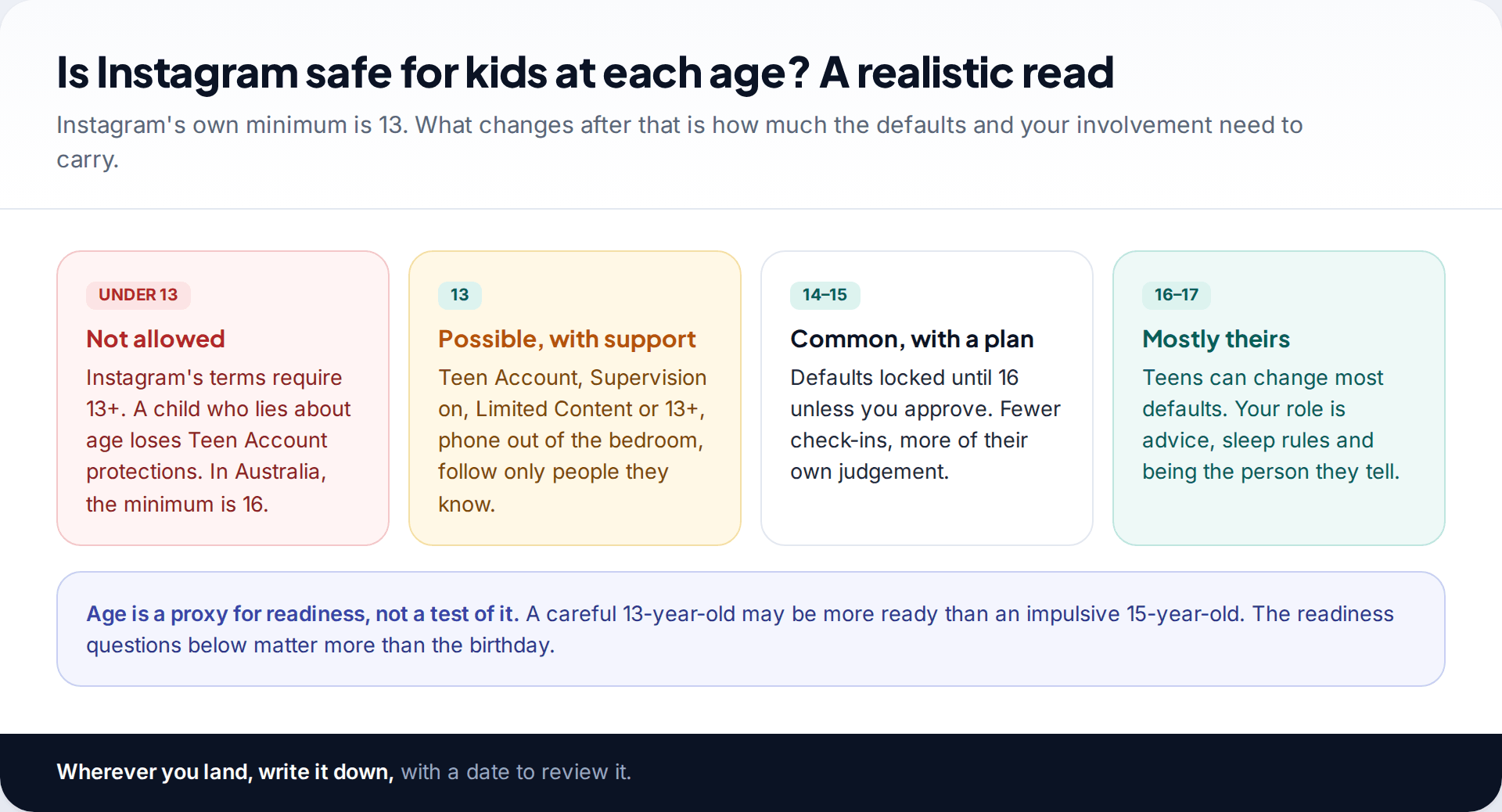
Under 13: not allowed, and not protected. If your child wants to share a hobby, a parent-run account posting their artwork or sport is a legitimate option. Meta applies extra protections to adult-managed accounts that feature children, including strict message filtering. In 2025 it said it had removed nearly 135,000 Instagram accounts for sexualised comments on, or requests for images from, such accounts. That’s a reminder to keep those accounts private too. Until 13, messaging apps limited to family and close friends meet most of the social need.
13: possible with support. Use a Teen Account with the real birthday, Supervision agreed from day one, Limited Content or 13+, the follow-only-people-you-know rule, and the phone out of the bedroom at night.
14 to 15: common, with a plan. The defaults stay locked unless you approve changes. Check in less often and let them set more of their own limits.
16 to 17: mostly theirs. Instagram lets them change most defaults. Your role becomes advice, a sleep rule, and being the person they come to.
Is your child ready? Eight questions
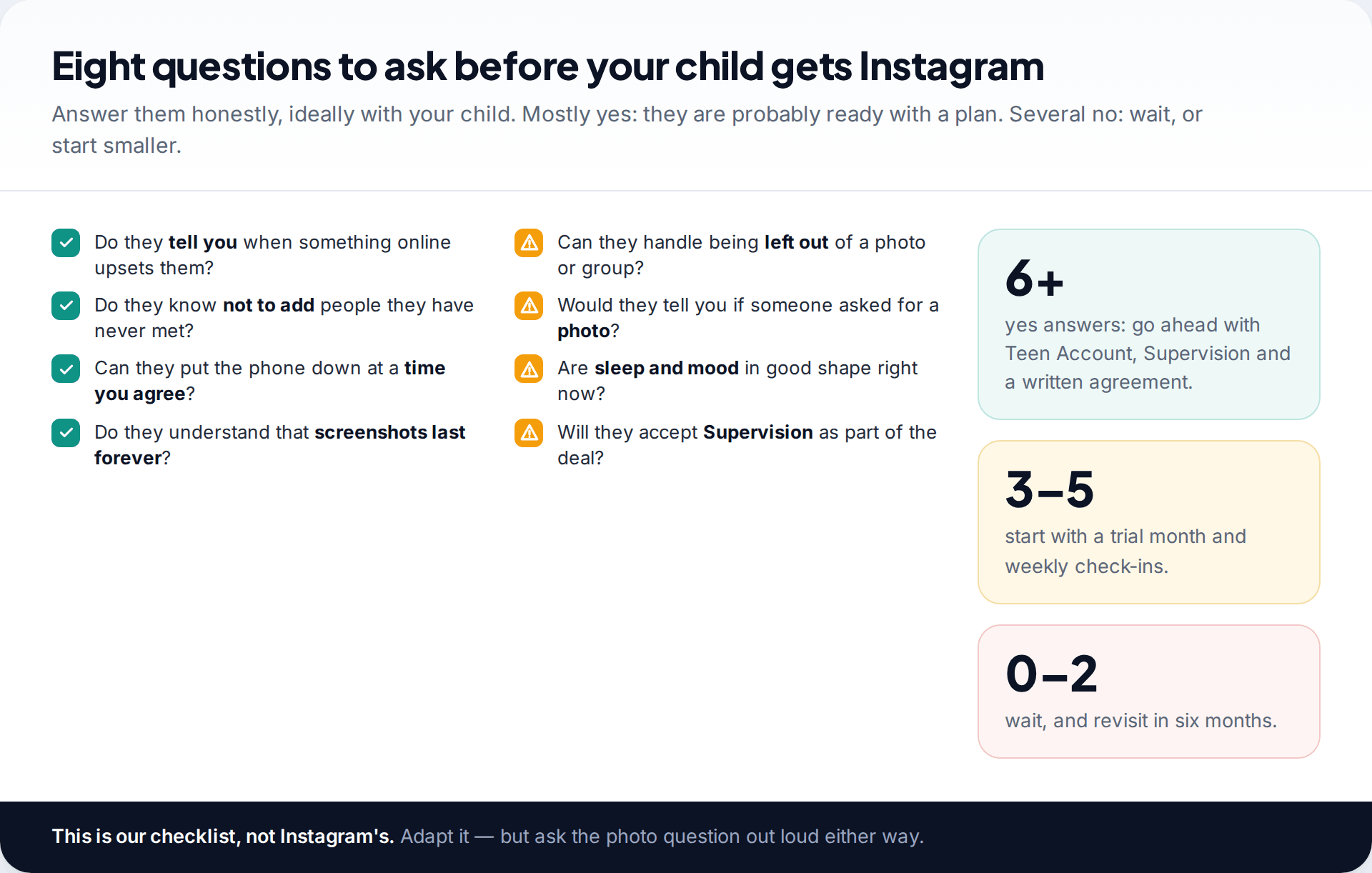
Age tells you what’s allowed. Readiness tells you what’s wise. Before saying yes, think honestly about how your child handles the things Instagram will put in front of them. Do they tell you when something upsets them online? Do they understand that anything they send can be kept? Can they handle seeing a party they weren’t invited to? Would they tell you if someone asked them for a photo?
Ask some of these with your child. Their answers, and how they react to being asked, tell you a lot. Mostly yes means go ahead with a plan. A mix suggests a trial month with weekly check-ins. Mostly no means “not yet”, with a date to revisit.
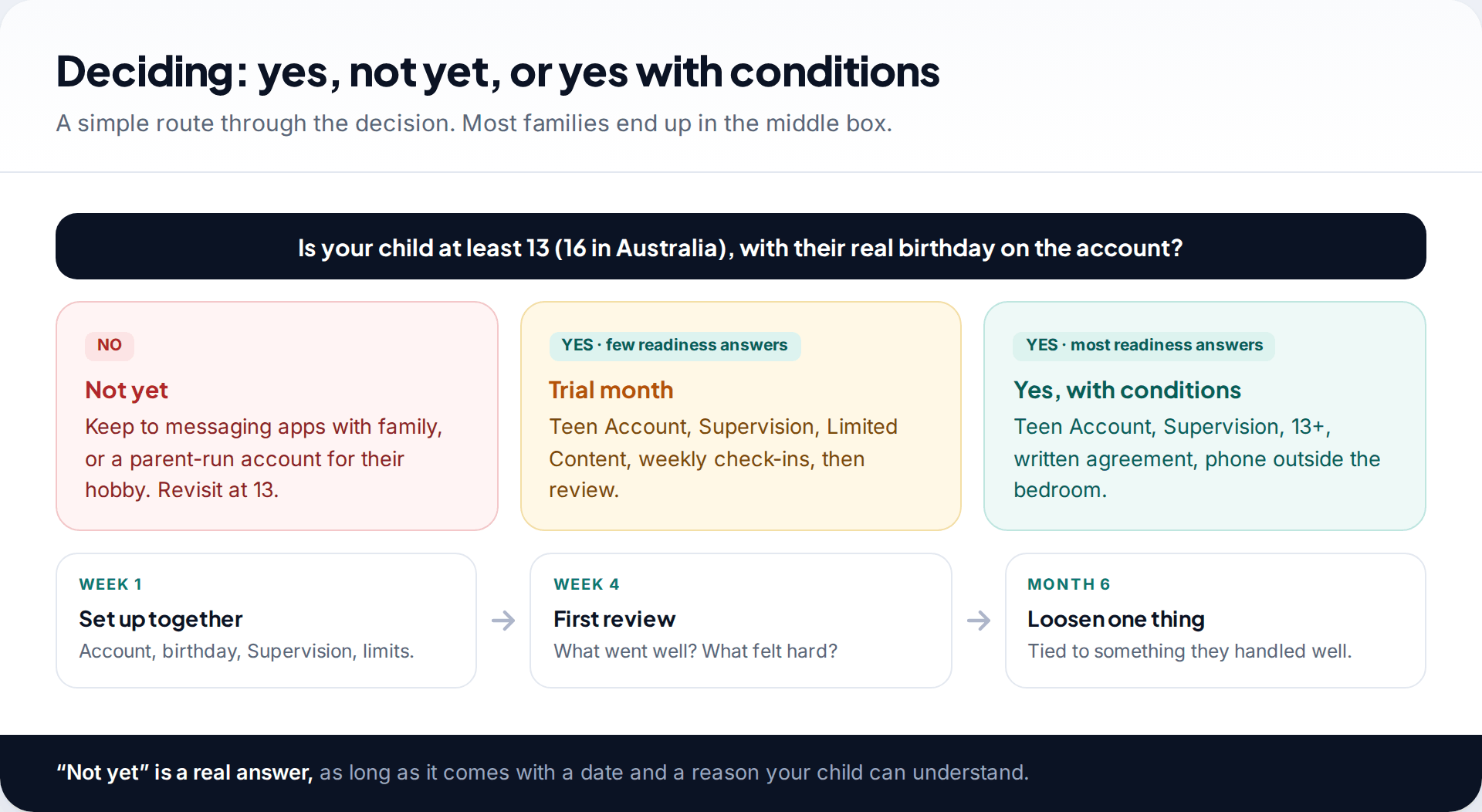
If you say yes: the first day
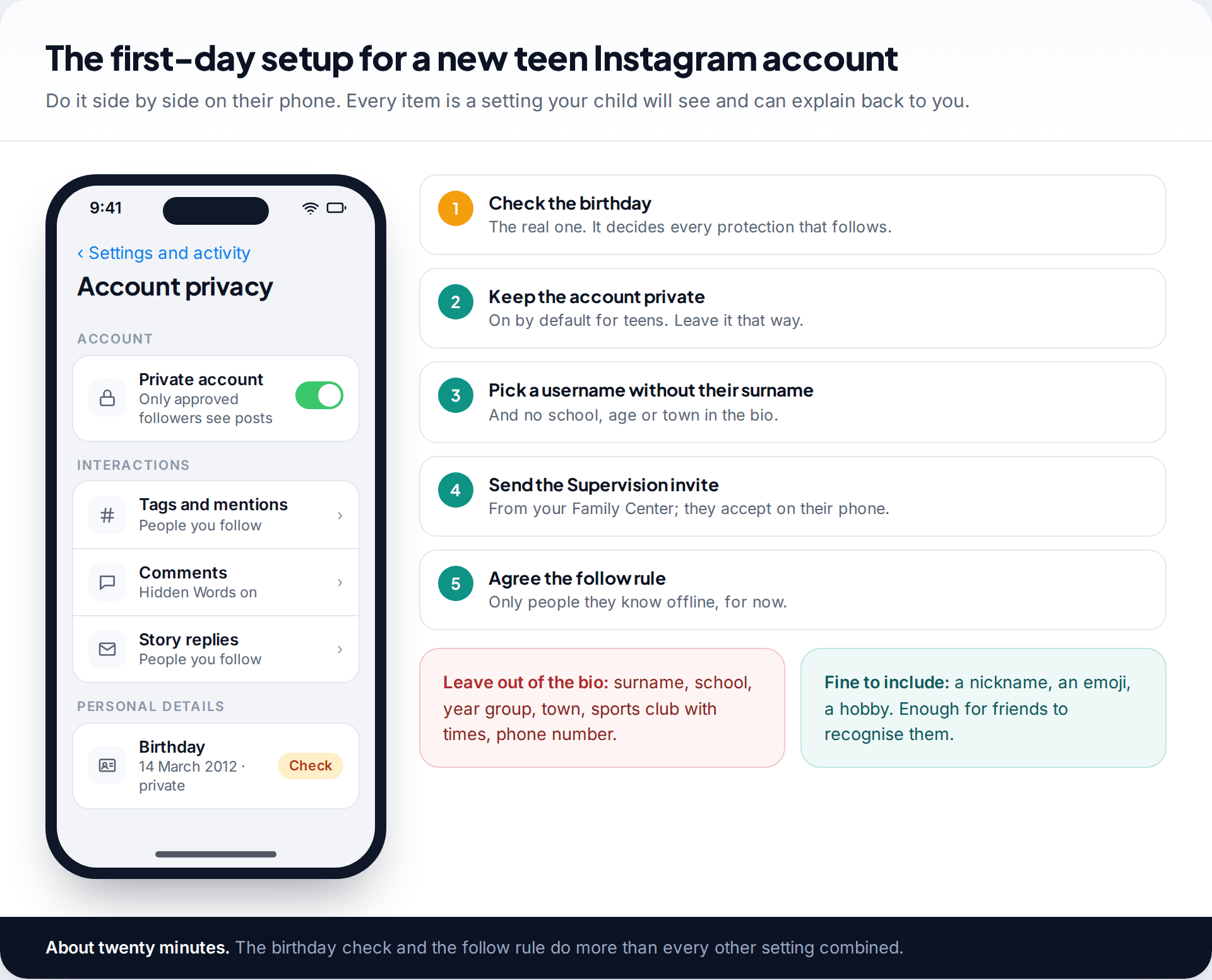
- Check the birthday. Every protection depends on it.
- Keep the account private, as Teen Accounts are by default.
- Choose a username and bio without their surname, school, age or town.
- Set up Supervision from your own Family Center, and have your teen accept on their phone.
- Agree the follow rule and write it into a short family agreement.
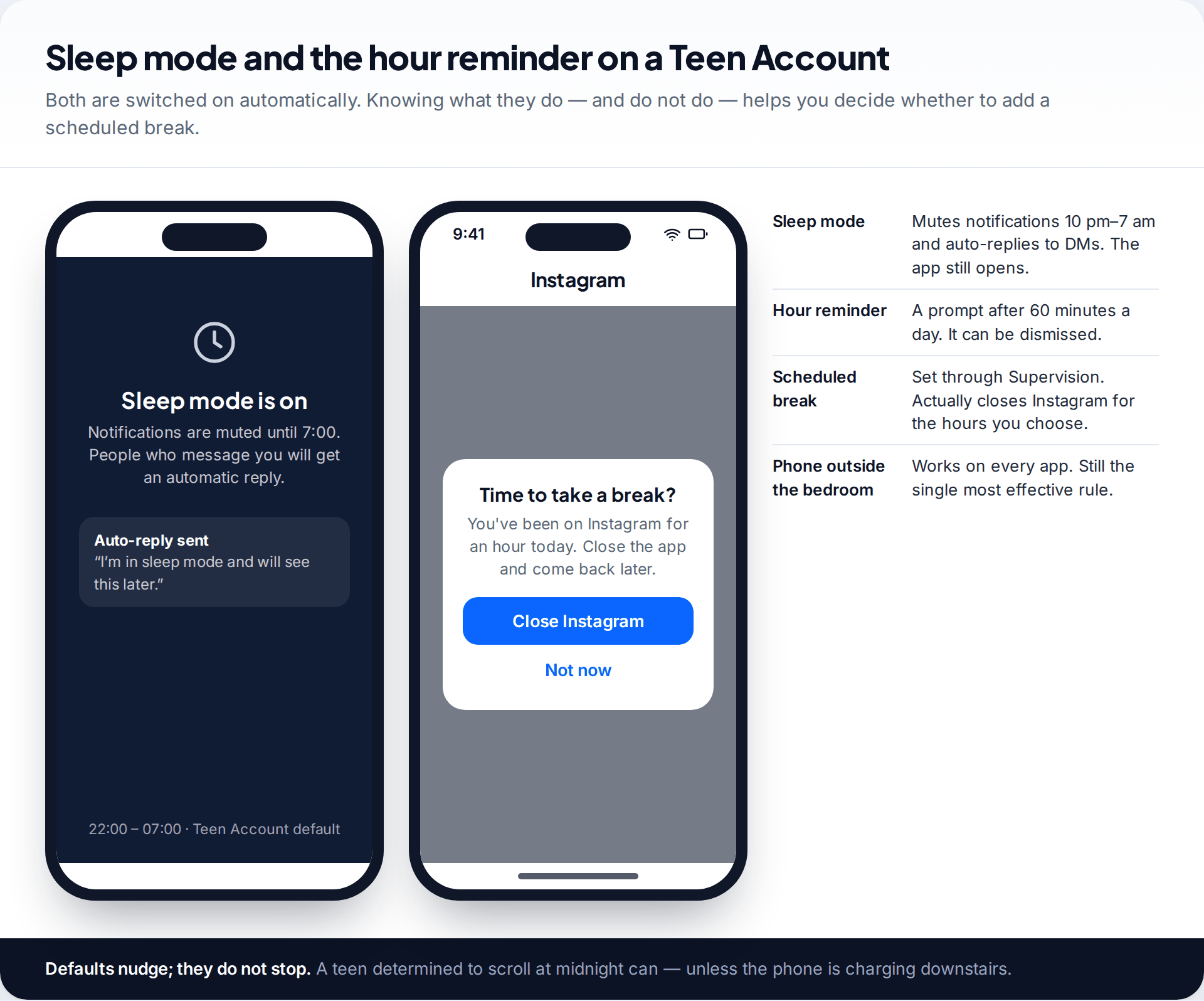
Then look at time together. Sleep mode mutes notifications overnight and sends an auto-reply, but the app still opens. The hour reminder can be dismissed. If sleep is a concern, set a scheduled break through Supervision, or better, agree that phones charge outside the bedroom. For the ongoing side, including a weekly check-in and when to step back, see our plan for monitoring a child’s Instagram safely.
Signs it isn’t going well
Saying yes isn’t a one-off decision. For the first few months, watch your child rather than the app. These signs suggest Instagram is costing more than it gives:
- Sleep slipping. Tired in the mornings, the phone found in the bedroom, Instagram time creeping past bedtime in Supervision.
- Mood after scrolling. Flat, irritable or anxious after time on the app, or comments about their looks that weren’t there before.
- Secrecy that’s new. Screens turned away, a sudden second account, or a new “friend” they won’t talk about.
- Friendships moving online only. Less time with friends in person, more time watching them on a screen.
None of these means you have to delete the account. Talk about what you’ve noticed, then tighten one thing, such as a scheduled break, Limited Content or a return to weekly check-ins. Tell them what would let you loosen it again. If mood or sleep problems persist, speak to your GP or the school, whatever part Instagram is playing.
Myths about Instagram safety
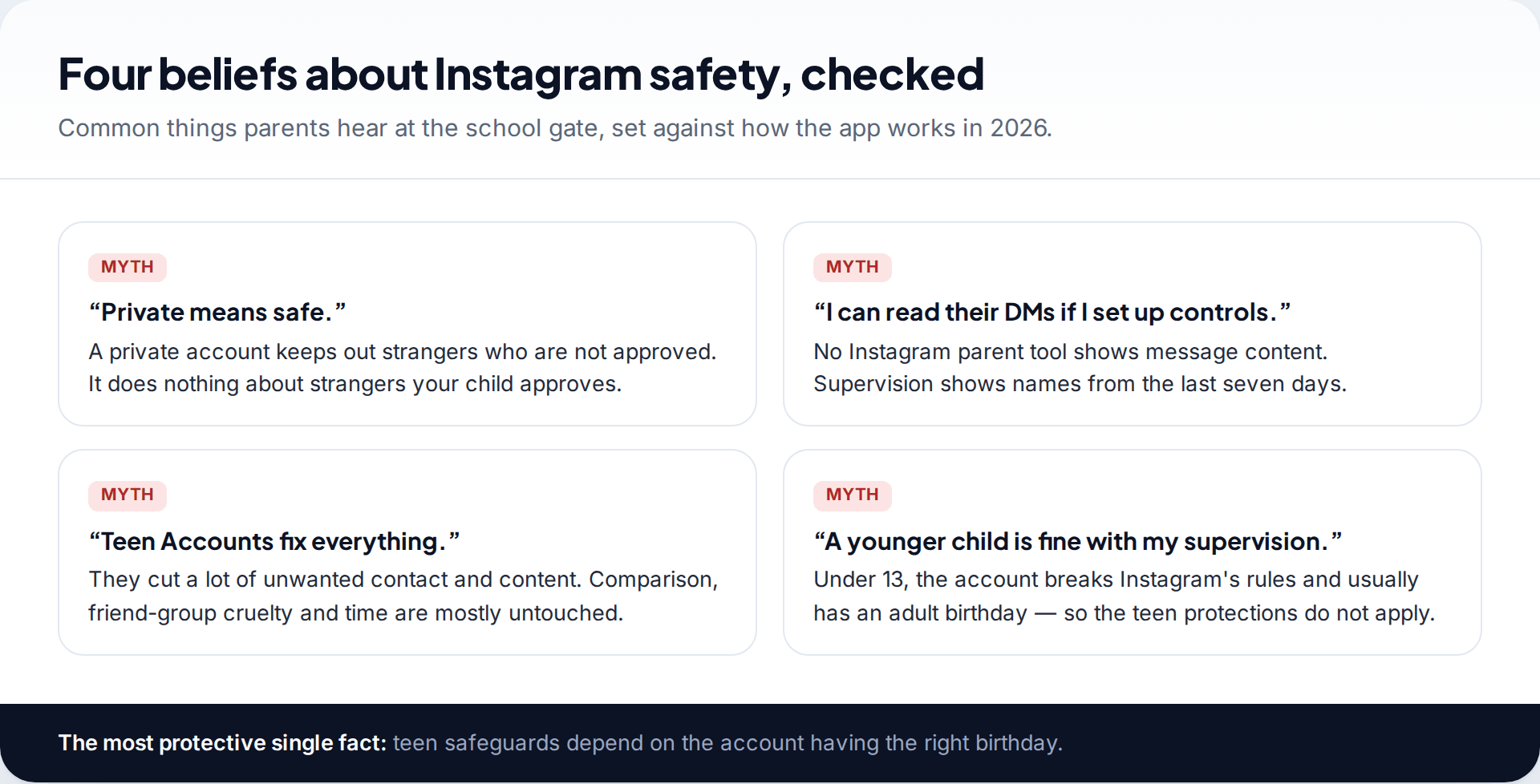
Four beliefs come up again and again. A private account keeps out strangers you haven’t approved, but not the ones you have. Teen Accounts reduce a lot, but they don’t address comparison or friend-group cruelty. Parental controls never show message content. And supervising a child who is under 13 doesn’t make the account safe, because it will usually carry an adult birthday. Correcting these four covers most of the gap between how safe parents think Instagram is and how safe it actually is.
How this page was put together
The protections described were checked against Meta’s own announcements from 2024 to 2026 on Teen Accounts, nudity protection, the 13+ content setting, DM safety features and parent alerts, together with reporting on Australia’s minimum-age law, in September 2026. Where a feature began in some countries first, we’ve said so.
The readiness questions, score bands and age suggestions are our editorial judgement, not research findings or Instagram policy. More on our approach is in our editorial standards.
Common questions
What age is Instagram appropriate for?
Instagram’s minimum age is 13, or 16 in Australia. Many families find 13 manageable with Supervision and clear rules, and some prefer to wait until 14 or 15, depending on the child.
Is Instagram safe for a 12-year-old?
No. It’s against Instagram’s rules, and the account will usually have a false adult birthday, so teen protections won’t apply. A parent-run account for a hobby is a safer option.
Can strangers message my child on Instagram?
Not directly on a Teen Account. Only people your child follows or is already connected to can message them. A stranger they follow back can, though, which is why the follow rule matters.
Is Instagram safer than TikTok or Snapchat?
Each has different defaults and different risks, and comparisons date quickly. The questions to ask are the same for every app: who can contact my child, what can they see, and will my child tell me when something goes wrong.
Do I need Supervision if Teen Accounts are automatic?
For under-16s, yes, in practice. Supervision is what lets you approve or refuse requests to loosen settings, set real time limits and receive safety alerts.
Can I see what my child looks at on Instagram?
Not post by post. With Supervision you can see time spent, who they follow and the general topics they’re interested in, and since 2026 you may be notified when they add a new interest. To see what their feed looks like, scroll Explore together now and then.
What should I do if my child already has an account with a fake age?
Talk to them without anger, then correct the birthday together or start a new account with the right one. Correcting it is what switches on the teen protections.
Looking for a tool to go with this? TheTruthSpy is a free parental control app for Android that stays visible on the child's phone. If it fits your family, see the Social media alerts feature.
Related guides
Monitoring Your Child’s Text Messages Safely: Options by Age
What parents can really see of a child's texts on iPhone and Android: Communication Limits, Communication Safety, Family Link contacts…
Vault Apps and Hidden Apps on a Child’s Phone: How to Spot Them
How to find hidden or vault apps on your child's phone: calculator vaults, iPhone hidden and locked apps, Android private…
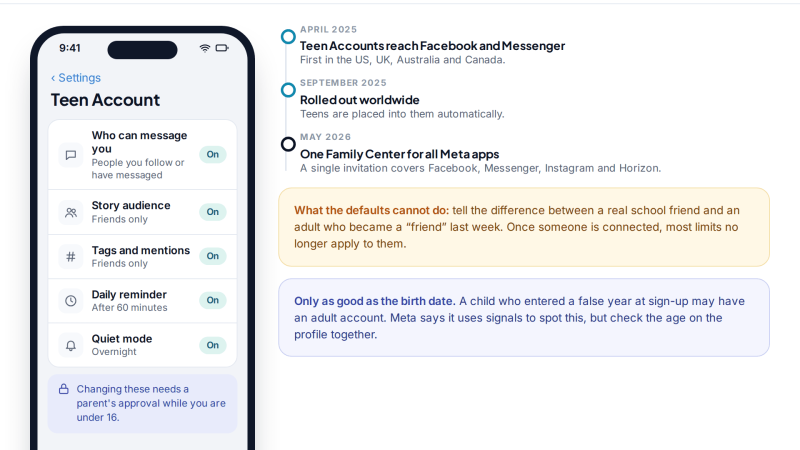
Facebook for Teens: Supervision Tools and Safe Monitoring Habits
How to monitor your child's Facebook openly: what Teen Accounts switch on automatically, what Family Center supervision shows (and never…
Parental controls your child can see
Location, screen time limits, a web filter and alerts from notifications — free, and visible on your child's phone. Pair a phone in about ten minutes.
Android · Free to set up · Visible on your child's phone