The 10 Best Family Locator Apps: Features, Privacy and Price

The best family locator apps are often the ones already on your phones. Apple Find My, Google Family Link and Google Maps location sharing are free, two-way and keep little history. Paid family locator apps such as Life360, Qustodio, Norton Family, Bark and GeoZilla add place alerts, history, driving and crash features. Which suits you depends on your devices, your children’s ages, and how much you trust each company with your family’s movements.
- All-iPhone family: Apple Find My with Family Sharing.
- Young child on Android: Google Family Link.
- Mixed devices, free: Google Maps location sharing.
- Driving and crash features: Life360, after reading its data policy.
- Already paying for parental controls: the locator in Qustodio, Norton Family or Bark may be enough.
Why privacy comes first in this comparison
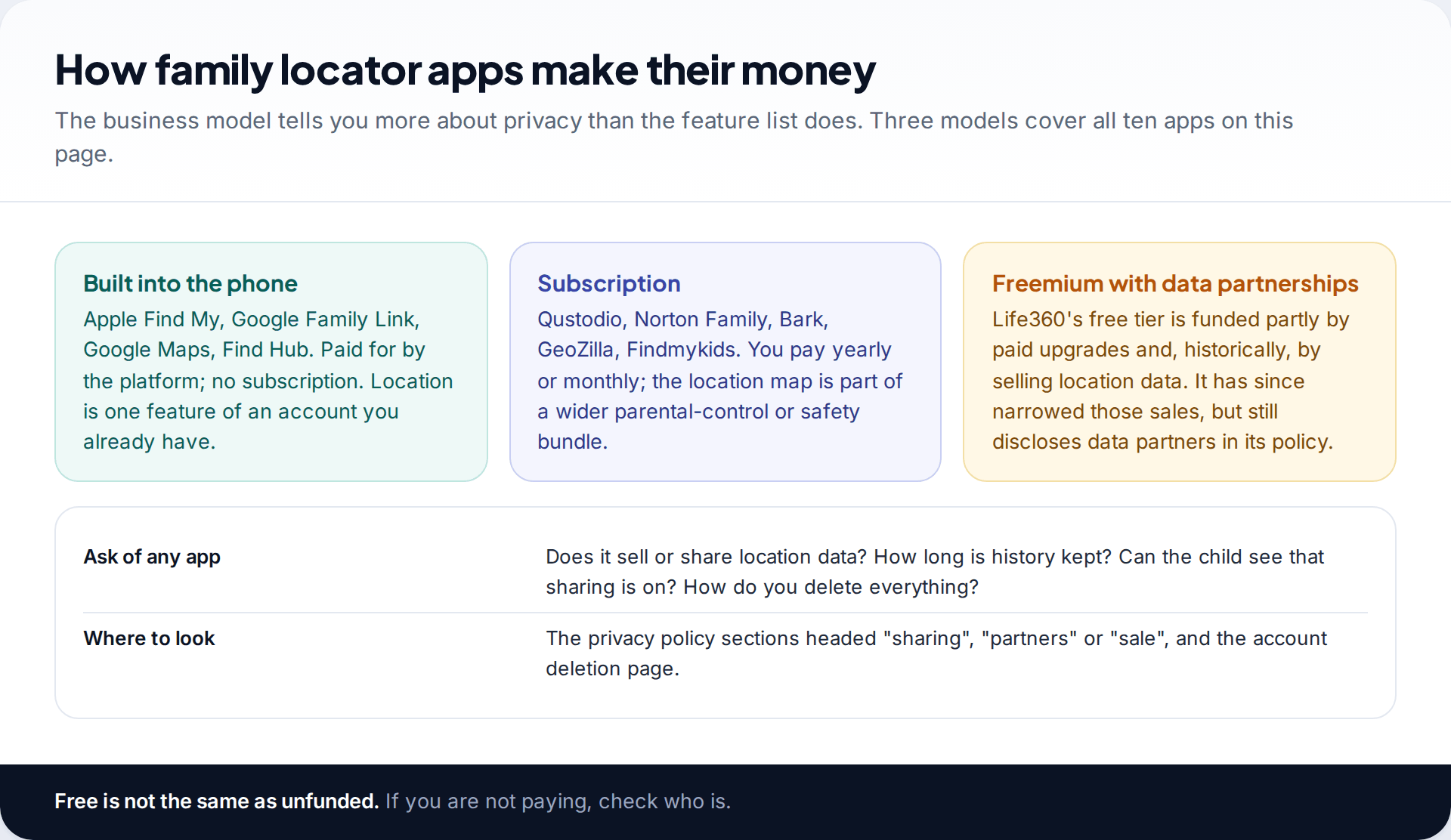
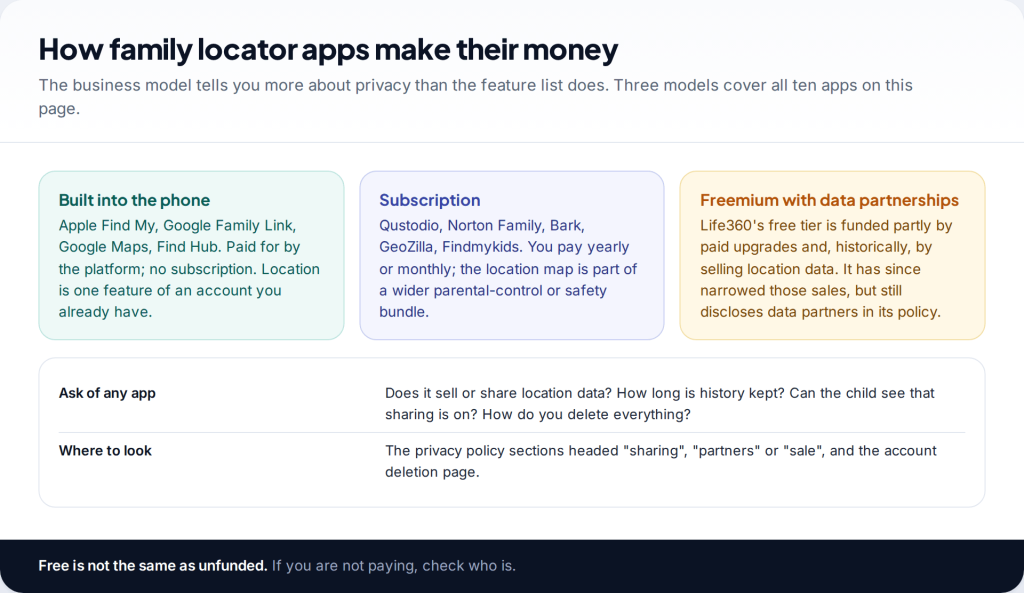
A family locator records where your children go to school, where your partner works and when the house is empty. That record is valuable, and not only to you. In December 2021 The Markup reported that Life360, then used by about 33 million people, was selling precise location data to around a dozen data brokers. Life360 announced in January 2022 that it would stop selling precise data to most of them.
That history is why this comparison scores each app on what it keeps and shares, not just on its features. Other comparisons tend to rank on feature count, which rewards the apps collecting the most.
Family locator apps compared
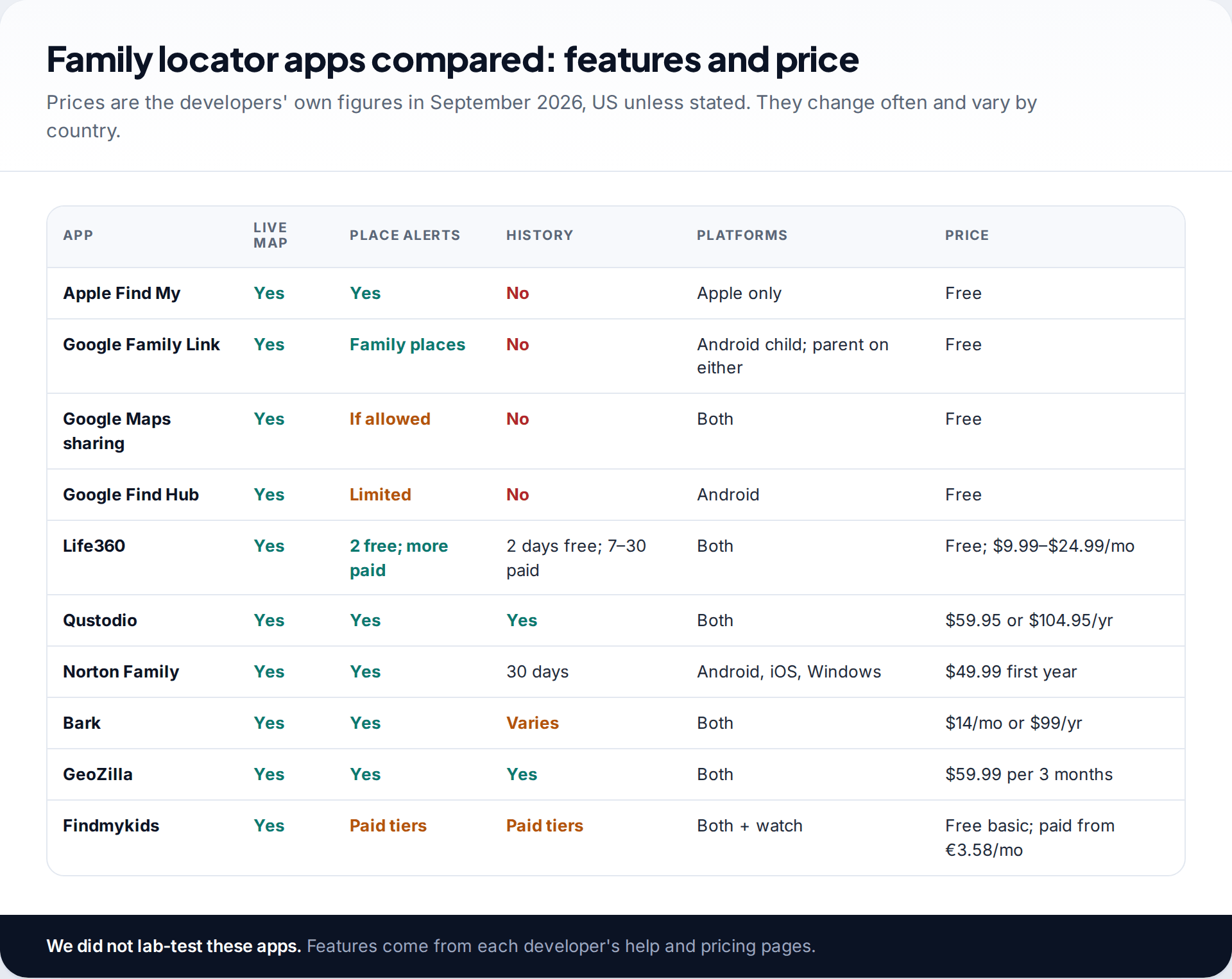
We did not lab-test these apps. The features, prices and platform details come from each developer’s help pages, plan pages and privacy policies, checked in September 2026. Independent reporting is cited where we rely on it. For a broader comparison that includes lost-phone finders, fleet and fitness trackers, see our guide to GPS tracking apps by use case.
How we judged them
Each app was scored on four criteria, in this order. Privacy: documented data sales, how much history is stored, and whether the person being located can see that sharing is on. Fit: whether it works across the devices a typical family actually owns. Useful features: place alerts, SOS and crash detection count; features that monitor content or audio are noted but don’t earn points. Cost over a year, at published prices. The numbering follows the sections below, grouped by type, rather than a single ranking, because the right answer for an all-iPhone family is wrong for a mixed one.
The free, built-in options
1. Apple Find My with Family Sharing
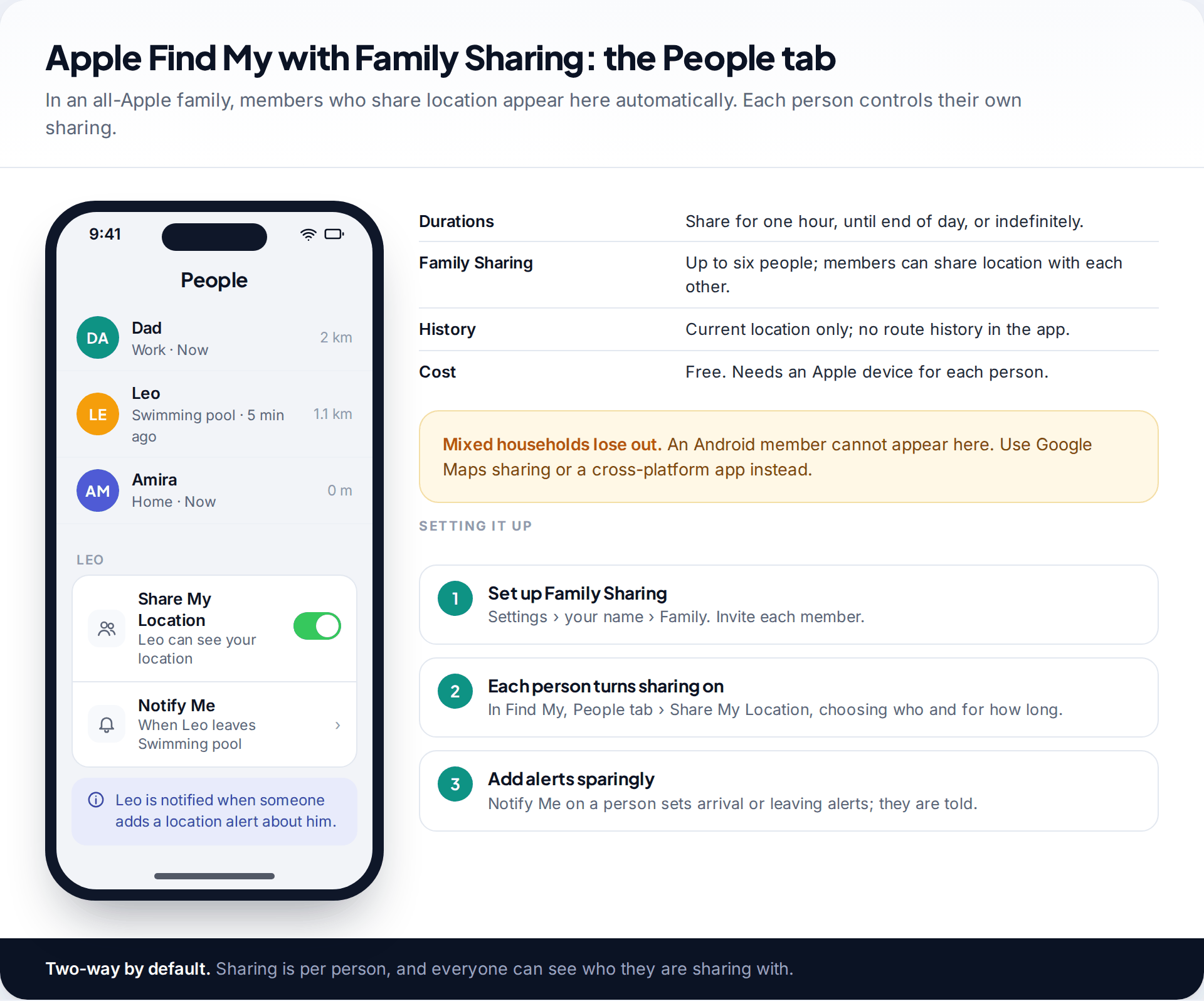
If everyone has an iPhone, start here. Family Sharing members can share location with each other in the People tab, and anyone can share for one hour, until the end of the day, or indefinitely. You can set a notification for when someone arrives or leaves a place, and the person is told when an alert is added. The app shows current location only, with no route history. The limitation is plain: Android users can’t join.
2. Google Family Link
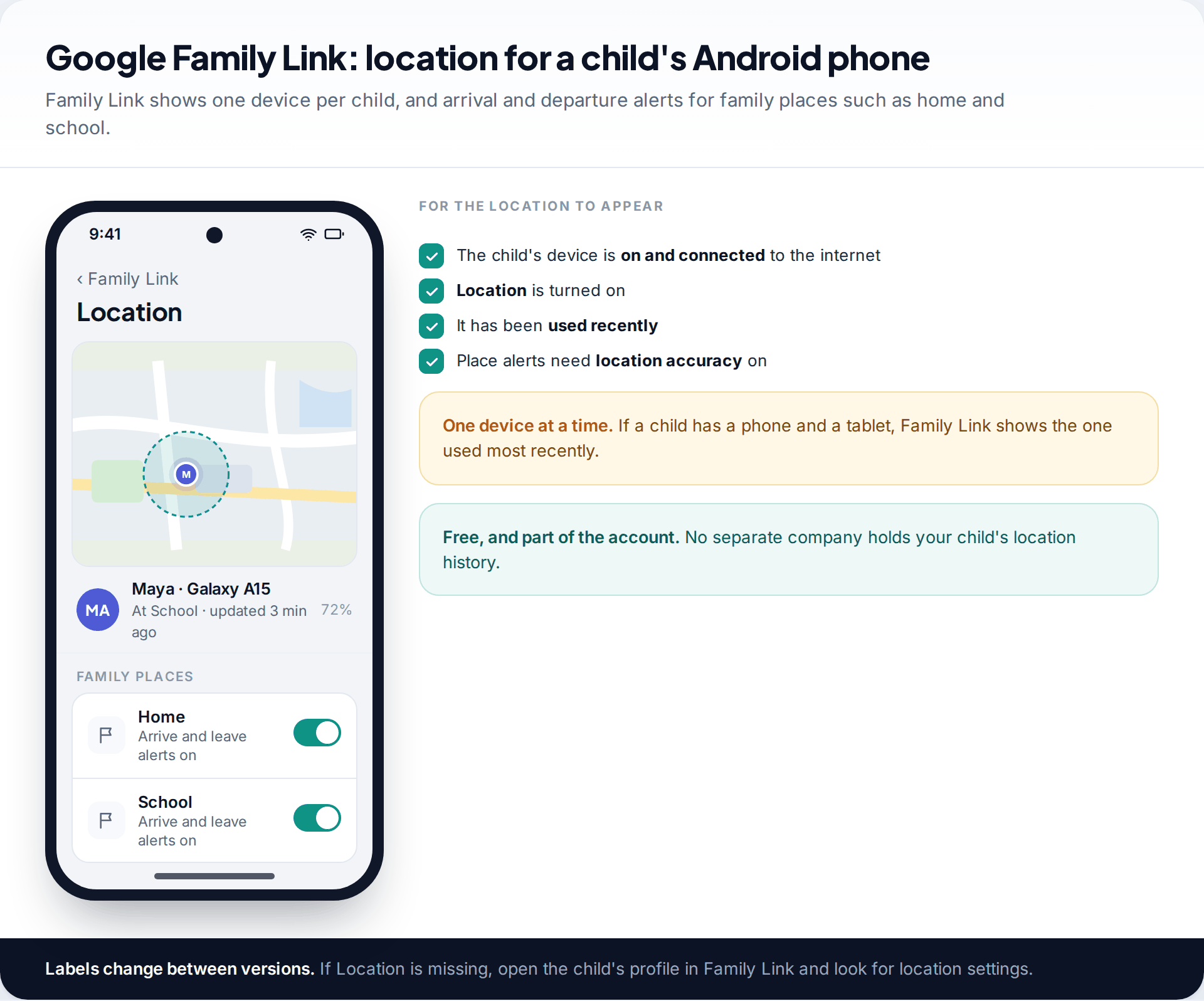
Family Link is Google’s parental control app for children’s accounts, and location is part of it. A parent opens Location to see the child’s device and can add family places, such as home and school, with arrival and departure alerts. For it to work the child’s device must be on, connected, with location turned on and recently used. It shows one device per child, the one used most recently.
3. Google Maps location sharing
The simplest cross-platform option for teens and adults. You choose who sees you and for how long; they see your location and battery level on Android, iPhone or the web. Each person decides whether others can set notifications about them.
4. Google Find Hub
Primarily a lost-device tool, Find Hub now also lets you share your location with friends and family. It’s worth knowing about in all-Android households that want one app for finding both phones and people.
Life360: most features, most scrutiny
5. Life360
Life360 organises a family into a private circle with a shared map, place alerts, driving summaries and, on paid tiers, crash detection and emergency dispatch. Its site listed Free (two days of history, two place alerts), Silver at $9.99 a month, Gold at $16.99 and Platinum at $24.99 in the US in September 2026. It is cross-platform and well suited to families with new drivers.
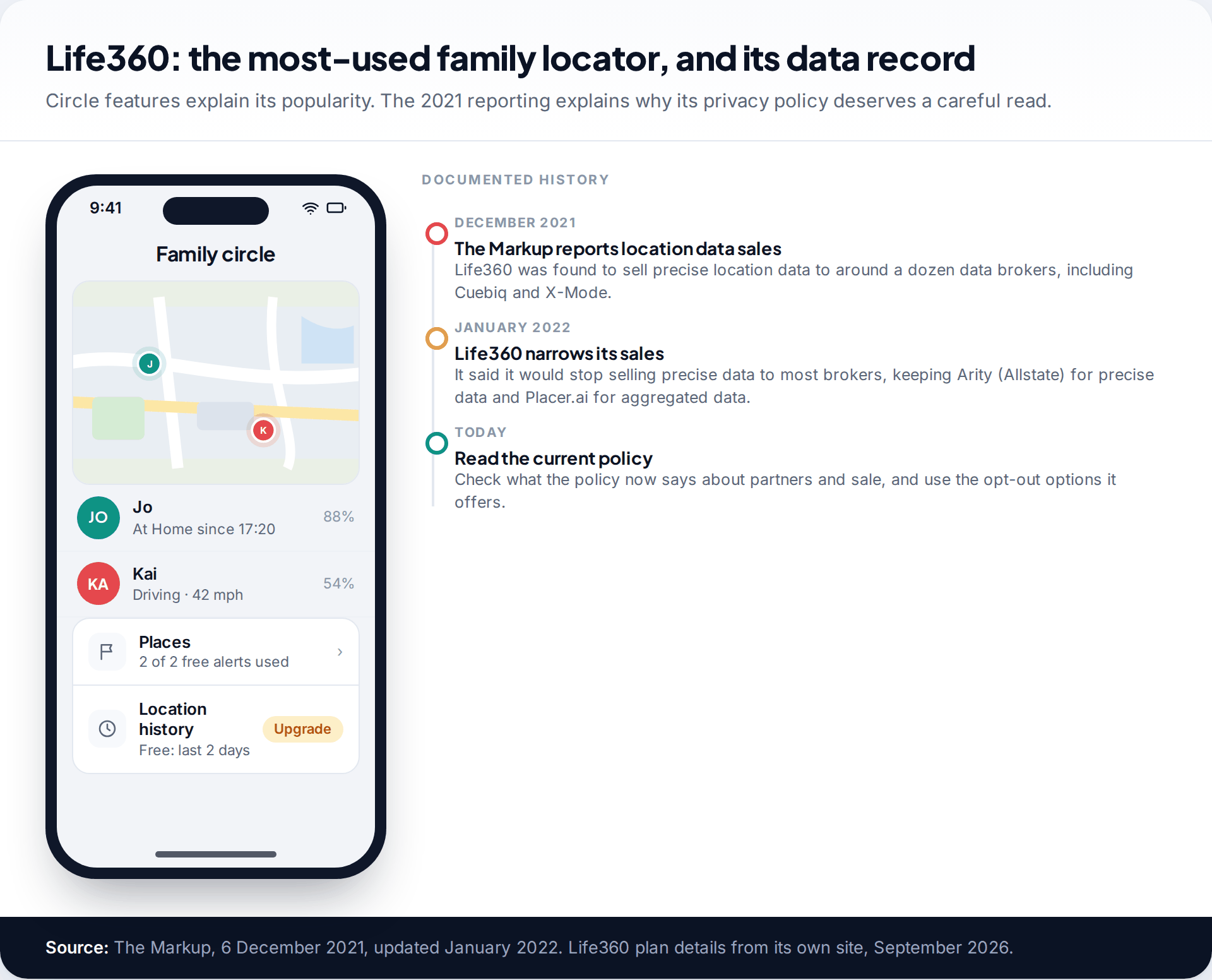
The trade-off is data. After The Markup’s 2021 report, Life360 said it would sell precise location data only to Arity, Allstate’s data unit, and aggregated data to Placer.ai. Before signing up children, read the current privacy policy’s sections on partners and sale, and use any opt-outs it offers.
Parental control suites with a family locator
6. Qustodio
Qustodio’s plans both include a family locator with saved-places alerts. Basic was $59.95 a year for up to five devices and Complete $104.95 for unlimited devices in September 2026. Complete adds call and message monitoring, which goes far beyond location, so choose it deliberately.
7. Norton Family
Norton Family maps a child’s Android or iOS device with a 30-day history and lets parents set “Favorite Locations” boundaries. It was $49.99 for the first year. Norton says location supervision isn’t available in every country, and Norton Family doesn’t support Mac.
8. Bark
Bark is best known for scanning children’s messages and social media for signs of risk, and it includes location. The app was $14 a month or $99 a year, covering unlimited children, with a seven-day trial. It is available in the US, South Africa and Australia.
Dedicated family trackers
9. GeoZilla
GeoZilla shares locations after the other person opts in by SMS, and adds driving behaviour reports and crash alerts. It can also pair with separate GPS tags. Premium was listed at $59.99 for three months, which makes it one of the more expensive options over a year.
10. Findmykids
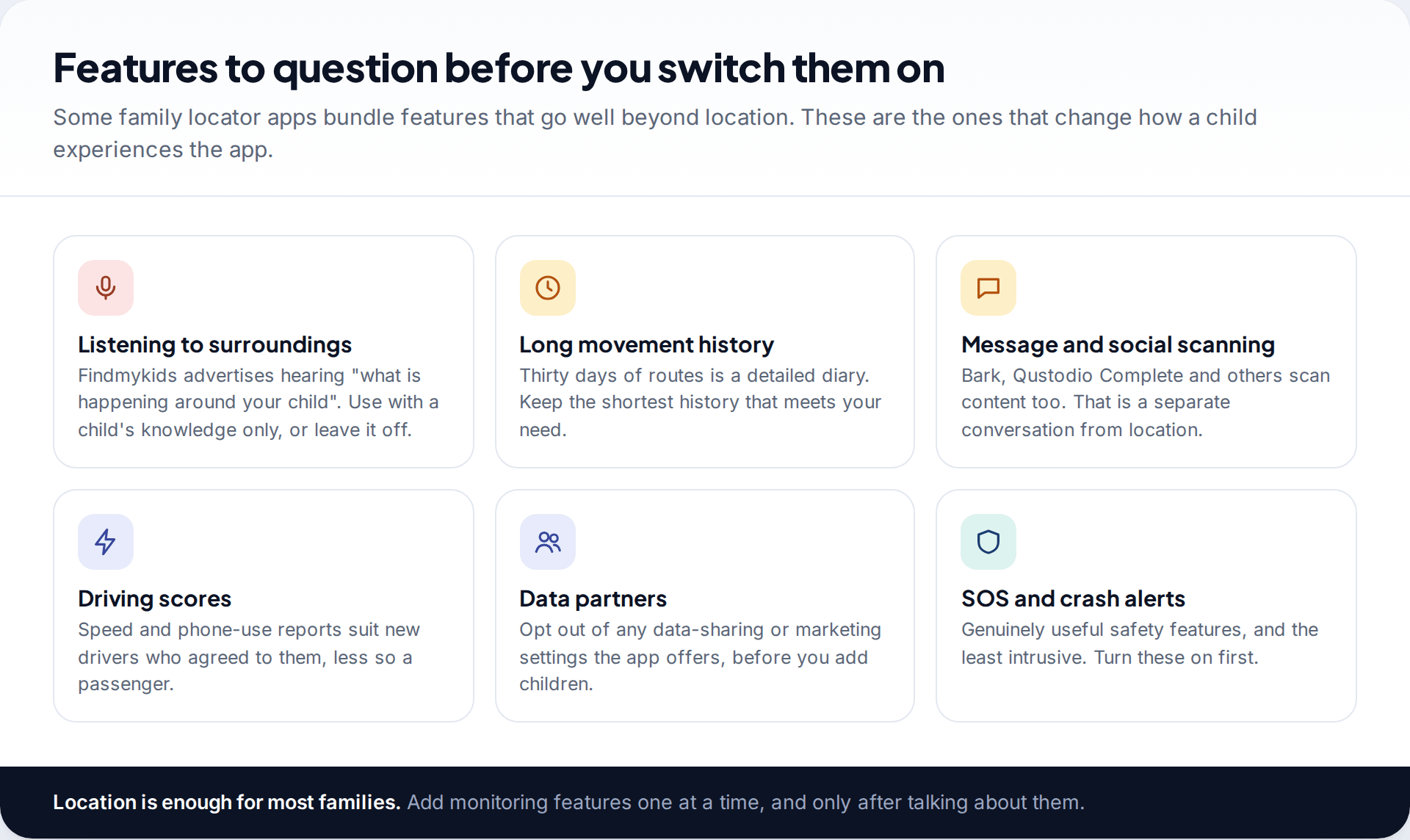
Aimed at younger children, Findmykids works with a child’s phone or a kids’ GPS watch. The free tier shows current location only; paid tiers were listed at €3.58 and €6.25 a month and add movement notifications and app controls. It also advertises the ability to “listen to what is happening around your child”. Think hard about that feature: used without the child knowing, it becomes surveillance rather than safety.
Privacy compared
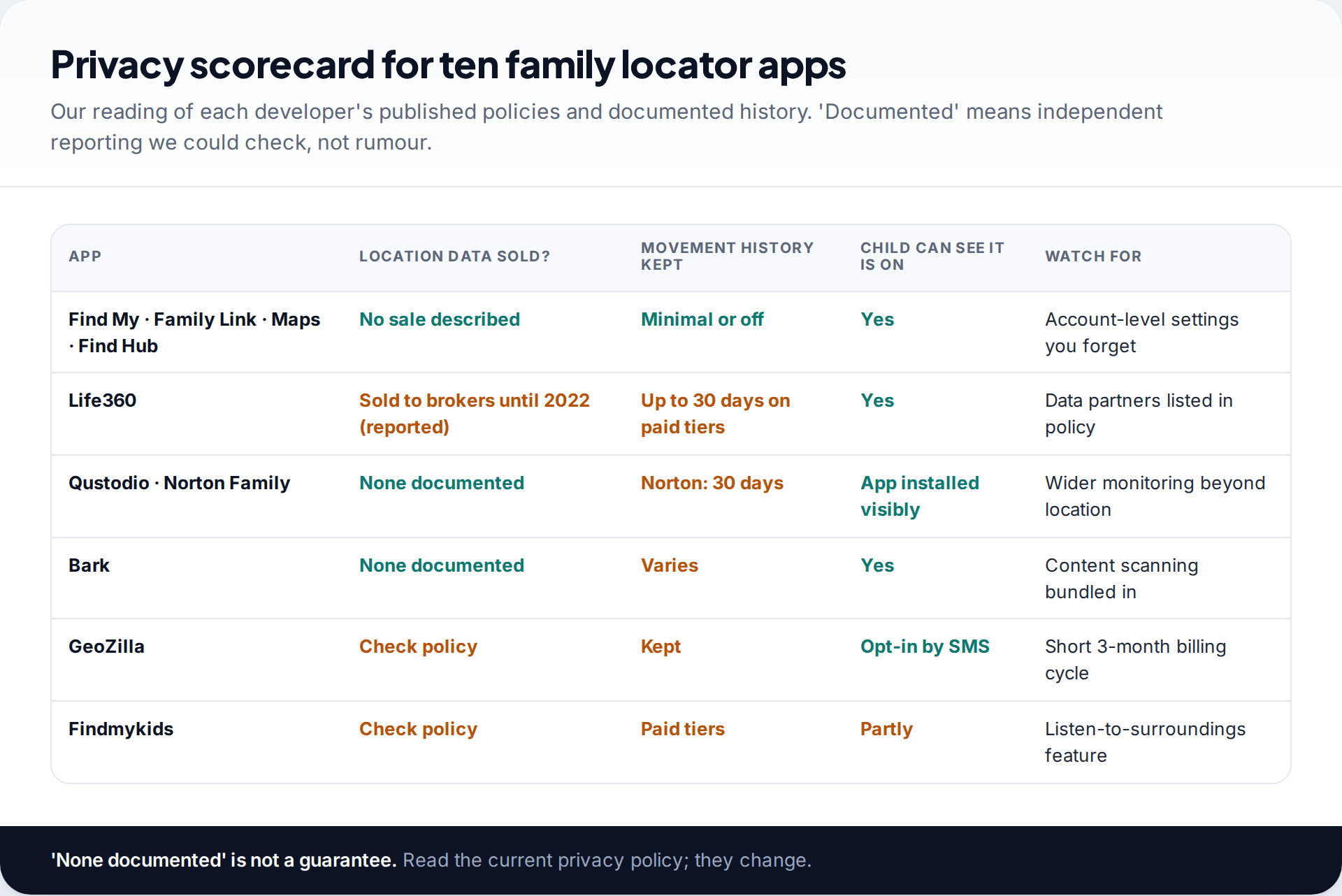
Three questions separate these apps. Has the company sold location data, according to reporting you can check? Only Life360 has a documented history of it on this list. How much movement history is stored? The built-in apps show current location, while paid tiers elsewhere store days to weeks. Can the person being located see that sharing is on? All ten show it on the tracked device in some form. That visibility is what separates a family locator from stalkerware.
Where a column says “check policy”, we could not find a clear public statement either way. That isn’t evidence of wrongdoing; it means you should read the policy yourself before trusting the app with children’s data.
When a teenager turns sharing off
A 15-year-old’s dot stops moving on a Saturday night
A parent sees their son’s location frozen at a friend’s house for three hours. The app says location was last updated at 19:40. He could have switched sharing off, or the phone could have run flat, lost signal, or had background access revoked after an update.
Every app on this list tells the parent something changed, but none can tell them why. Texting him to ask works better than escalating to a more intrusive app, which he can also switch off. The family agree afterwards: sharing stays on at weekends, and he messages if his battery is low.
Leaving an app: deleting your family’s data
Uninstalling a family locator doesn’t delete the history held on the company’s servers. Before you switch, remove each member from the circle or family group, then use the account deletion option in the app or on the developer’s website. For the built-in apps, stopping sharing in Find My, Family Link or your Google Account’s location sharing settings ends it immediately. If an app’s policy offers a data export, download it first if you want a record.
What a year of each app costs
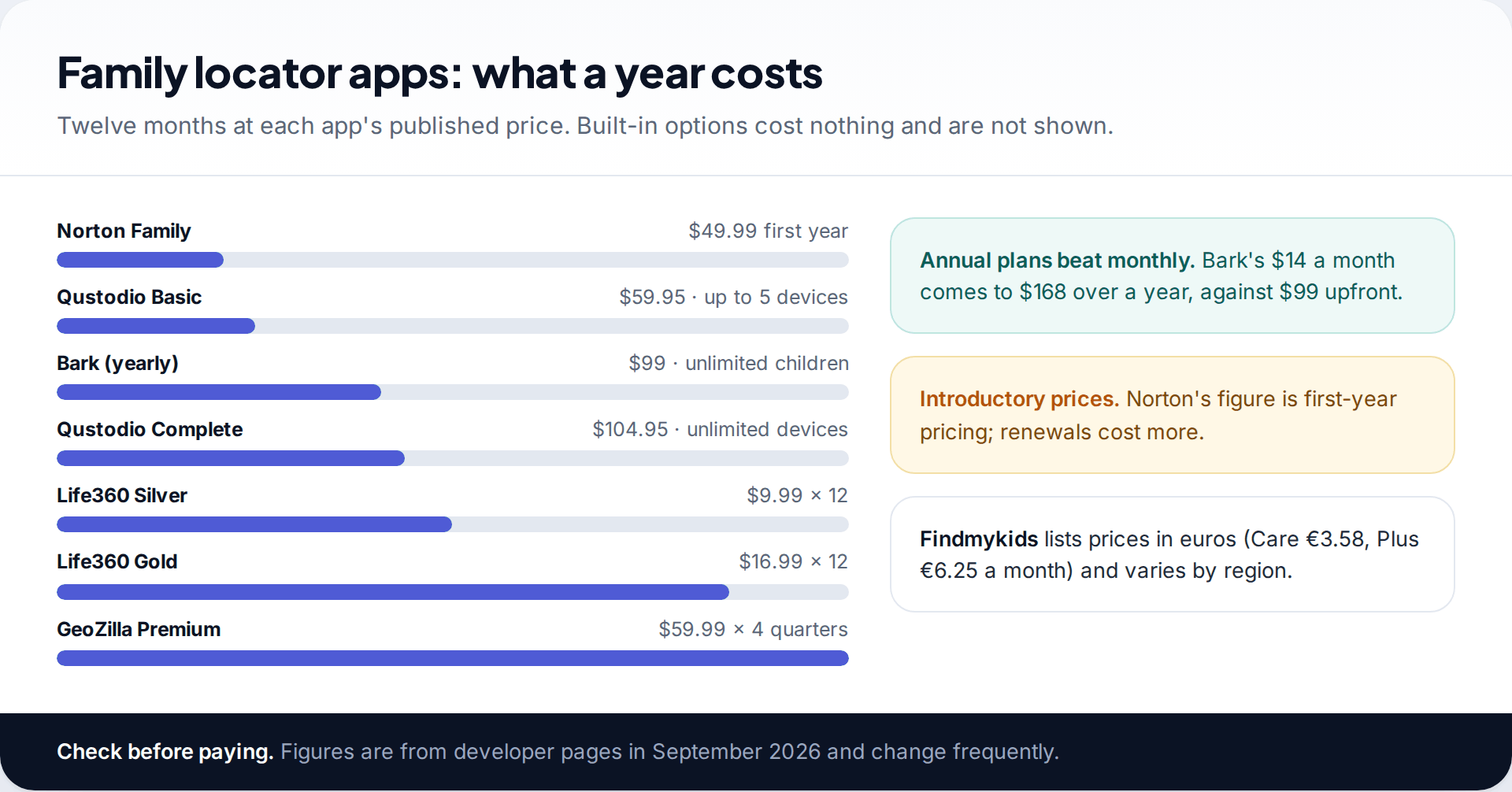
Monthly billing adds up. Life360 Gold works out at about $204 a year and GeoZilla’s quarterly Premium at about $240. If you already pay for Qustodio, Norton Family or Bark, check their locator before adding a second subscription.
Choosing, and setting it up openly
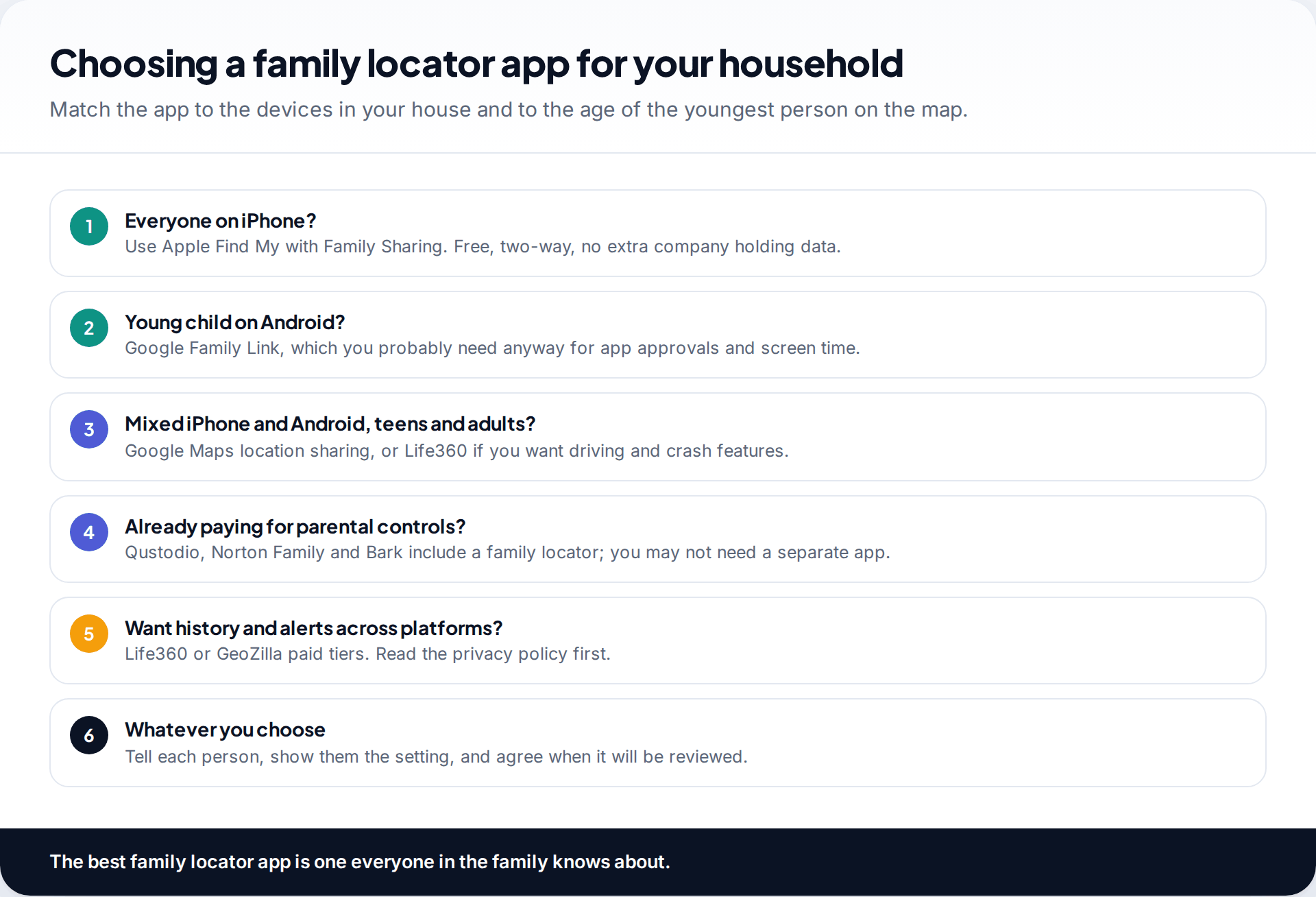
Whichever app you pick, install it with the person, not on them. Show a child where the setting lives and what you can see. Agree with a teenager when sharing will be reviewed, for example on a birthday or when they start driving. Our walkthrough on setting up location sharing for the whole family covers the mixed iPhone and Android case step by step.
Family locators aren’t only for children. Adults often use them to know when a partner has reached home after a late shift, or to keep an eye on an older parent who drives. The same rules apply: the adult chooses to share, can see that they are sharing, and can stop at any time. Crash detection and SOS features are often the most valued parts for that group.
Know the limits, too. Every app here needs the phone on, connected and with location permission granted. None can show where a switched-off phone is now, and indoor positions can be off by a building or more.
How this page was put together
We checked features and prices against Apple’s Find My guide, Google’s Family Link, Maps and Find Hub help pages, and the plan pages of Life360, Qustodio, Norton, Bark, GeoZilla and Findmykids in September 2026. The data-sale history comes from The Markup’s December 2021 investigation and its January 2022 update. We didn’t install and test the apps, and nothing here is sponsored.
Prices change often and differ by country. Read about how we research comparisons and handle corrections.
Common questions
What is the best free family locator app?
Apple Find My for all-iPhone families, Google Family Link for young children on Android, and Google Maps location sharing for mixed households. All three are free and keep little or no history.
Does Life360 still sell location data?
After The Markup’s 2021 report, Life360 said it would stop selling precise location data to most data brokers, continuing with Arity for precise data and Placer.ai for aggregated data. Check its current privacy policy for the latest position and opt-outs.
Can my child see that I am tracking their location?
With every app on this list, yes, in some form: the app is installed visibly or sharing is shown in settings. Apps that hide themselves are stalkerware, not family locators.
Which family locator app works on both iPhone and Android?
Google Maps location sharing, Life360, GeoZilla, Qustodio, Bark and Norton Family (on Android and iOS) all work across both. Apple Find My doesn’t.
Do family locator apps work when the phone is off?
No. They show the last location reported before the phone went off or lost its connection.
Is a GPS watch better than an app for a young child?
For children too young for a phone, a watch with its own SIM can work well. Findmykids and Bark both offer one. Check what the watch can record beyond location before buying.
Looking for a tool to go with this? TheTruthSpy is a free parental control app for Android that stays visible on the child's phone. If it fits your family, see the Location & geofencing feature.
Related guides
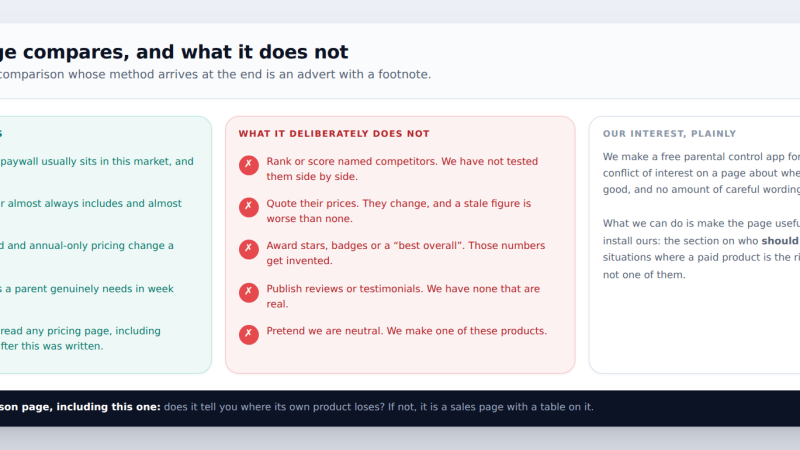
Free vs Paid Parental Control Apps: What the Money Actually Buys
We make one of these products and it is free — so here is the method first, then where paywalls…
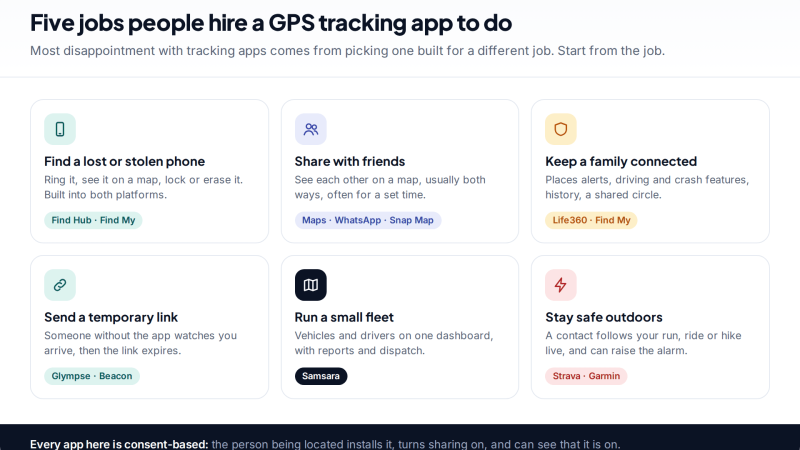
10 GPS Tracking Apps for Android and iPhone, Compared by Use Case
Ten GPS tracking apps for Android and iPhone grouped by job: finding a lost phone, sharing with friends and family,…
Parental controls your child can see
Location, screen time limits, a web filter and alerts from notifications — free, and visible on your child's phone. Pair a phone in about ten minutes.
Android · Free to set up · Visible on your child's phone