Real-Time Location for Your Child’s Phone: Setting It Up Properly

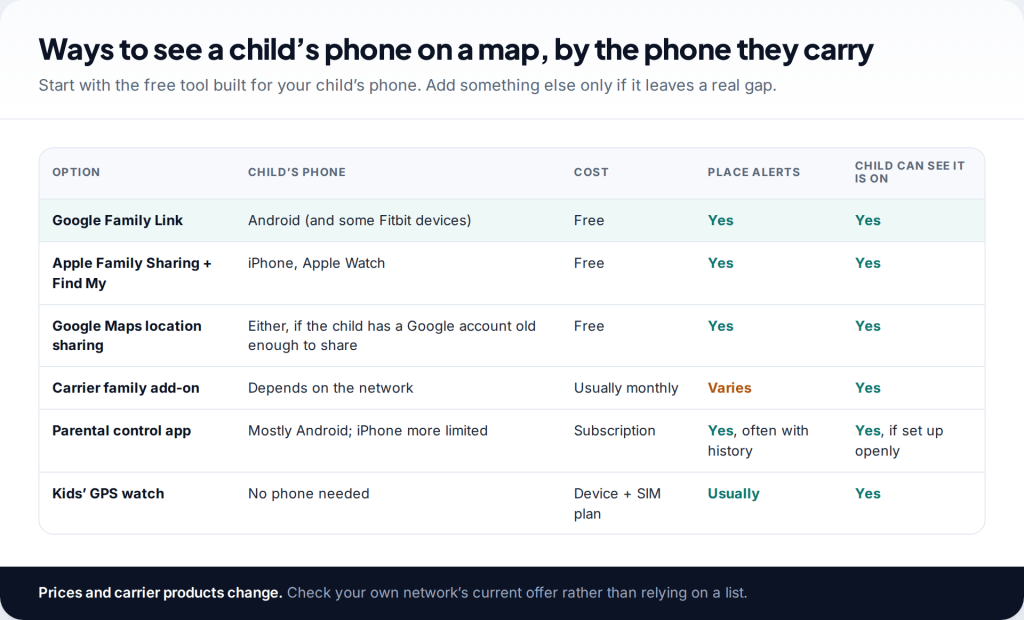
You can track your child’s phone location in real time for free, openly, with the tools built into their phone: Google Family Link for Android and Apple Family Sharing with Find My for iPhone. “Real time” means frequent updates with a timestamp, not a perfect live feed. Accuracy and freshness depend on signal, battery and a few settings on the child’s phone.
- Android child: Family Link › child › Location › Set up location.
- iPhone child: Family Sharing location on their phone; you watch in Find My.
- Set up the child’s phone properly. Location accuracy, “always” permission and battery settings decide how live the map is.
- Talk first. A child who knows why keeps the phone charged and tells you when something is wrong.
Choosing a way to see your child’s location
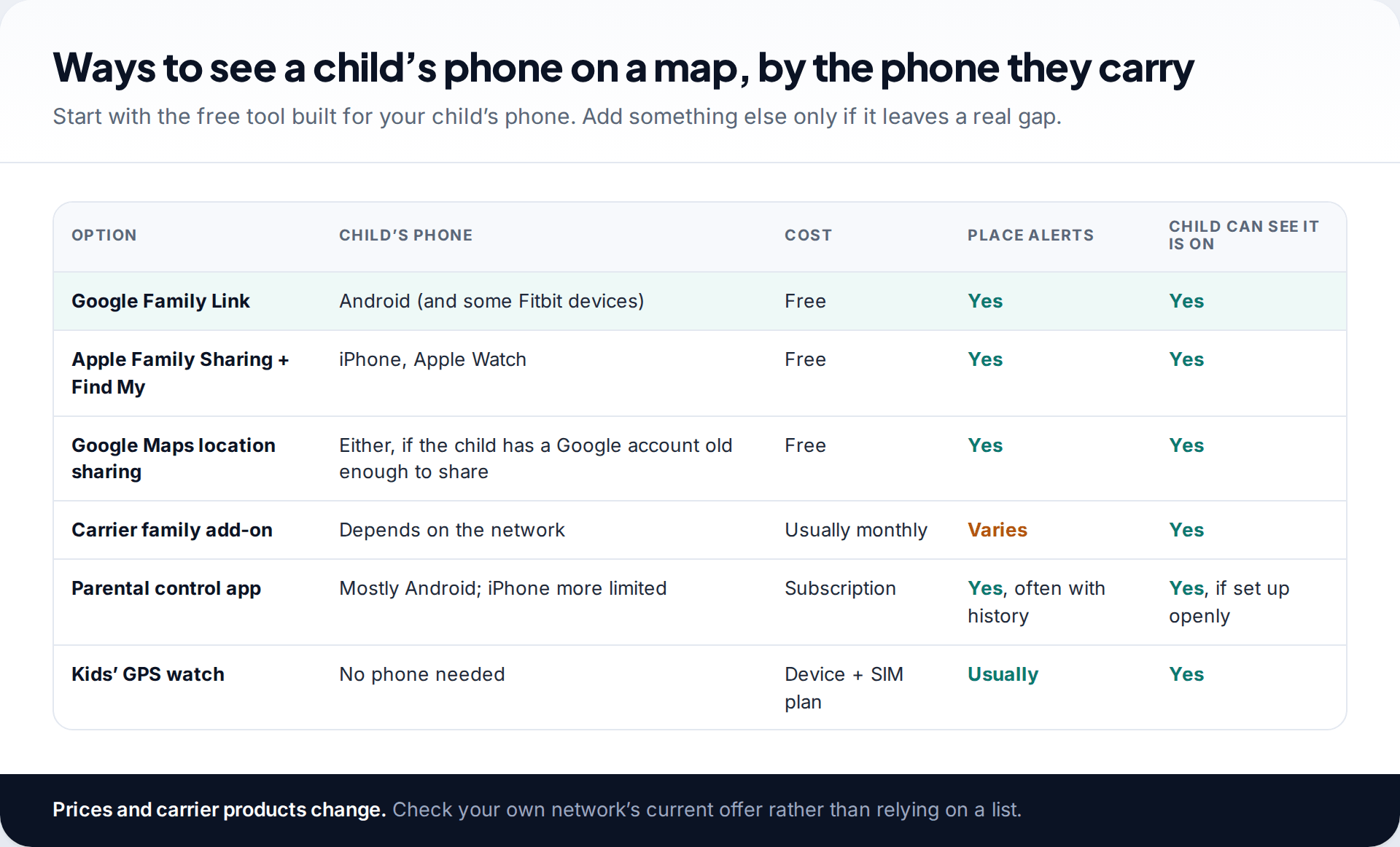
The phone your child carries decides the starting point, not the phone you carry. Family Link’s parent app runs on iPhone too, so an iPhone parent can manage an Android child. Apple’s tools are needed for a child with an iPhone.
- Android child: Google Family Link, with a supervised Google account. It shows the phone on a map and can alert you when the child arrives at or leaves labelled places.
- iPhone child: Apple Family Sharing. The child shares their location with the family group, and you see it in Find My, with notifications for arrivals and departures.
- Older child with their own Google account: Google Maps location sharing works across both platforms, and many teens prefer it because it feels like what their friends use.
- Carrier add-ons are sold by some mobile networks as monthly family locator services. What they include varies, so check your network’s current offer.
- Dedicated parental apps add history, more places and one dashboard for several children, at a subscription cost.
- No phone yet? A kids’ GPS watch may suit younger children. Our guide to choosing a kids’ GPS watch covers what to look for.
What “real time” really means for location tracking
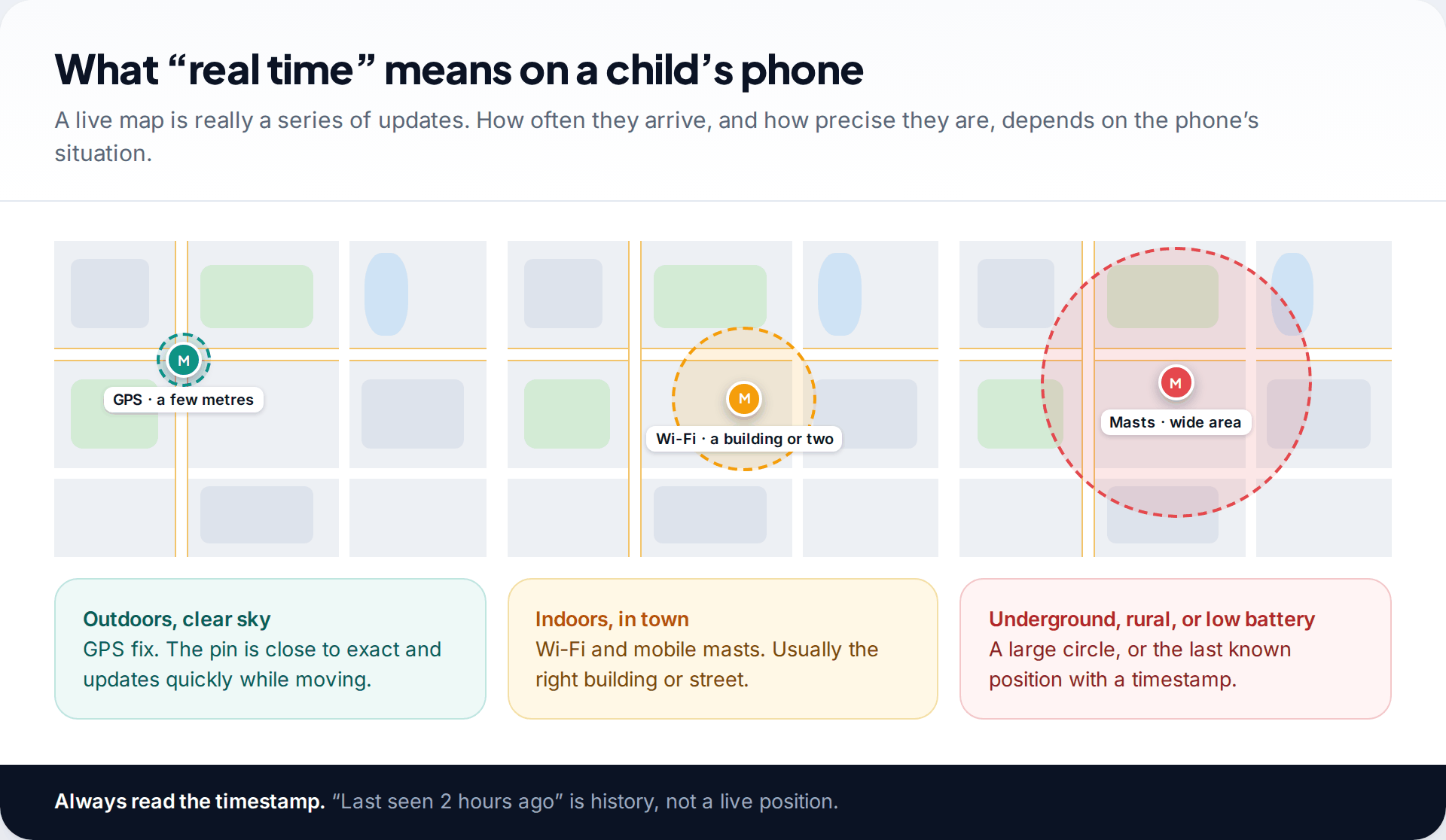
A live map is a series of location reports from the child’s phone. How often those reports arrive and how precise they are depends on where the phone is and what state it’s in.
Outdoors with a clear view of the sky, the phone gets a GPS fix and the pin is close to exact. Indoors in a town, it relies on nearby Wi-Fi networks and mobile masts, which usually places it in the right building or street. Underground, in the countryside or with a nearly flat battery, you may see a large circle, or the last known position with a time next to it. Phones also save battery by reporting less often when they are still, then more often when they move.
The practical habit is to read the timestamp before the pin. “Now” or “2 min ago” is a live position. “Last seen 3 hours ago” is where the phone was, not where your child is.
How to track a child’s Android phone location in real time
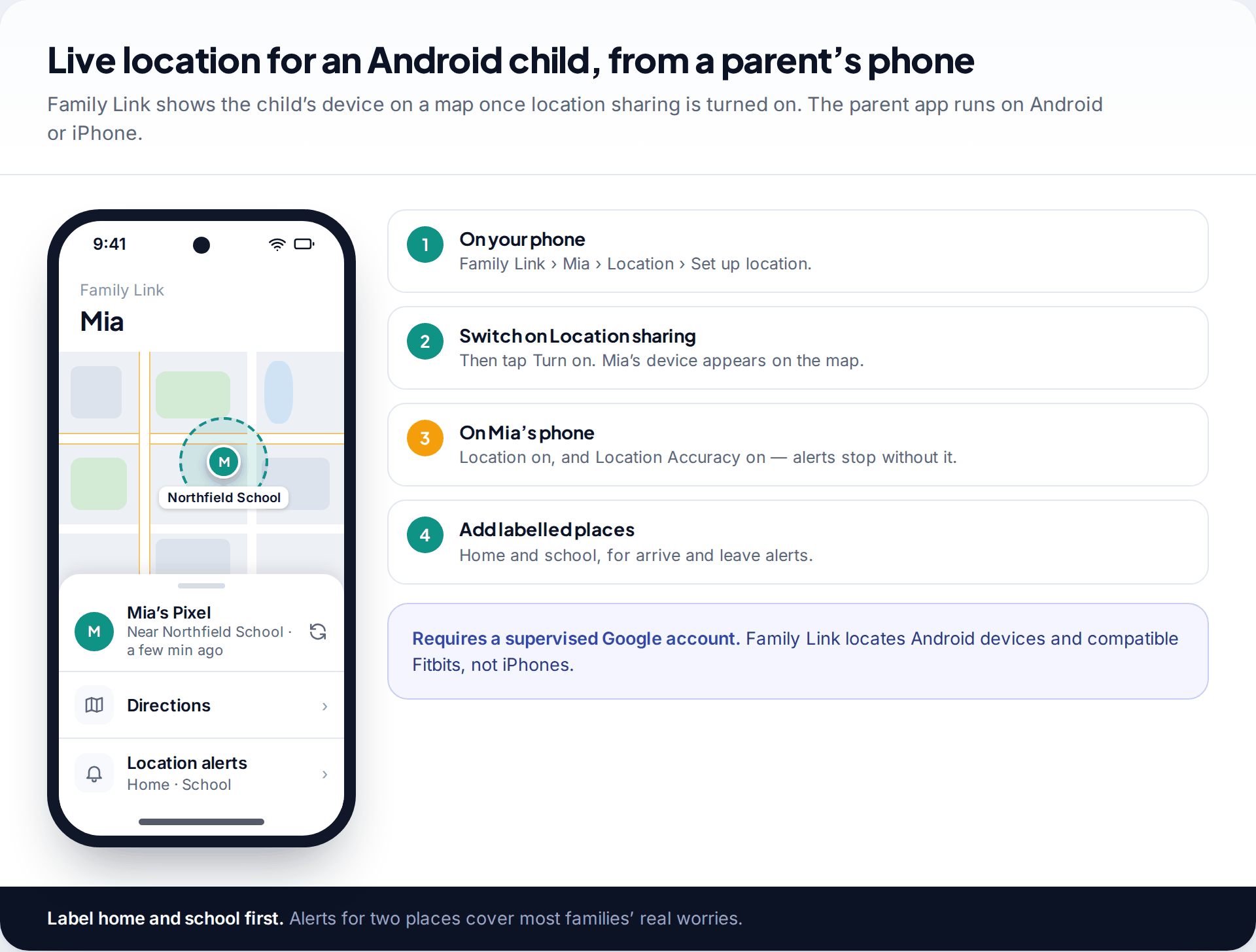
- Supervise the child’s Google account in Family Link, if you haven’t already. For children under the minimum age for their own account, you create it through Family Link.
- Open Family Link on your phone, select your child and tap Location › Set up location.
- Switch on Location sharing and tap Turn on. The device appears on the map in Family Link.
- On your child’s phone, check that location and Location Accuracy are both on. Google’s help says location alerts are switched off when accuracy is off.
- Label home and school and set up arrival and leave alerts for them.
If both parents manage the account, Family Link notifies the other parent when a location setting changes, so you won’t find alerts you didn’t know about.
How to see a child’s iPhone location
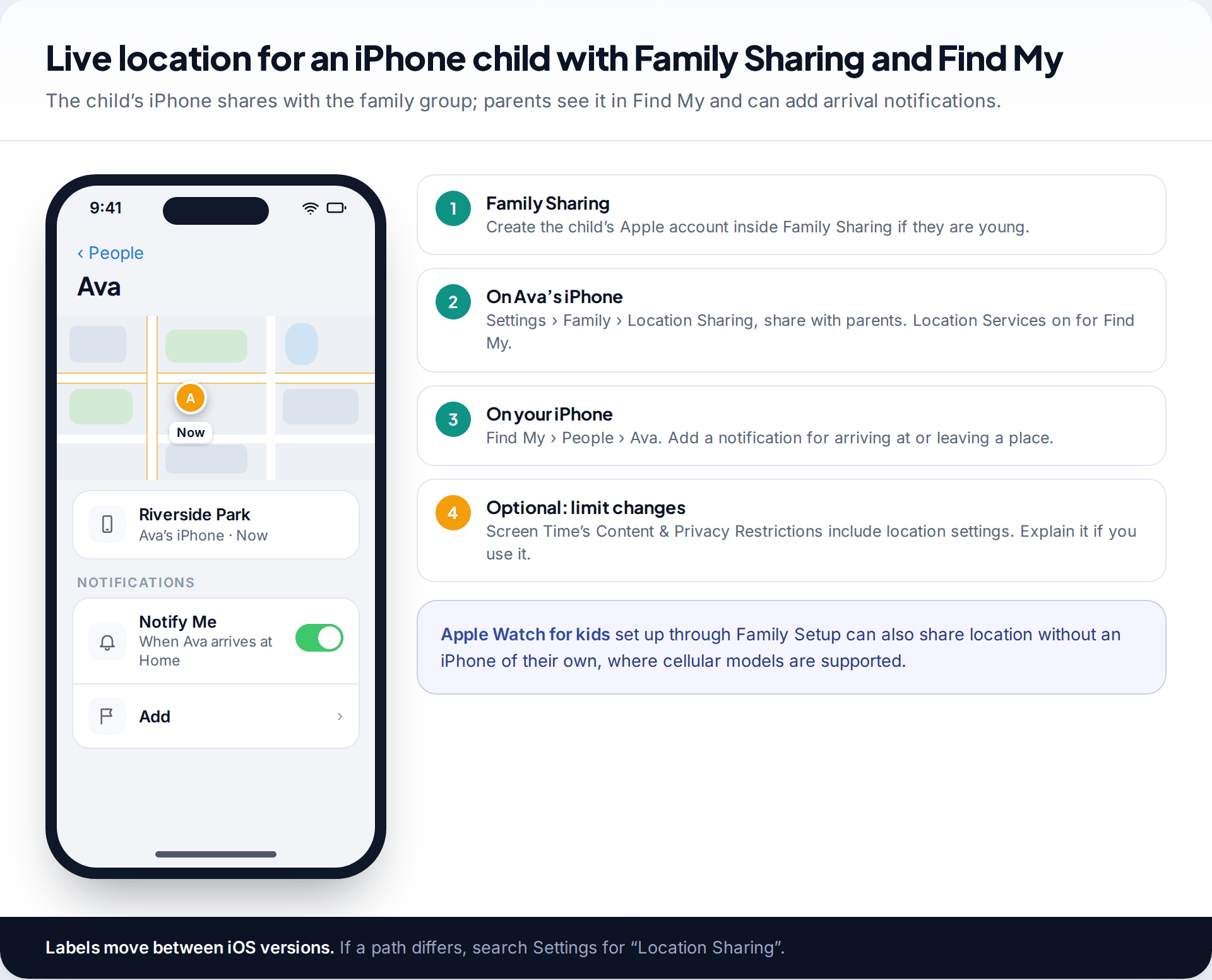
- Set up Family Sharing and add your child. Younger children need a child account created by a parent inside Family Sharing.
- On your child’s iPhone, go to Settings › Family › Location Sharing (paths vary a little by iOS version) and share with you. Make sure Location Services is on and Find My is allowed to use it.
- On your iPhone, open Find My › People and tap your child. You see where their phone is and when it last updated.
- Add notifications under the child’s name to be told when they arrive at or leave a place, such as home or school.
Parents can use Screen Time’s Content & Privacy Restrictions to stop location settings being changed. If you do, tell your child and explain why. A setting that is discovered rather than explained tends to become an argument. Children with a cellular Apple Watch set up through Apple’s Family Setup can also share location from the watch.
Carrier services and dedicated parental apps
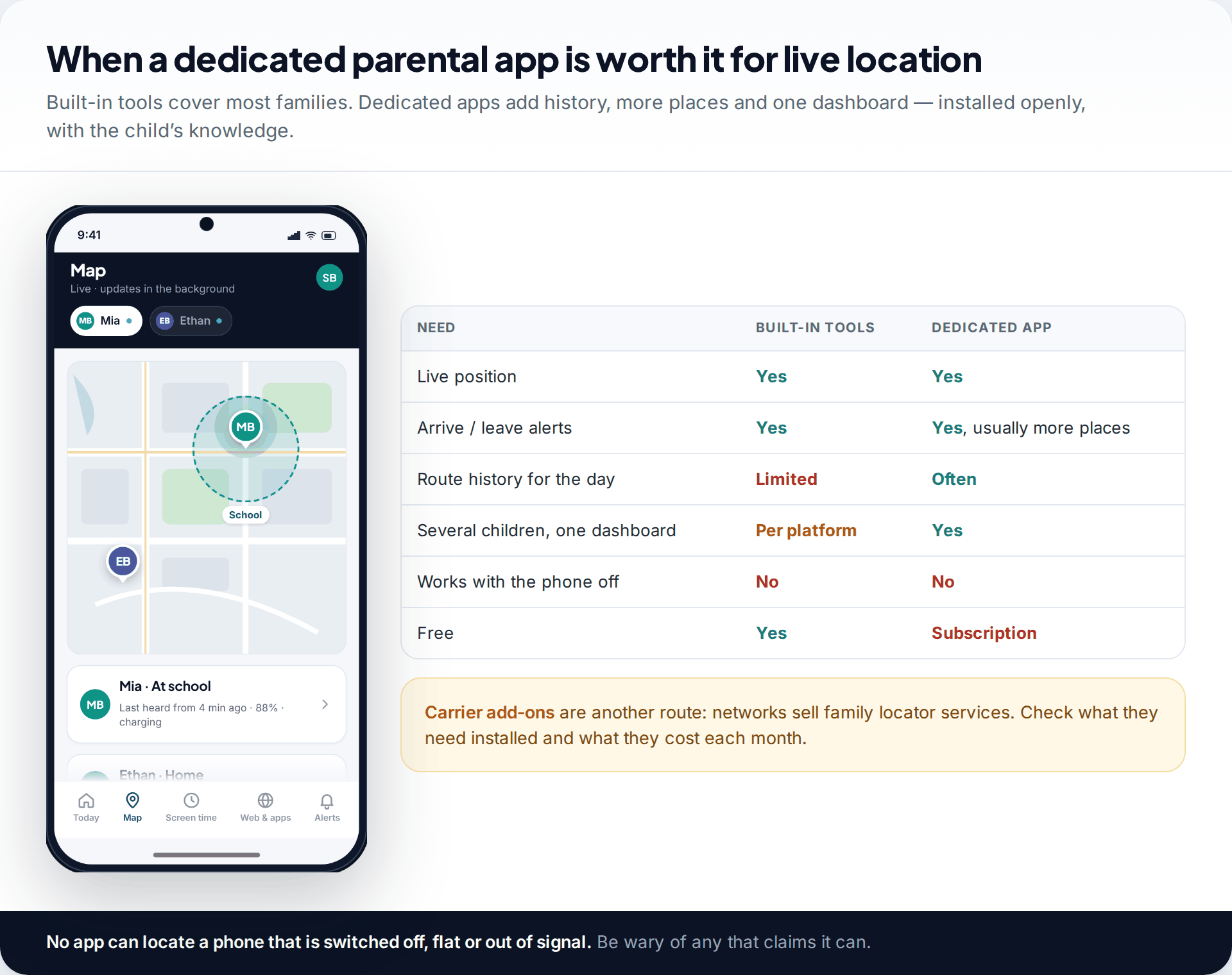
For most families the free tools are enough. The main reasons to pay for something else are a single dashboard for children on different platforms, several places with alerts, and a day’s route history.
Some mobile networks sell family locator services as monthly add-ons. What they include, and whether they need an app on the child’s phone, varies by network and changes over time, so check the current terms before subscribing.
If you want a live map, place alerts and route history together in one parent dashboard, our family location feature does that for a child’s phone, installed openly with your child’s knowledge. Like every other tool, it cannot locate a phone that is switched off, flat or out of signal.
Accuracy and battery: setting up the child’s phone
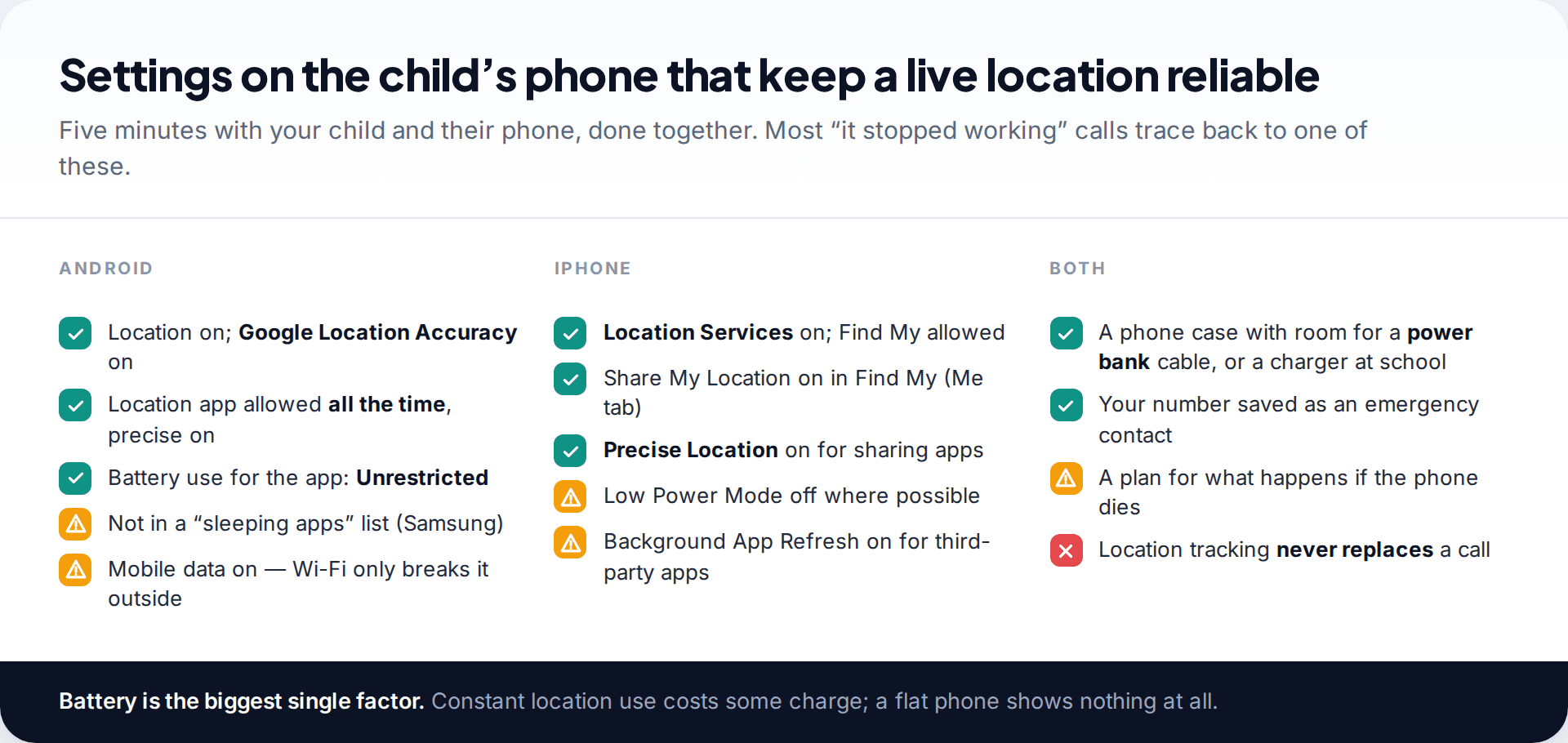
How “live” the map feels depends on the child’s phone. On Android, keep Google Location Accuracy on, allow the location app to use location all the time with precise location on, and set its battery use to unrestricted. Samsung phones in particular can put apps to sleep. On iPhone, keep Location Services on, Share My Location on in Find My, and Precise Location on for any sharing app. Low Power Mode reduces background updates.
Location sharing uses some battery, because the phone reports its position in the background. The bigger risk is simpler: a flat phone shows nothing. A small power bank in a school bag often does more for peace of mind than any setting.
Talking to your child about it
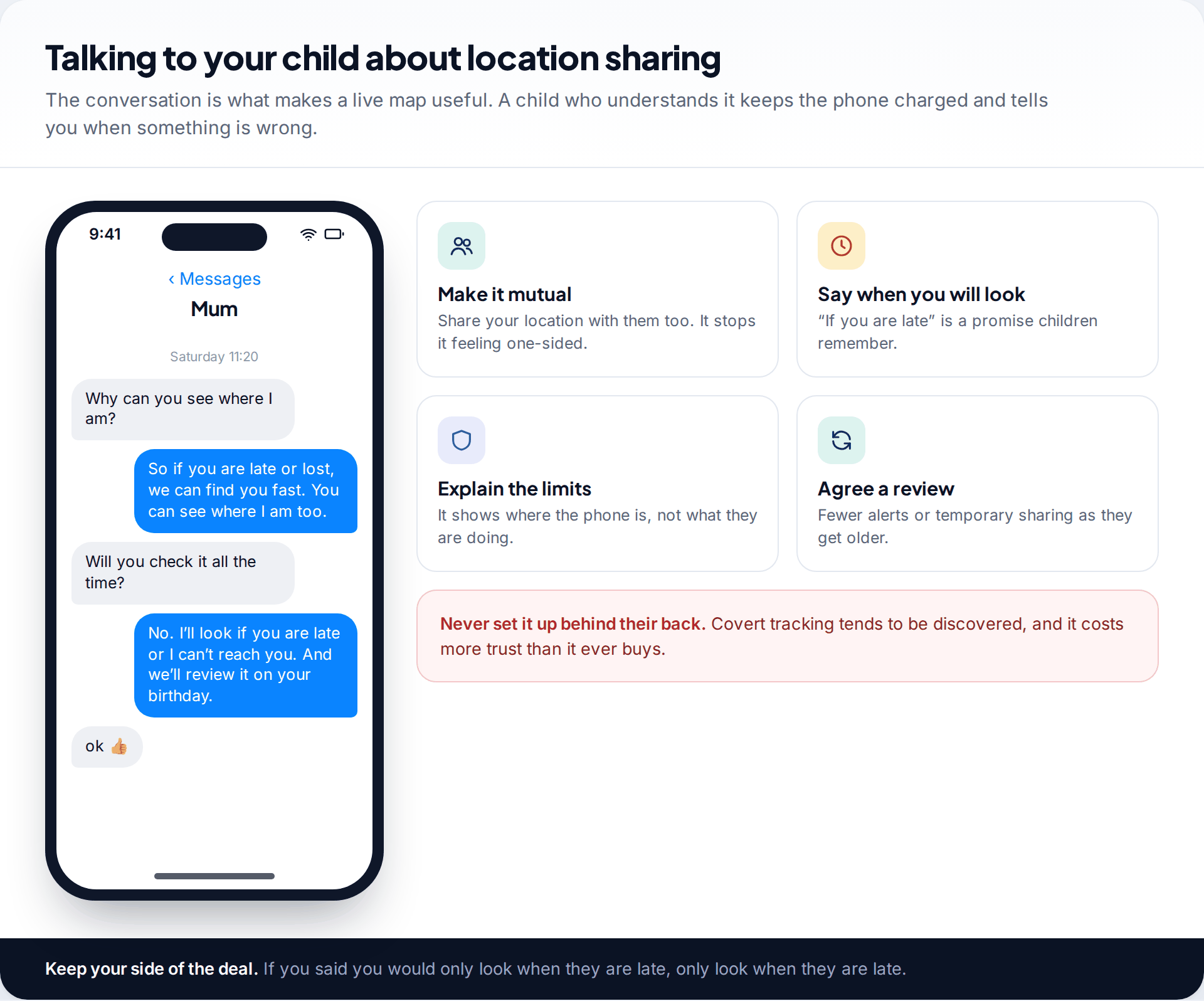
The conversation matters more than the app. Explain what the map shows (where the phone is) and what it doesn’t (what they are doing or who they are with). Share your own location with them so it runs both ways. Tell them when you’ll look, for example if they are late or you can’t reach them, and then stick to it.
Adjust as they grow. A 9-year-old may be happy with full sharing and alerts. A 14-year-old will accept more if alerts are limited to home and school and there is a date to review it. Setting up tracking without telling a child tends to be discovered, and it costs more trust than it buys. It also teaches them to hide things rather than tell you.
Fixing the most common setup problems
The map shows the iPad at home, not the phone in the school bag
On Apple devices, location sharing comes from one device on the account. If a tablet was set as the location device, that is what you see.
Fix: on the child’s iPhone, open Find My › Me and choose to use this iPhone as the location device.
Location alerts in Family Link have gone quiet
Google turns location alerts off when Location Accuracy is switched off on the child’s phone.
Fix: turn Google Location Accuracy back on in the child’s location settings and check the alert again.
The pin jumps around at school
Large buildings block GPS, so the phone estimates from Wi-Fi and masts, which moves the pin between nearby streets.
Fix: nothing is wrong. Rely on the arrival alert, and make the school’s place a little larger if your tool allows it.
Your child switched sharing off
Sometimes it is an accident or a battery-saving tip from a friend. Sometimes it is a sign the arrangement no longer feels fair.
Fix: talk before you lock settings. Ask what bothered them and whether fewer alerts or a review date would help.
When the location stops updating
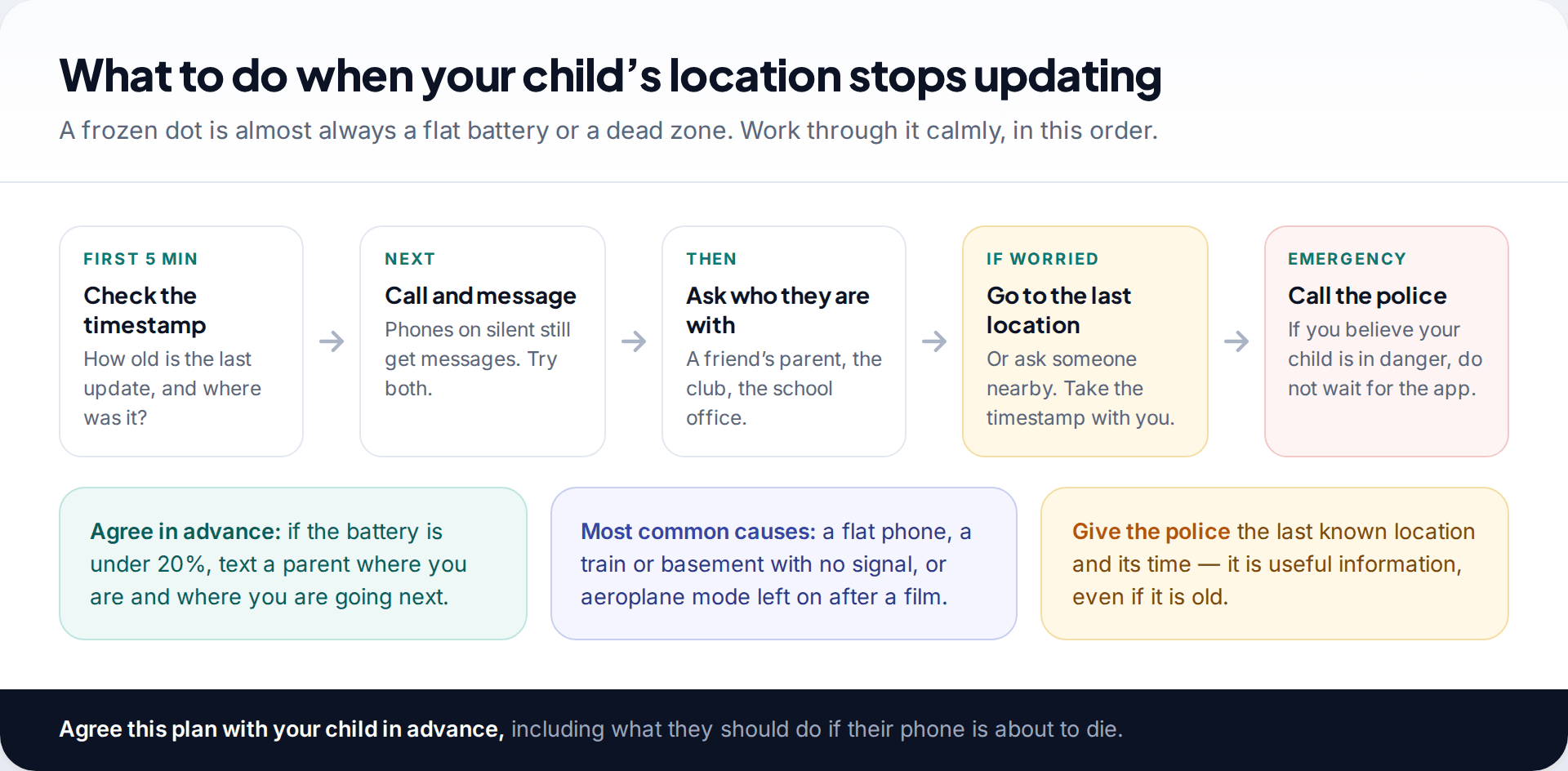
A location that stops updating is usually a flat battery, a phone switched off, or no signal on a train or in a basement. Check the timestamp, then call and message, since a phone on silent still receives texts. Contact the friend’s parent, club or school if you know where they were heading.
If you genuinely believe your child is in danger, contact the police straight away rather than waiting for the app. The last known location and time are useful information to give them.
| Real-time tracking can | It cannot |
|---|---|
| Show where the phone is, with a time | Show where your child is if they are not carrying the phone |
| Alert you to arrivals and departures | Tell you why they are somewhere or who they are with |
| Show a recent last-known position | Locate a phone that is off, flat or has location disabled |
| Give peace of mind on routine journeys | Replace a phone call, a plan, or a trusted adult |
How this page was put together
Setup steps were checked in September 2026 against Google’s Family Link help on finding a child’s location and location alerts, Google Maps’ location-sharing help, and Apple’s support pages on sharing location with Family Sharing and in Find My. Carrier add-ons vary by country and change often, so we describe them in general terms rather than naming prices.
We did not measure accuracy or battery drain ourselves. The ranges described are general, not test results. You can read how we research and update these guides.
Common questions
How can I track my child’s phone for free?
Use Google Family Link for an Android phone, or Apple Family Sharing with Find My for an iPhone. Both are free and built by the phone’s platform maker.
Can I track my child’s iPhone from an Android phone?
Not with Apple’s tools, which need an Apple device to view. If your child has a Google account they can share through Google Maps, which you can view on Android. Some cross-platform parental apps also work.
How accurate is my child’s location on Family Link or Find My?
Outdoors, usually within a few metres. Indoors or in dense areas it can be out by a building or a street, and in poor signal much more. The circle around the pin shows the uncertainty.
Will my child know I can see their location?
They should. Family Link and Family Sharing are designed to be visible on the child’s phone, and tracking works best when your child knows about it and why.
Can I see my child’s location if their phone is off?
No. You see the last known location and the time it was recorded. It updates again when the phone is on and connected.
At what age should I stop tracking my child’s location?
There is no fixed age. Many families reduce alerts or move to time-limited sharing in the mid-teens and review it together each year. What matters is that the arrangement changes as your child becomes more independent.
Looking for a tool to go with this? TheTruthSpy is a free parental control app for Android that stays visible on the child's phone. If it fits your family, see the Location & geofencing feature.
Related guides
How Accurate Is Phone Location Tracking? GPS, Wi-Fi and Cell Compared
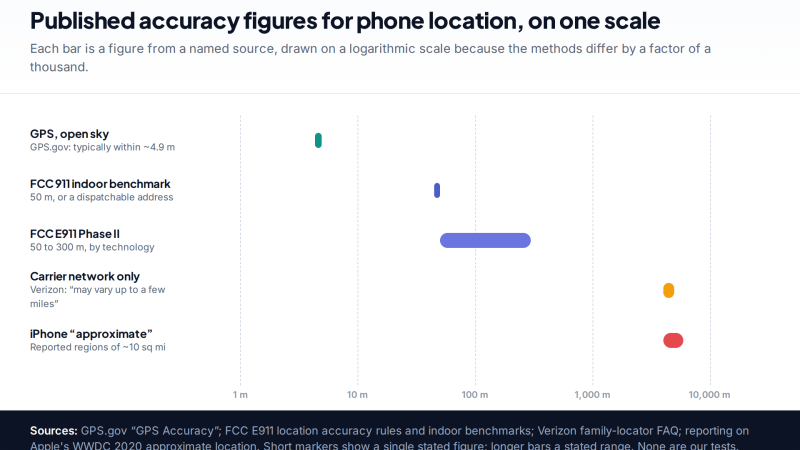
Phone location accuracy runs from a few metres with GPS under open sky to miles when only the mobile network…
Using Google Maps Timeline to Find a Lost Phone
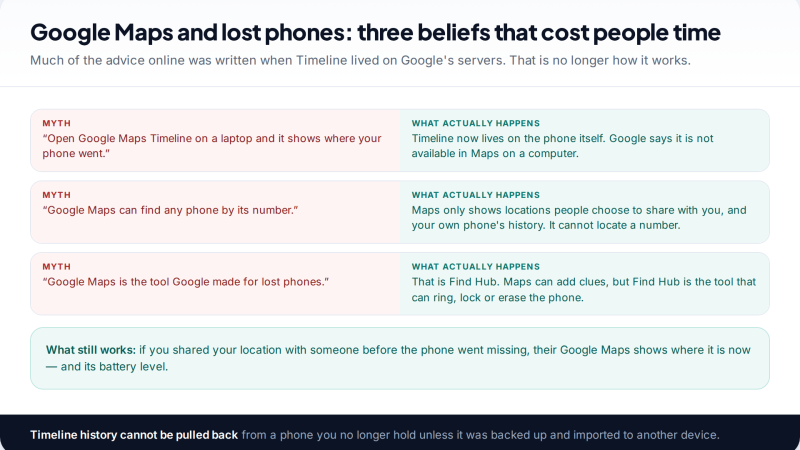
Can Google Maps find a lost phone? Only in two cases: someone you share your location with can see it,…
GPS Tracking for Small Business: A Starter Guide
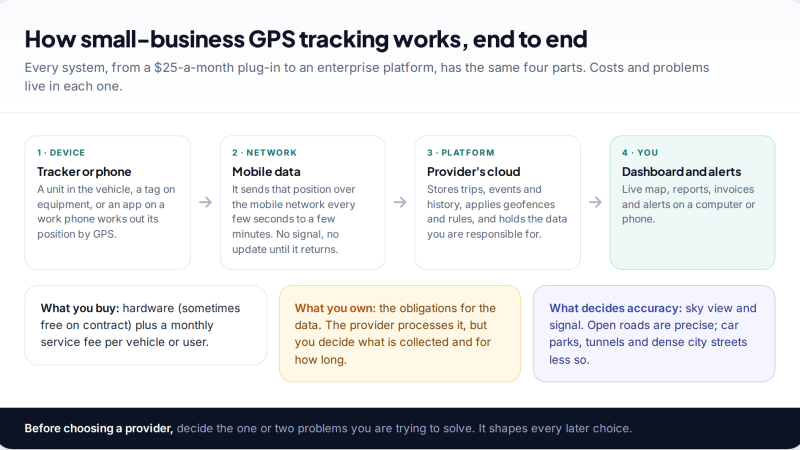
A plain starter guide to GPS tracking for a small business: vehicle trackers versus phone apps, what a small fleet…
Parental controls your child can see
Location, screen time limits, a web filter and alerts from notifications — free, and visible on your child's phone. Pair a phone in about ten minutes.
Android · Free to set up · Visible on your child's phone