Kik Safety Alerts
Kik needs no phone number and has almost no parental tools, so strangers can reach children easily. TheTruthSpy alerts you when a new username messages your child and when a keyword you chose appears.
Either build · Free · Permission: Notification access · Visible on your child's phone
Most apps on this site have a parental story. Kik does not really have one, and pretending otherwise would not help you.
We would rather say that than sell you a setting that does not exist. Here is what makes Kik different, and why the honest first question is whether the app belongs on the phone at all.
No phone number required
An account needs only an email, which means a child can create one in a minute and an adult can create ten. There is no SIM, no number and no identity behind a Kik handle.
Usernames are public
People can be found and messaged by handle, and handles get shared in group chats and on other platforms. A username posted publicly is an open door that stays open.
Anonymity by design
That is the product's appeal to teenagers and the reason it has a long history of being used to reach them. The feature that makes it attractive is the feature that makes it risky.
Thin controls
There is little to switch on beyond ignoring new people and blocking. No Family Center, no supervised account, no teen mode. That is why the useful conversation is about whether the app is needed at all.
For a younger child, blocking Kik is simpler than watching it, and the app blocker will do it in one tap. For a teenager who has a real reason to use it, monitoring the pattern and agreeing the rules tends to work better than a ban they route around. The rest of this page is for the second case.
What the Kik monitor can see
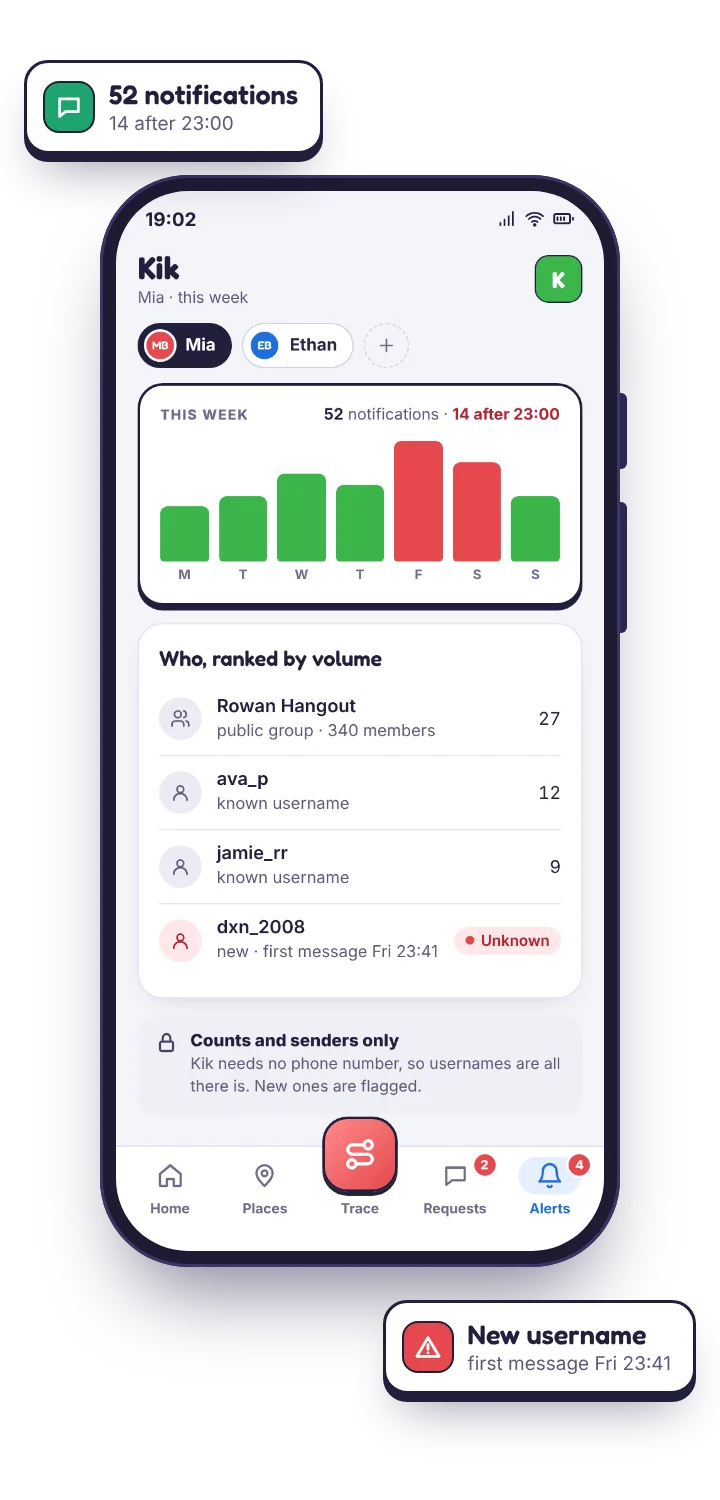
TheTruthSpy works from Android notifications, so what Kik chooses to put in a notification is what reaches your panel. On an app teenagers mostly use in private, the clock reading is unusually informative, and because Kik identifies people by username rather than a saved contact, a handle you have never seen before is more meaningful here than on WhatsApp, where everyone is already in the address book.
- Counts and timing. How many Kik notifications arrived each day, and how many after the late-night hour you set.
- Usernames. The handle that messaged. There are no contact names to match against, so every sender is a handle, and the unfamiliar ones stand out.
- New-chat notifications. A first message from someone new produces its own notification, and on Kik that is the moment worth catching. TheTruthSpy flags it as a new sender.
- Public groups. Group names appear in notifications, so a child joining a public group where anyone can post is visible the first time it posts.
- Keyword alerts. Your chosen words and phrases, flagged when they appear in a notification preview, with the serious ones marked urgent.
The conversations themselves are not readable, and the honest boundaries are these.
Anything advertising that it will show you a child's full Kik chat history on a normal Android phone is either extracting the app's private database with elevated access that breaks on the next update, or it is lying to sell a subscription. TheTruthSpy reads the notification Kik posts and nothing inside the app. A notification cleared before TheTruthSpy sees it leaves only the count, not the preview. If your child has Kik open when a message lands, Android posts nothing, so that exchange never reaches the monitor. Photos and videos show as an attachment marker, not as content. Kik group names appear; the messages inside them do not.
What survives is the pattern: who is messaging, how often, how late, and whether the handles are ones your child has ever mentioned. On Kik that pattern is usually enough to know whether something is wrong.
| You want to know | From notifications | Why |
|---|---|---|
| Which usernames message them, how often, how late | Yes | Every notification carries the handle and a time. |
| A first message from a stranger | Yes | Kik posts a new-chat notification; TheTruthSpy flags it. |
| A public group they joined | When it posts | The group name is in the notification. |
| The opening line of a message | If preview text is on | A separate switch, shown on the child's phone. Worth it on Kik. |
| The conversation | No | Lives inside the app. Only notifications are read. |
| Photos, videos | No | An attachment marker, nothing more. |
| Messages read with the app open | No | No notification is posted. |
The Kik settings that do exist
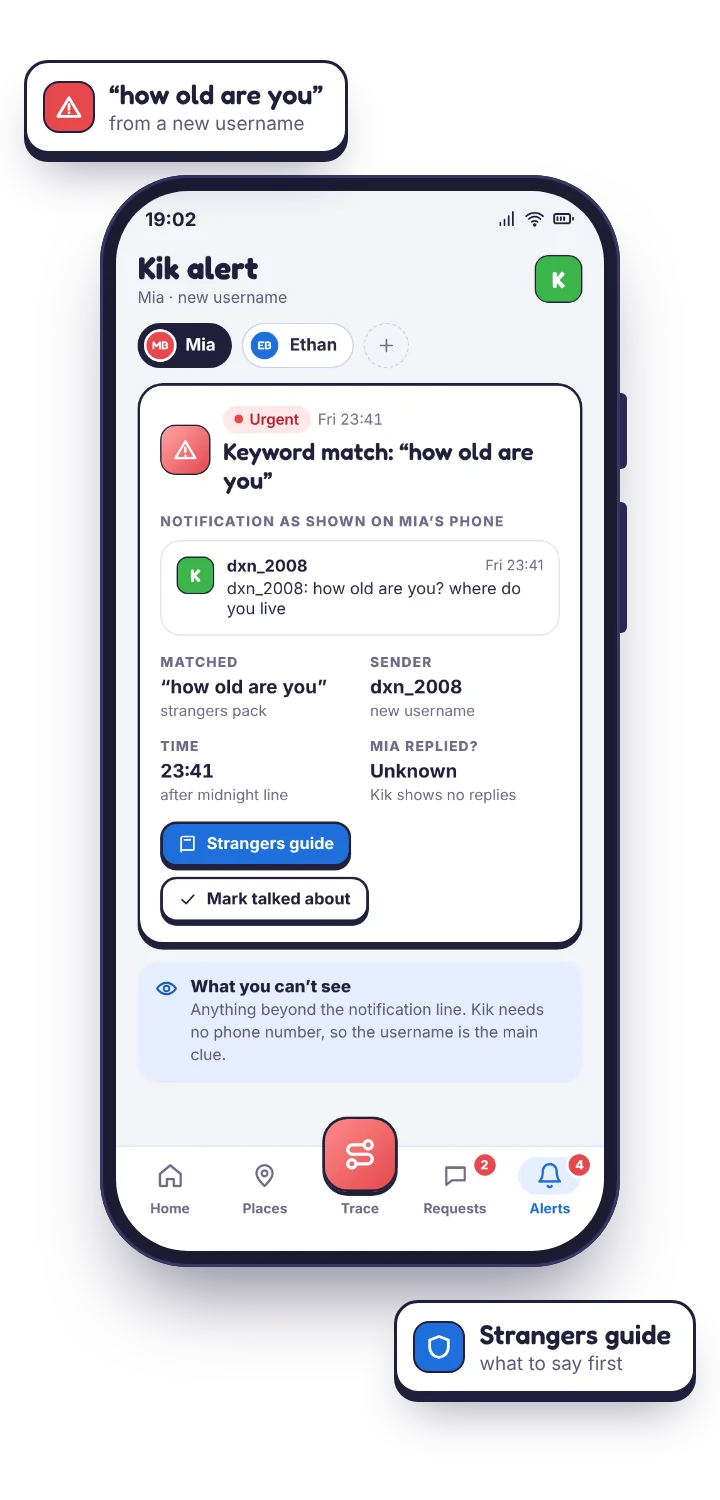
Set these up together on the phone. The wording shifts between updates, so look for the equivalent if a label differs. The TheTruthSpy app carries the checklist so you can tick them off, and the single highest-value rule on this app is not a setting at all: do not share the username.
| Setting or rule | What it does |
|---|---|
| New people go to a separate area | Kik holds messages from people not in your child's chat list apart from the main inbox. Make sure your child knows that anyone appearing there is a stranger, whatever they claim. |
| Block, and show them how | Blocking works properly here and takes effect straight away. Walk through it once together so it is a reflex rather than something they have to ask permission for. |
| Do not share the username | A handle posted publicly, in a bio or a group, is an open door. Pick one that is not their real name, and keep it off other platforms. |
| Address-book matching off | If you would rather the account was not linked to people who have their number. |
| Leave public groups | Anyone can join and post. If a group is the reason they have Kik, that is the conversation to have. |
Keyword alerts that fit Kik monitoring
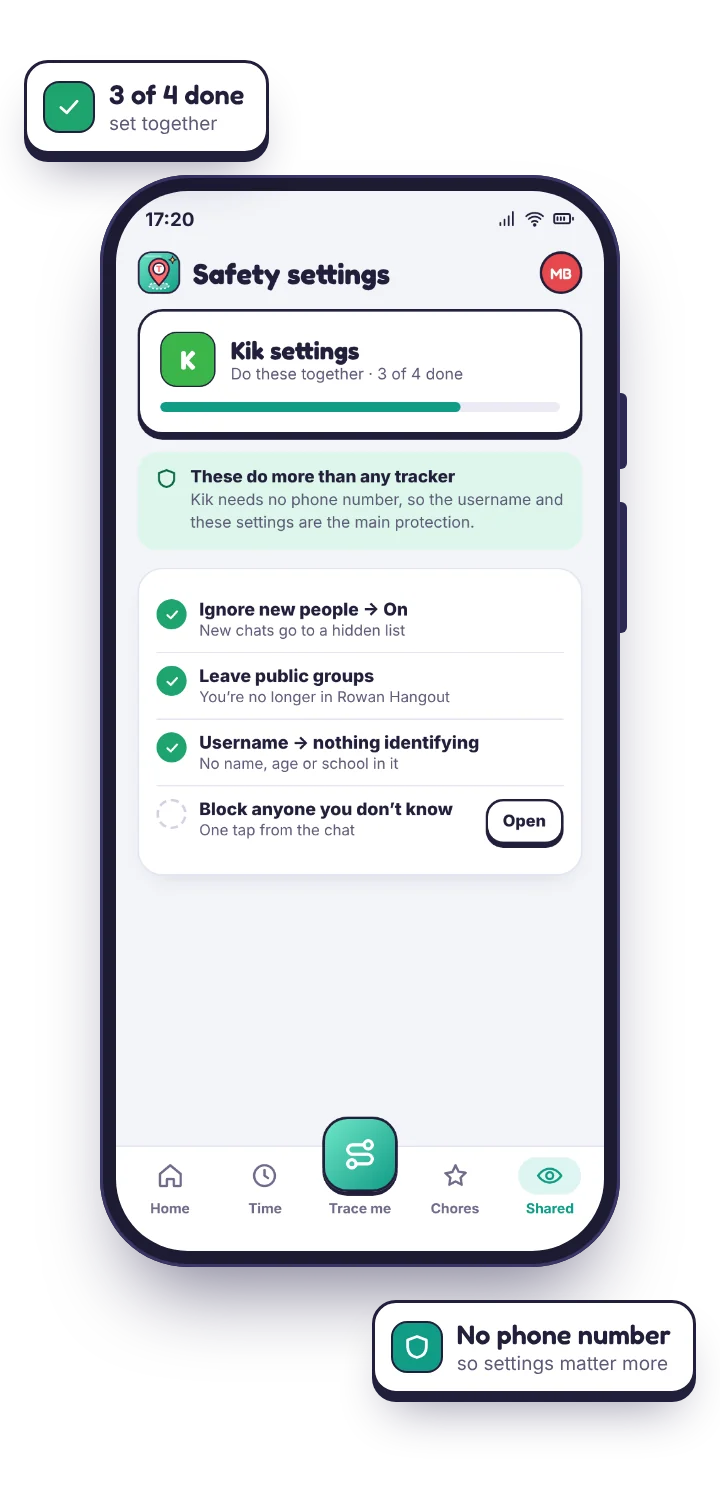
Because Kik traffic is mostly strangers rather than school friends, the list can be shorter and blunter than on other apps, and preview text should be on so that the list has something to read. Mark the identity-probing and secrecy phrases urgent. On Kik those two categories are the ones that actually matter.
- Age and identity probing: “how old”, “asl”, “you look”, “send a pic of you”.
- Moving to somewhere more private: “add me on”, “snap”, “what's your number”, “let's talk somewhere else”.
- Secrecy: “don't tell”, “our secret”, “delete this”, “between us”.
- Money and gifts: “gift card”, “I'll send you”, “prize”.
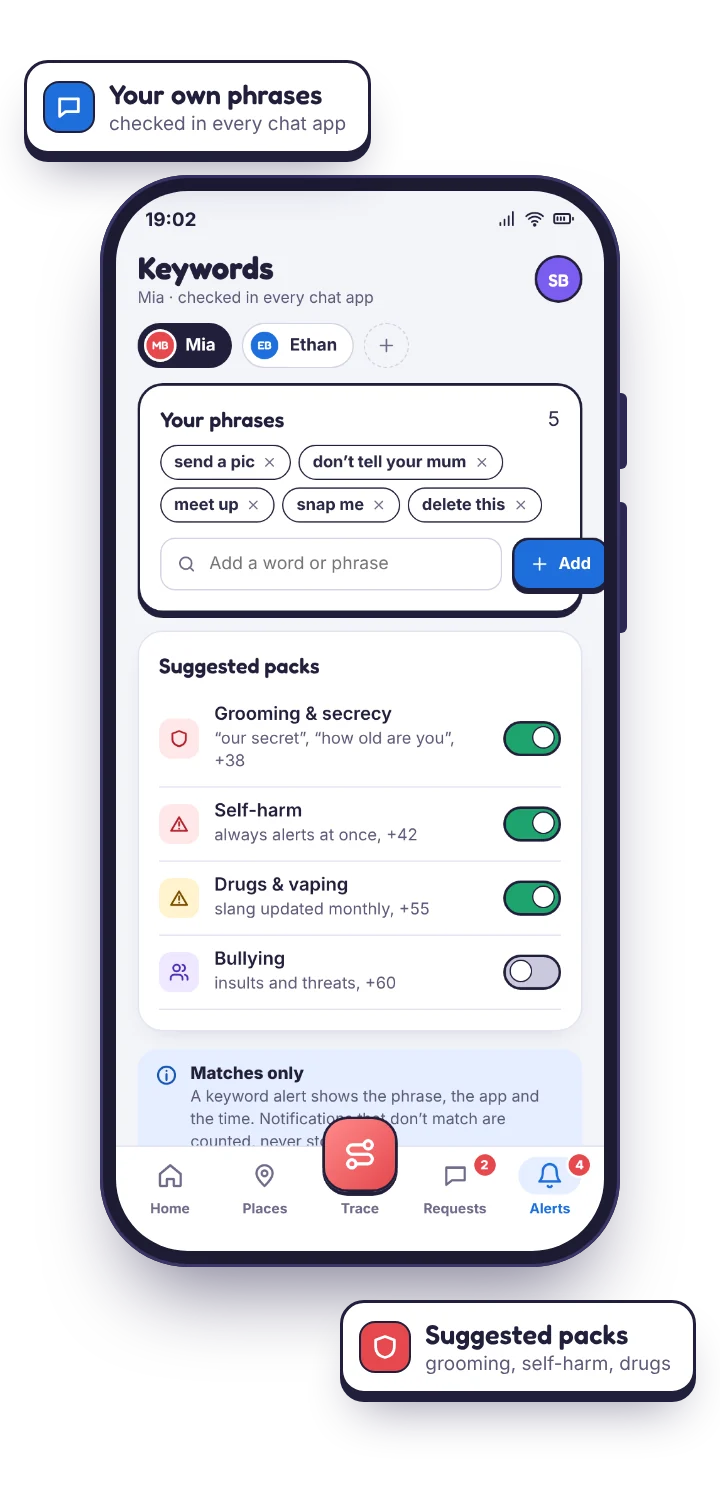
A match from a username that has never appeared before is escalated automatically. On Kik, a new handle asking “how old are u” in its first message is the single pattern this feature exists to catch, and it is the one in the demo.
Questions parents ask about the Kik monitor.
Can the Kik monitor read my child's Kik messages?
No. It reads the notifications Kik posts to Android: the username, the time, and the preview line if you allow it. The conversation inside the app stays closed. No honest tool on a normal phone does otherwise.
Will I see who is messaging my child on Kik?
You see the username the notification carries. Kik has no saved contact names to match against, which is why an unfamiliar handle stands out so clearly here.
Should I just block Kik instead?
For a younger child, often yes, and the app blocker will do it.
Will my child know Kik is being monitored?
Yes. Kik is named on the shared list in the app on their phone, along with whether preview text is included. On Kik, set it up with them watching.
Kik alongside the other messaging apps
A child on Kik is rarely only on Kik. Usernames met there often reappear on Snapchat, which the Snapchat safety alerts page covers, and the social media monitoring overview shows every chat app on one screen. If you would rather Kik were not on the phone at all, blocking the app is simpler than watching it. If it stays, stranger contact usually starts with a new-chat notification from an unknown username, so the keyword list you set for other chat apps is worth reusing here.
Spot the unfamiliar username early.
Decide whether Kik stays. If it does, pair your child's phone with them watching, switch preview text on, and let the first unfamiliar username find you.
Android · Free to set up · Visible on your child's phone