WhatsApp Safety Alerts
Get an alert when an unsaved number or a keyword you chose appears in your child's WhatsApp, plus daily and late-night counts. Chats stay encrypted. The first step is WhatsApp's own privacy settings.
Either build · Free · Permission: Notification access · Visible on your child's phone
Do the WhatsApp privacy settings first? Yes. They do more than any monitor.
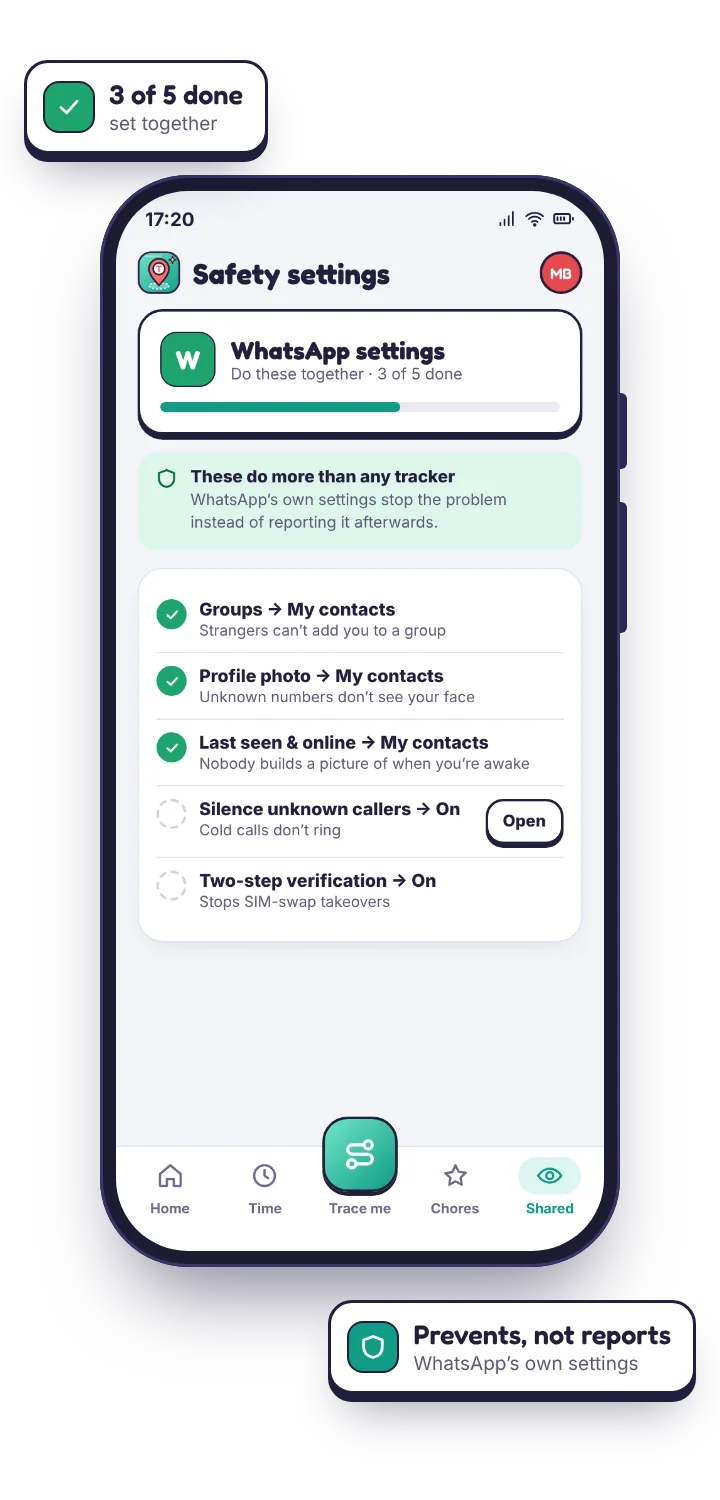
This is the recommendation we would give even if you never installed anything of ours. WhatsApp's own settings control who can reach your child at all, which prevents the problem rather than reporting it afterwards. It takes four minutes on their phone.
Five settings, done together on their phone
WhatsApp sits in an odd place. It is the app Grandma uses, the app the football team runs on, and also the app where a stranger with a foreign number can message your child the moment they know the number. The settings below close the routes strangers actually use, which are groups and cold calls far more often than a direct message out of nowhere.
Do these together rather than for them. A child who set their own privacy settings understands what each one does, and is markedly less likely to undo them a month later. The TheTruthSpy app on their phone carries this checklist so you can tick each one off as you go, and your panel shows which are still outstanding.
| Setting | Change it to | What it stops |
|---|---|---|
| Groups | My contacts | Strangers adding your child to a group they never joined, the most common route for unwanted contact and content. |
| Profile photo | My contacts | An unknown number seeing your child's face before any message is sent. |
| Last seen & online | My contacts | Anyone building a picture of when they are awake and on the phone. |
| Calls | Silence unknown callers | Cold calls from numbers not in their contacts ringing at all. |
| Two-step verification | On, with a PIN | Account takeover via a SIM swap or a stolen verification code. |
What can a WhatsApp monitor actually add? The pattern of who is messaging, not the messages.
WhatsApp is end to end encrypted. The message is scrambled on your child's phone and put back together on the other person's, and nothing in between can read it: not WhatsApp, not us, not any product claiming otherwise.
What TheTruthSpy reads instead: the notification
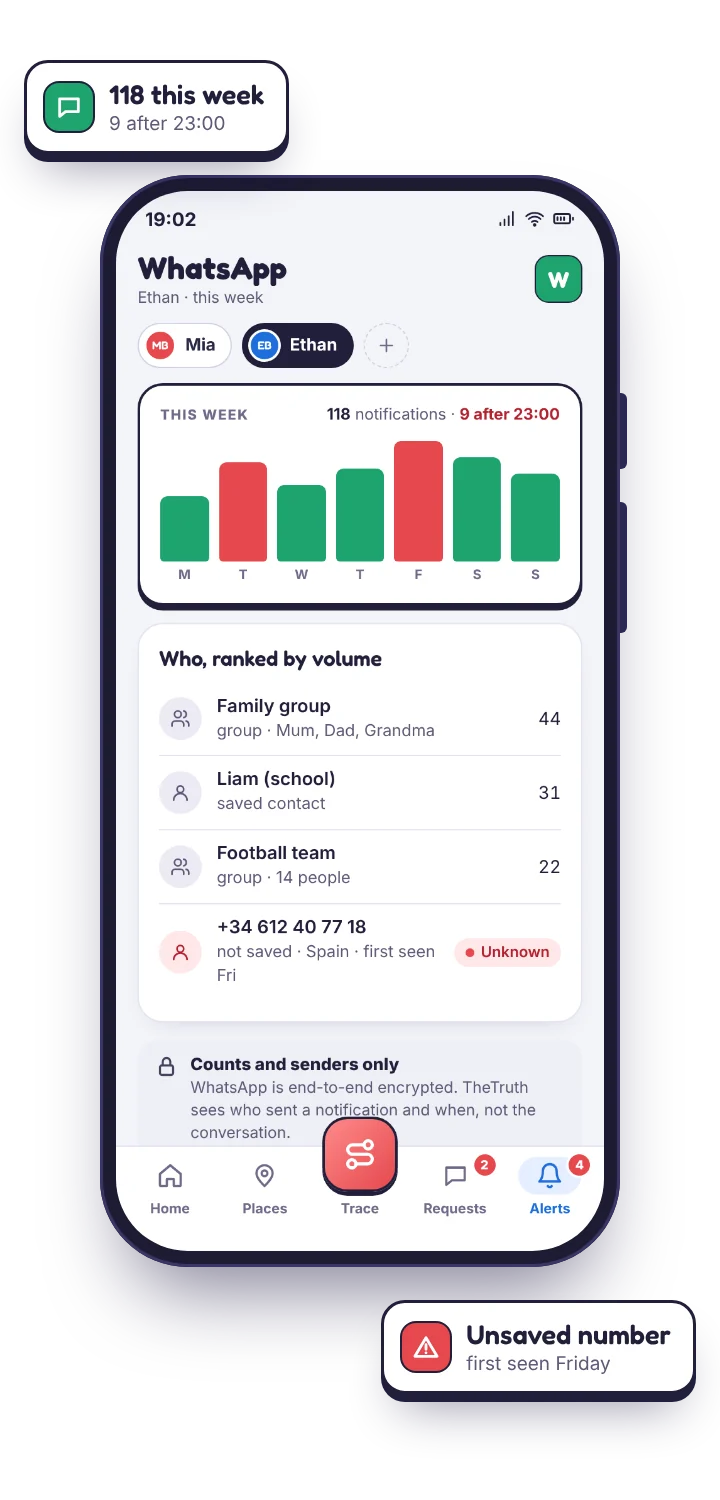
TheTruthSpy reads the notification WhatsApp posts to Android, with a permission your child granted on a screen they saw. A notification carries the sender, the time, the kind of event (a message, a photo, a voice note, a missed call) and, only if you switch it on, the first line of text. Over a week those notifications become a picture of your child's WhatsApp life that is accurate about who and when, and silent about what.
- Counts and timing. How many WhatsApp notifications arrived each day, and how many after an hour you set. A Tuesday with 31 messages after eleven at night is worth a look; a Saturday with 90 during the day usually is not.
- Who, and which group. The sender's name or number, and in a group, which member wrote. Names come from the phone's own contacts.
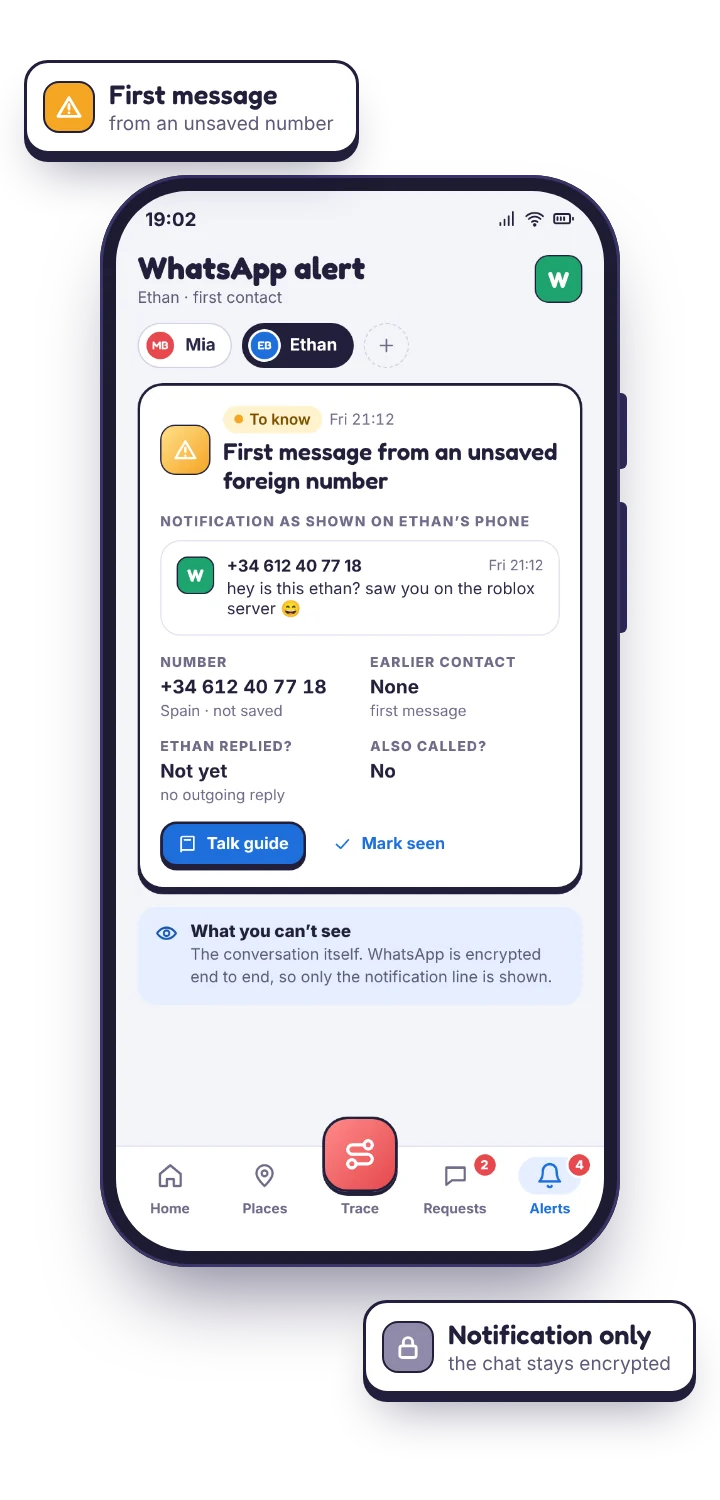
- Unsaved numbers, which stand out. Every other sender carries a contact name; this one is a bare +33 or +44, and that contrast is the single most useful thing this feature produces.
- Missed calls count too. WhatsApp voice and video attempts appear in the stream, so repeated calling from one number registers even when no message is ever sent.
The limits, stated without softening, because this is the page where they matter most.
A notification cleared before TheTruthSpy sees it leaves only the count. A message read inside the app while it is open never raises a notification at all, so an evening spent in one chat with the app in the foreground shows up as very little. Media shows as “Photo” or “Voice message”, never the image or the audio. Disappearing messages are gone from the phone and we have no copy either. A chat your child has muted produces no notification and therefore nothing at all, which is why a sudden silence from a busy name is itself worth noticing.
Products that claim more are doing one of two things. Either they root the phone or install an accessibility-level extractor to read WhatsApp's private database, which breaks on the next update, voids the warranty and is exactly the kind of covert access this app refuses to build, or they are describing a notification reader in language designed to make you think it is a transcript. Neither is a reason to trust them with your child's phone.
| You want to know | From notifications | Why |
|---|---|---|
| Who is messaging, how often, how late | Yes | Every notification names the sender and carries a time. |
| Whether a new or unsaved number appeared | Yes | Unsaved senders show as a bare number against named contacts. |
| Whether a watched phrase was used | If it is in the notification | Keyword alerts read the preview text WhatsApp shows. |
| The full conversation | No | End-to-end encrypted. No app on the market can read it. |
| Photos, voice notes, documents | No | Notifications say “Photo” or “Voice message”, nothing more. |
| Disappearing or deleted messages | No | Gone from the phone; there is no copy anywhere. |
| Muted chats | No | No notification is posted, so nothing is seen. |
Preview text on or off? On WhatsApp this one is genuinely borderline. Our lean: off.
With preview text off you get senders, counts, timing and keyword matches, which is the whole of the pattern described above. With it on, you additionally get the opening line of each message. It is a separate switch, per app, off by default, and named on your child's phone the moment you change it.
The argument for on
The first line from an unknown number tells you a great deal about what kind of contact it is. “Hi, it's Liam's mum, can you pass on…” and “salut, you don't know me but…” are very different messages, and with preview text off they look identical: one notification from an unsaved number. For a child who is already getting messages from people you do not know, that opening line can save a worried evening.
The argument for off, which we find stronger here
WhatsApp is where school friends and family live, so the overwhelming majority of what you would read is ordinary teenage traffic you have no business seeing, and reading it costs more trust than it returns. Compare that with the Kik safety alerts page, where preview text is clearly worth switching on because the traffic is mostly strangers. The right answer differs per app, which is why it is a per-app setting.
Either way, the setting is named on your child's phone alongside WhatsApp itself. The “What's shared” screen lists each monitored app with the preview-text state beside it, so this is a decision you make with them, not about them. The social media monitoring hub explains how the switch works across every app.
Which keywords? Four or five, written the way their friends actually type.
Because WhatsApp traffic is mostly harmless, a long list produces noise you will stop reading inside a fortnight. A short list of phrases that would genuinely change your evening is the one that keeps working.
A keyword list that survives a month
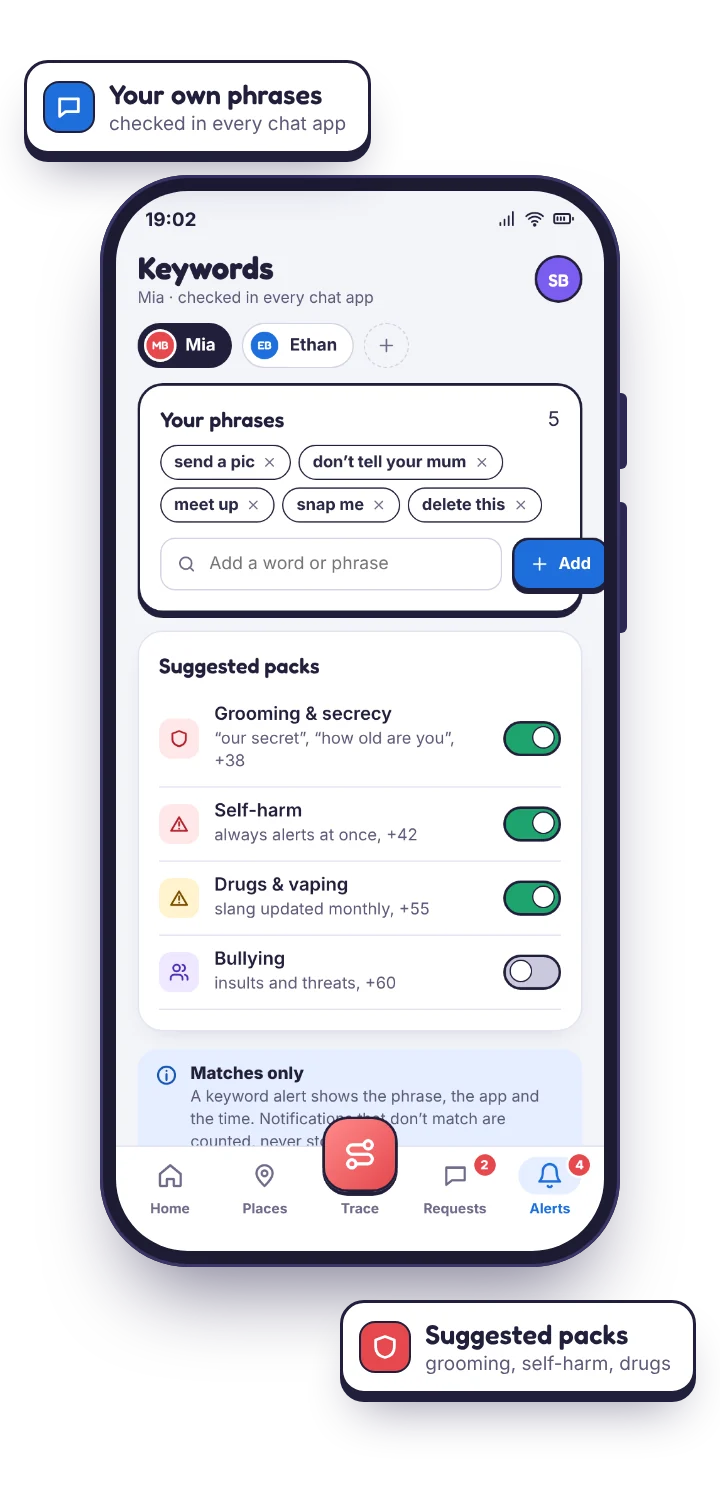
Keyword alerts read the text WhatsApp puts in the notification: the preview line of a message, the name of a group, the caption on a photo. When a phrase on your list appears, TheTruthSpy flags it, gently by default, urgently if you mark it so. Families tend to settle on a handful of phrases in four groups.
- Meeting and secrecy: “meet me”, “don't tell”, “our secret”, “delete this”. Mark these urgent so they interrupt you.
- Pressure for images: “send pics”, “send a photo of”, “just one”.
- Money and scams: “gift card”, “send money”, “verification code”. WhatsApp is a common route for scams aimed at children, and the verification-code one is how accounts get stolen.
- Anything specific to your family: a name you would rather they were not talking to, a place, a nickname.
Write them lowercase and without punctuation, the way a fourteen-year-old types. Leave everything except the meeting and secrecy phrases to the daily summary. Revisit the list after a month; most people delete half of it, and the half that remains is the half that matters.
Questions parents ask about monitoring WhatsApp.
Can the WhatsApp monitor read my child's messages?
No, and neither can any other app on a normal Android phone. WhatsApp is end-to-end encrypted. TheTruthSpy reads the notifications WhatsApp posts: sender, time, event type, and the preview line if you switch preview text on. That is enough for counts, unknown-sender alerts and keyword matches. It is not a transcript.
Does it see WhatsApp calls?
The call itself is not recorded and cannot be.
Will my child know WhatsApp is being monitored?
Yes, by design. WhatsApp is listed on their “What's shared” screen with the preview-text state beside it, and their phone shows that a parent opened the panel today. There is no hidden mode.
Should I switch preview text on?
On WhatsApp, we lean towards off: most of the traffic is friends and family, and reading opening lines costs more trust than it returns. Switch it on if an unsaved number starts appearing and you want to know what kind of contact it is, and switch it off again afterwards.
The other inboxes on the same phone
WhatsApp is often where the family group and the class group live side by side. Where relatives abroad use Viber instead, the Viber safety alerts page works the same way, and the social media monitoring overview shows every chat app's counts on one screen. Ordinary texts sent outside WhatsApp appear in the SMS log, which needs the direct-download build. None of this is billed.
Know when a stranger reaches WhatsApp.
Set the five privacy settings together first, then pair the phone and add three keywords. Ten minutes, no card, and nothing hidden from your child.
Android · Free to set up · Visible on your child's phone