Monitoring Your Child’s Text Messages Safely: Options by Age

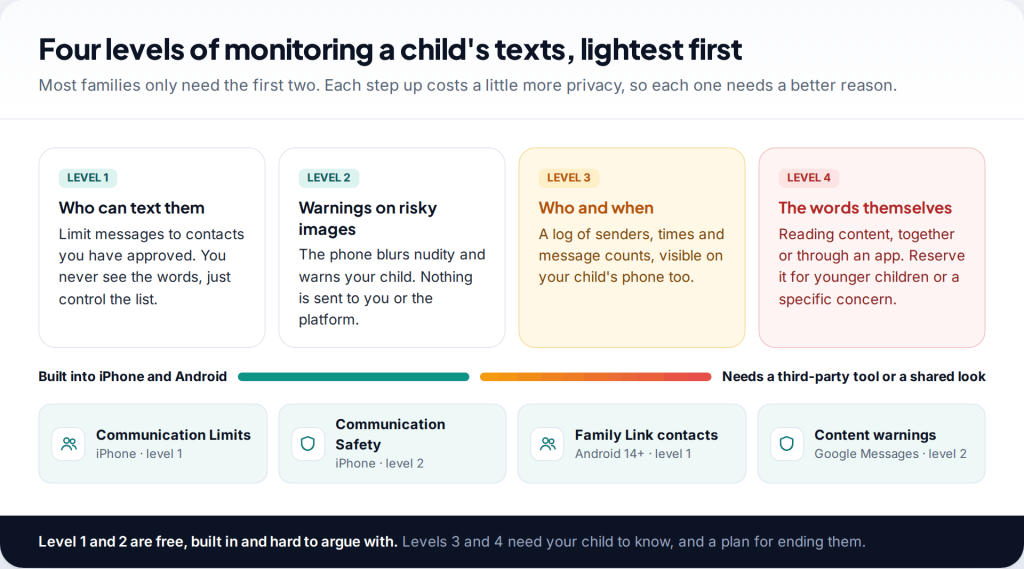
Can you monitor your child’s text messages? Partly, and less than most parents expect. Apple and Google let you control who can text a child and blur explicit images automatically, but neither lets a parent read messages. Beyond that, you’re choosing between reading together, openly, or using a third-party tool your child knows about. What fits depends mostly on their age.
- Start with who, not what. Limiting texts to approved contacts is free on both iPhone and Android and covers the biggest risk: strangers.
- Image warnings are already on. Apple’s Communication Safety and Google Messages’ sensitive content warnings are on by default for children.
- Reading content is a bigger step. Keep it for younger children or a specific worry, do it openly, and agree when it stops.
- Texts are a shrinking part of the picture. Most teen messaging happens in apps that SMS controls never touch.
What “monitoring texts” can actually mean
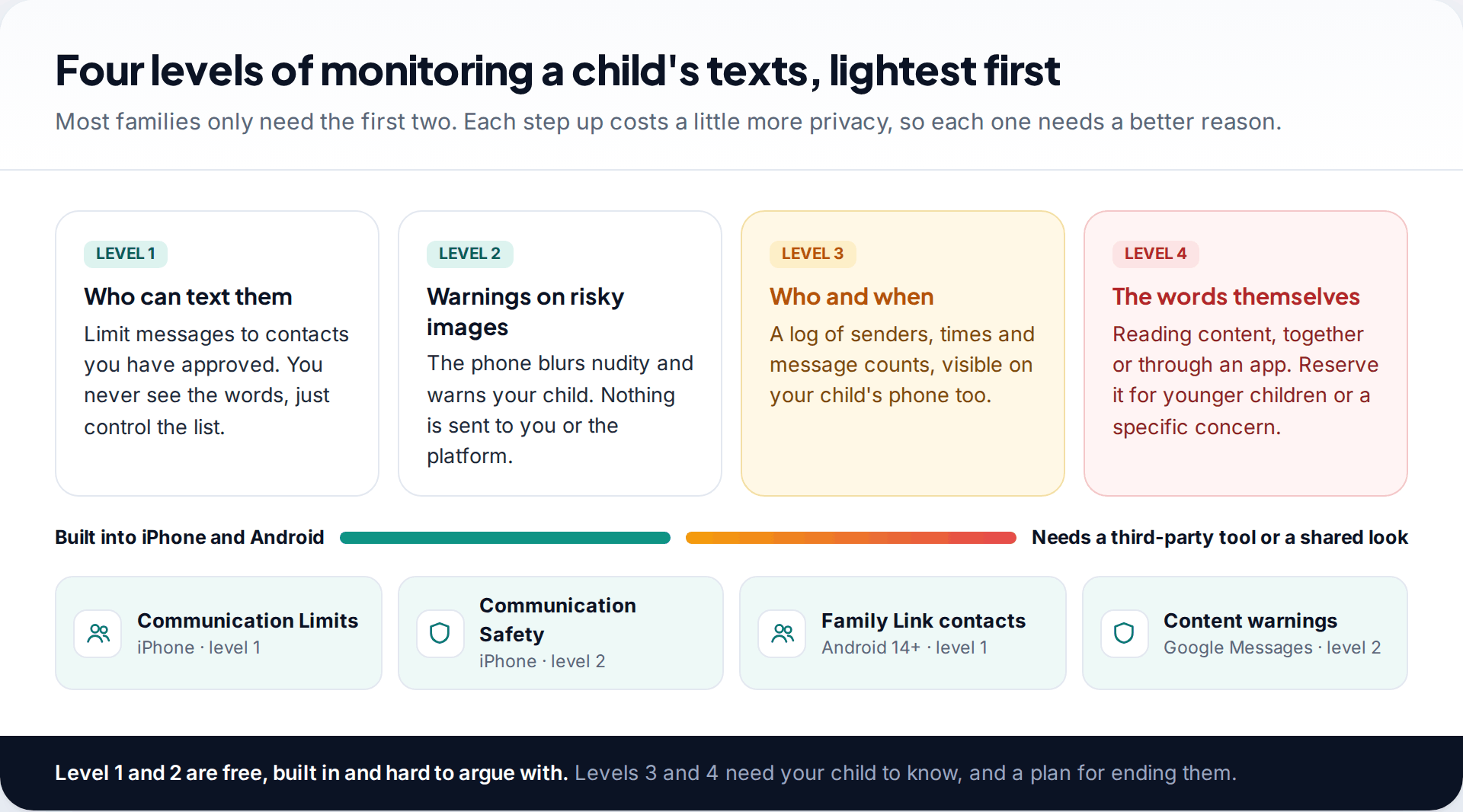
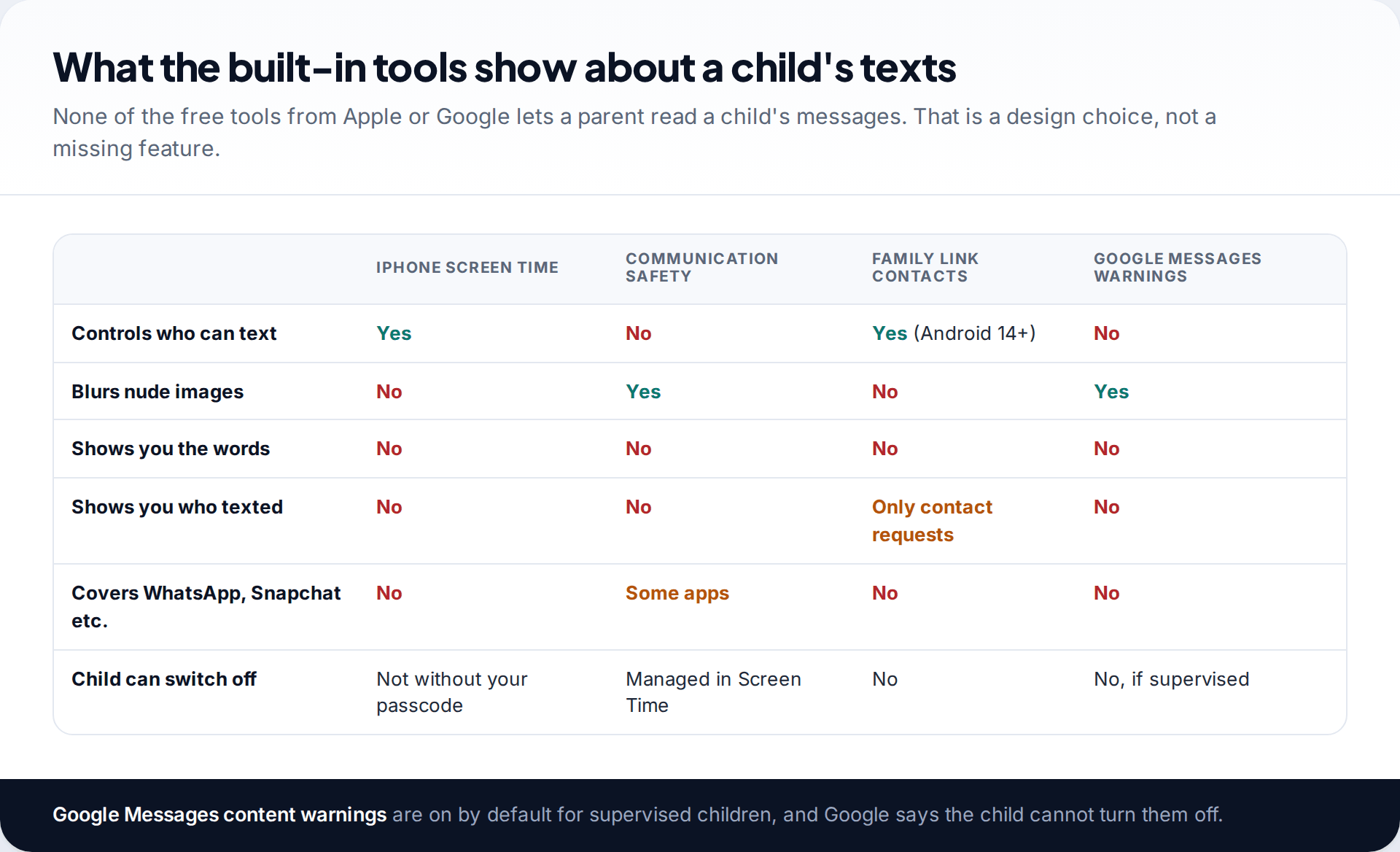
Parents searching for a way to see their child’s texts usually want one of four things, and it helps to know which. The lightest is control over who can get through: the child texts family and approved friends, and unknown numbers can’t reach them. Next is protection from harmful images, which both platforms now do on the phone itself. Then there’s a record of who texted and when. The heaviest is reading the words.
The first two cover the risks parents worry about most: strangers, grooming attempts that start with an unknown number, and unwanted explicit images. They’re built in, free, and don’t involve reading anything. The last two need either your child’s cooperation or a separate tool. Our guide to checking a child’s WhatsApp openly covers the same choice for the app many children actually use.
What an iPhone lets you see and control
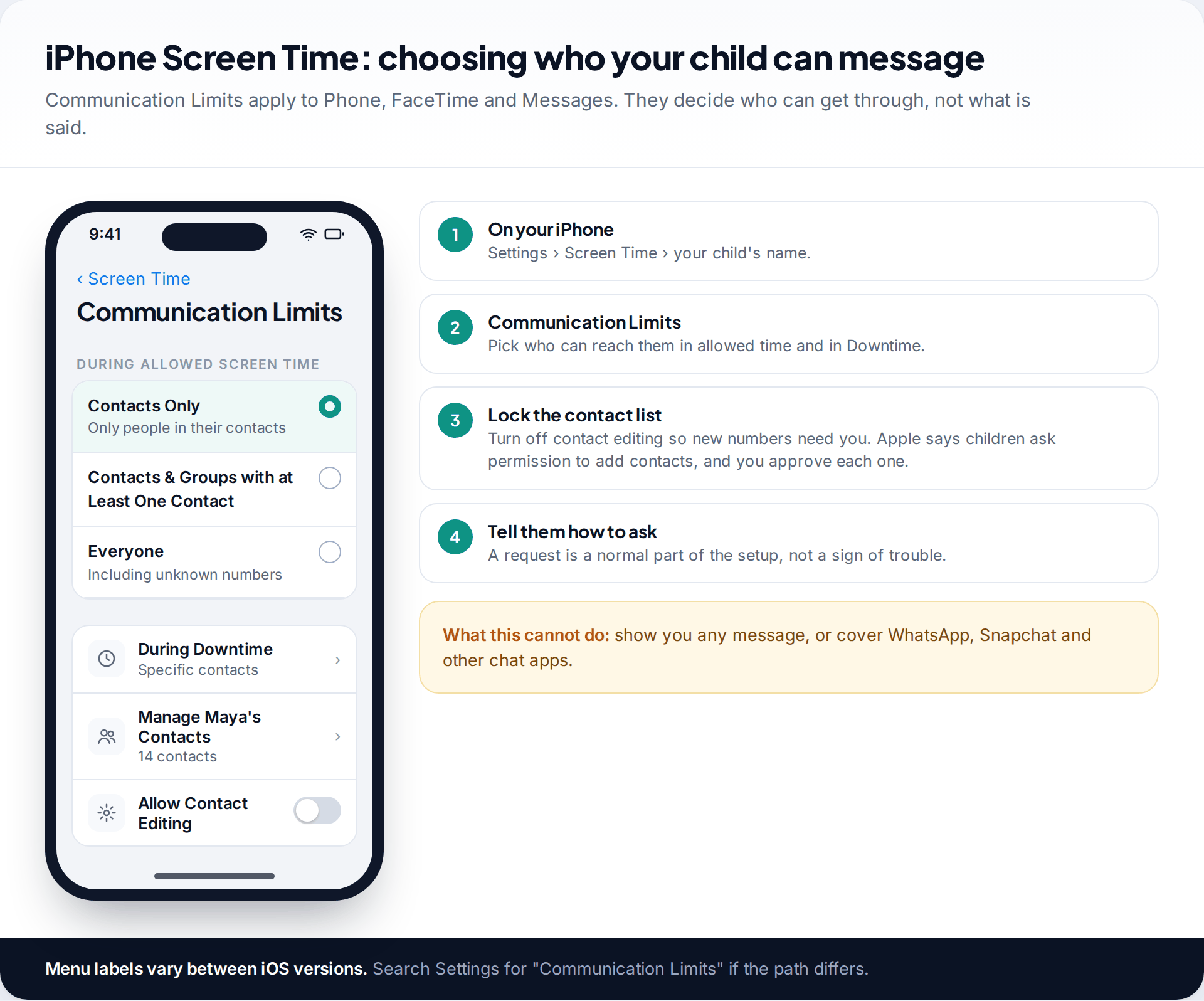
On a child’s iPhone, the parent controls sit in Screen Time on your own phone, through Family Sharing. Communication Limits let you choose who your child can call, FaceTime and message: contacts only, contacts and groups containing at least one contact, or everyone. You can set a separate, tighter list for Downtime. If you manage their contacts and turn off contact editing, a new number has to go through you. Apple describes this as children asking permission to add a contact, with parents approving each request.
What Screen Time doesn’t do is show you messages. There’s no parent view of iMessage or SMS content. Some parents get round this by signing the child’s phone into the parent’s own Apple Account, so messages sync to the parent’s devices. We’d advise against it. It mixes your data with theirs, breaks age-appropriate settings, and when they find out, and they will, it looks like spying.
Communication Safety, the protection you may not know is on
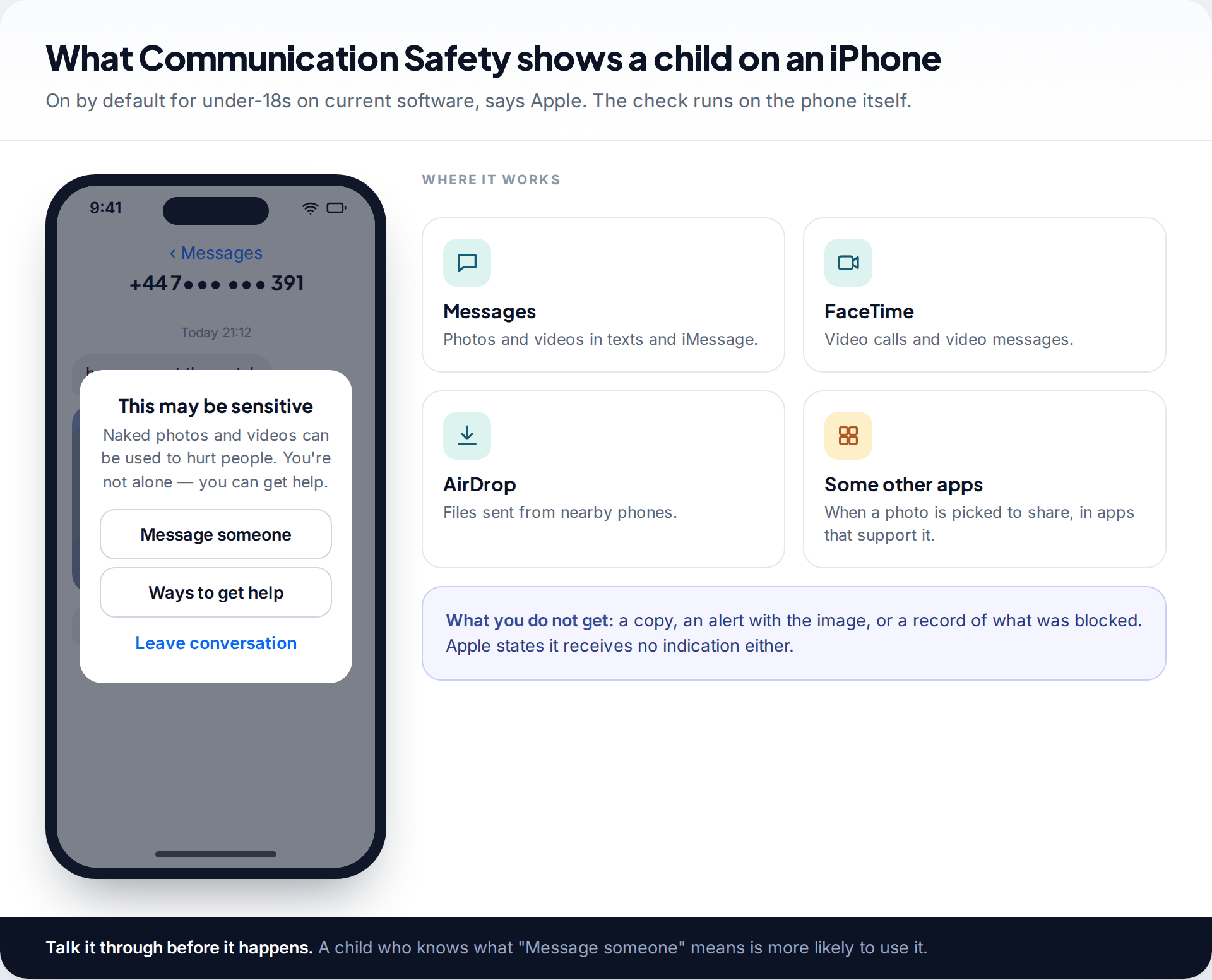
Apple says Communication Safety is on by default for under-18s on current software. It checks photos and videos in Messages, AirDrop, FaceTime video messages, Contact Posters and shared albums, plus some third-party apps when your child picks a photo to share. When it detects nudity, it blurs the image and shows a warning with options to message a trusted adult, leave the conversation, block the contact or find help. The analysis happens on the device. Apple says it doesn’t receive the image or any indication that something was flagged. You don’t get a copy either, so the feature works best if your child already knows that “message someone” can mean you.
What Android and Family Link let you see and control
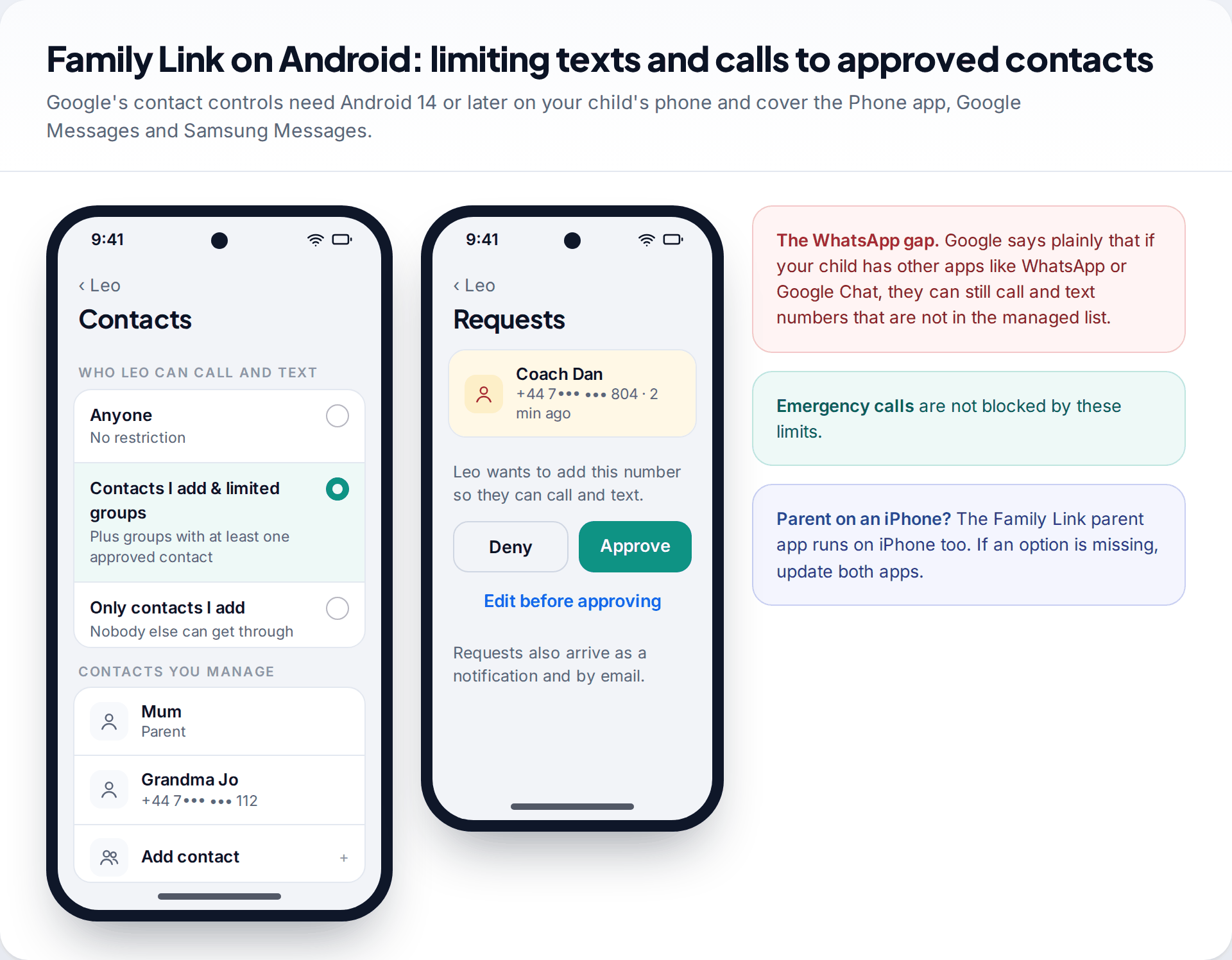
On Android, Google’s Family Link supervises your child’s Google Account. On phones running Android 14 or later, it can now limit calls and texts to contacts you manage, with three settings: Anyone, Contacts I add & limited groups, or Only contacts I add. These apply to the Phone app, Google Messages and Samsung Messages. When your child wants to add a number, you get a request to approve, edit or deny. Emergency calls always get through. The Family Link parent app is available for iPhone as well as Android.
Google is candid about the gap. Its help page says that if your child has access to other apps like WhatsApp or Google Chat, they can still call and text numbers that aren’t in the managed list. Contact limits work best alongside app approval, so new messaging apps need your OK first.
Sensitive content warnings in Google Messages are Android’s counterpart to Communication Safety. Google says they’re on by default for supervised users, and the child can’t turn them off, though you can change the setting in Family Link. Classification happens on the phone through a system component called SafetyCore. Google says no identifiable data or content is sent to its servers. Like Apple’s version, it warns the child. It doesn’t report to you.
How much to monitor your child’s text messages at each age
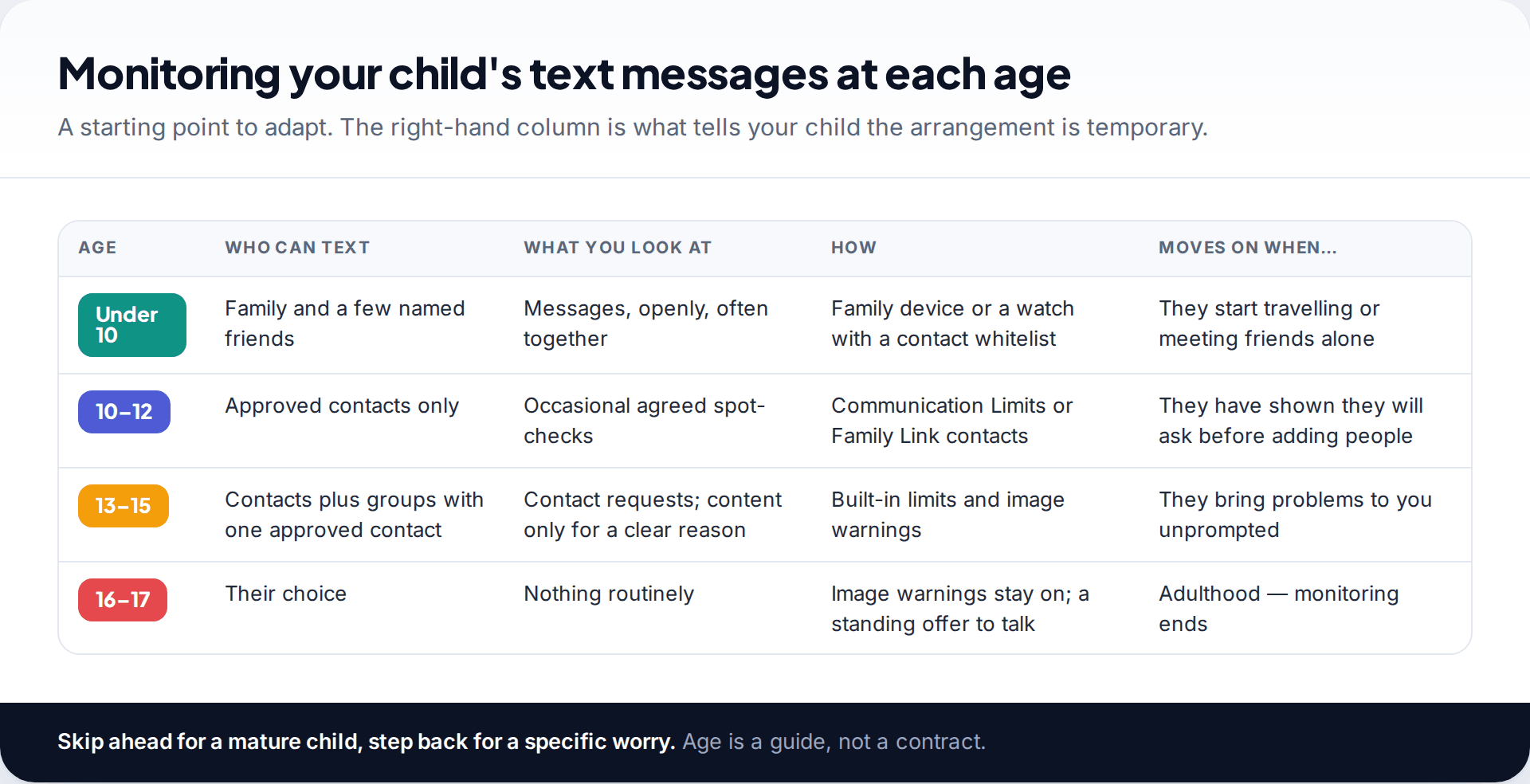
Under 10. If a young child has a phone or a watch at all, texting is usually with family and a handful of friends. Reading messages together is normal at this age and doesn’t feel like surveillance. It’s how they learn what a kind message and an odd one look like. A tight contact list does most of the protective work.
10 to 12. This is the age of the first proper phone and group chats. Keep contacts approved, and if you want to see content, agree occasional spot-checks done together rather than reading on your own at night. What you’re checking at this stage is mostly who, not the details of friendships.
13 to 15. Loosen the contact rules to include groups with at least one approved contact, since school and club chats are unavoidable. Keep image warnings on. Reading content should now need a reason, such as a change in mood, a name you don’t recognise or a specific incident, and you should say so first.
16 and 17. Routine monitoring of texts at this age tends to damage more than it protects. Keep the warnings, keep the offer to talk, and let the rest go. A 17-year-old will be managing adult relationships within a year. They need practice at it while you’re still close by.
Third-party monitoring apps, used openly
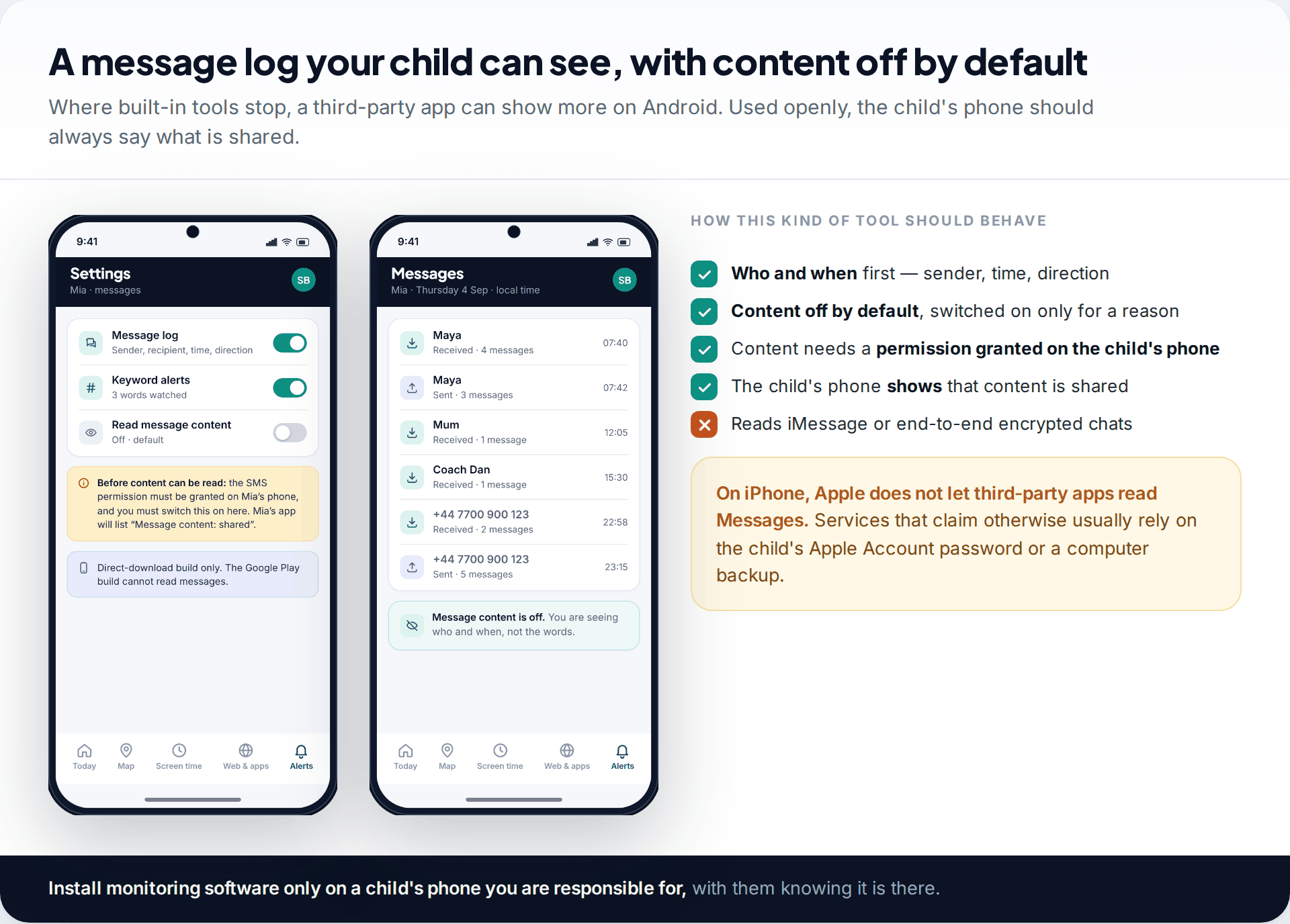
If the built-in tools don’t cover a real concern, a third-party app can show more on Android, where apps can be given permission to read SMS. Look for one that shows the least by default and makes everything visible on your child’s phone. There are broadly two designs. Alert-based tools scan for worrying content and flag it without showing you everything. Log-based tools show a list of messages and leave the judgement to you. Alert-based tools intrude less. Logs give more context, and more room to overreact.
Our app takes the log approach with limits built in. It shows who texted and when, and message content stays off until you switch it on and your child’s phone grants the permission. The child’s phone then lists “message content: shared”. It can’t read iMessage or end-to-end encrypted chats, and Apple doesn’t allow any app to read an iPhone’s Messages. Be wary of services claiming otherwise. They usually depend on the child’s Apple Account password or computer backups. You can see how it handles text messages.
Avoid anything sold as hidden. An app that promises to be invisible on your child’s phone is built for covert use. On a child’s phone it destroys trust when it’s found. On anyone else’s phone it may be illegal.
The trust trade-off, and how to read messages well
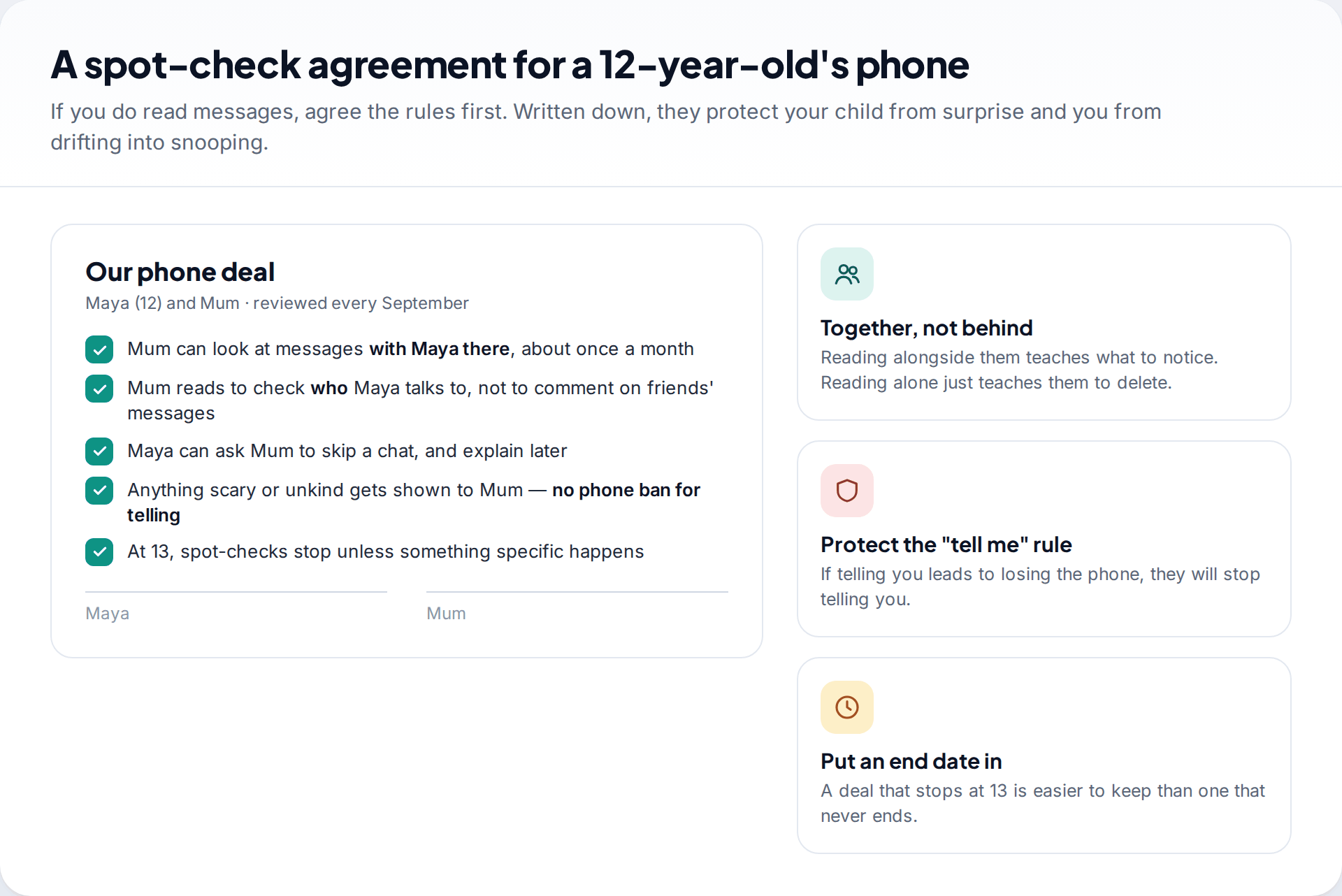
Every level of monitoring takes something from your child’s sense of privacy. What you get back is only worth it if they keep talking to you. The most common way monitoring backfires is predictable. A parent reads something, reacts to a minor issue such as swearing or a friend’s gossip, and the child learns to move conversations to an app the parent can’t see.
A few habits reduce that risk. Read with them, not after they’re asleep. Decide in advance what you’re looking for, usually unknown adults, pressure, unkindness or anything sexual, and let the rest pass. Don’t bring up friends’ messages with those friends’ parents unless someone is at risk. And protect one rule above all: if your child shows you something frightening, they don’t lose the phone for it.
An unknown number in a 12-year-old’s texts
During an agreed spot-check, a father sees several friendly messages from a number that isn’t in his son’s contacts. The sender says he’s “from the football group”. Rather than confronting his son, he asks how they met. His son doesn’t know. They block the number together, report it using the “report junk” option, switch Communication Limits to contacts only, and the father tells the coach.
What monitoring texts cannot catch
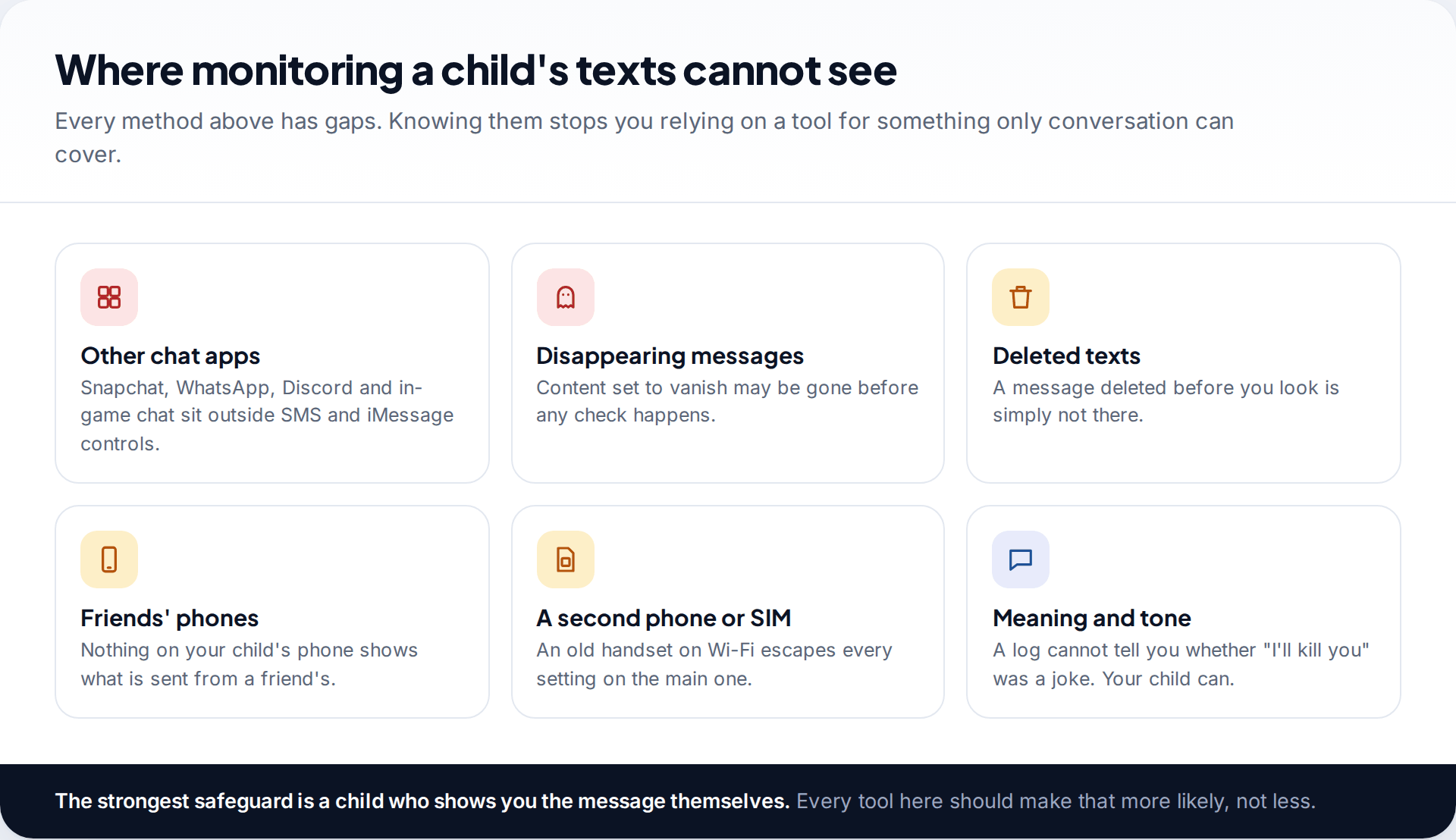
SMS and iMessage are now only part of how children message. Most of their conversations happen in Snapchat, WhatsApp, Instagram, Discord and games, and none of the controls above reach inside those apps. Messages can be deleted or set to disappear before any check. Nothing on your child’s phone shows what their friends send from their own phones. An old handset on home Wi-Fi escapes every setting on the new one. And no log can tell you whether a message was a joke, a fallout or a threat. Only your child can.
So treat text monitoring as one layer, and put more effort into the layer that works everywhere: a child who knows what warning signs look like and expects a calm reaction when they bring you something.
How this page was put together
We checked the iPhone features against Apple’s Screen Time and Communication Safety support pages, and the Android features against Google’s Family Link help pages on managing contacts and sensitive content warnings, in September 2026. Contact limits on Android need Android 14 or later on the child’s phone. Features and labels change often, so check the current help page if your screens differ.
We haven’t tested third-party monitoring services for this article and don’t rank them here. The age bands are a suggested starting point, not guidance from any official body. Read how we research and correct our guides.
Common questions
Can I see my child’s text messages on my phone?
Not with Apple’s or Google’s own parental controls. They let you control who can text your child and blur explicit images, but not read messages. Seeing content means reading together or using a third-party app openly on an Android phone.
Can I read my child’s iMessages through Screen Time?
No. Screen Time controls who your child can message and when, but doesn’t show message content. Sharing your Apple Account with a child’s phone would sync messages, but it causes other problems and isn’t a good idea.
Does Family Link show text messages?
No. Family Link can restrict calls and texts to approved contacts on Android 14 and later, and it controls sensitive content warnings in Google Messages. It doesn’t show message content.
Is it legal to monitor my child’s texts?
In many countries parents can supervise their own minor child’s phone, but the rules vary, and monitoring can also capture messages from other people. Doing it openly, on a phone you’re responsible for, is the safest approach. Monitoring another adult’s phone without consent is illegal in many places.
At what age should I stop monitoring my child’s texts?
Many families stop routine checks somewhere around 13 to 15 and keep only built-in protections after that. Agree the point in advance so it doesn’t feel arbitrary, and make clear that a specific concern can still lead to a conversation.
Will my child know if I monitor their texts?
They should. Built-in controls are visible on their phone, and an open third-party app should say what it shares. Hidden monitoring tends to come out eventually, and the damage to trust usually outweighs anything it caught.
Looking for a tool to go with this? TheTruthSpy is a free parental control app for Android that stays visible on the child's phone. If it fits your family, see what the app does.
Related guides
Is Instagram Safe for My Child? A Parent’s Guide
Is Instagram safe for kids? Not under 13, and not automatically after. Teen Accounts now remove many risks by default;…
Vault Apps and Hidden Apps on a Child’s Phone: How to Spot Them
How to find hidden or vault apps on your child's phone: calculator vaults, iPhone hidden and locked apps, Android private…
Facebook for Teens: Supervision Tools and Safe Monitoring Habits
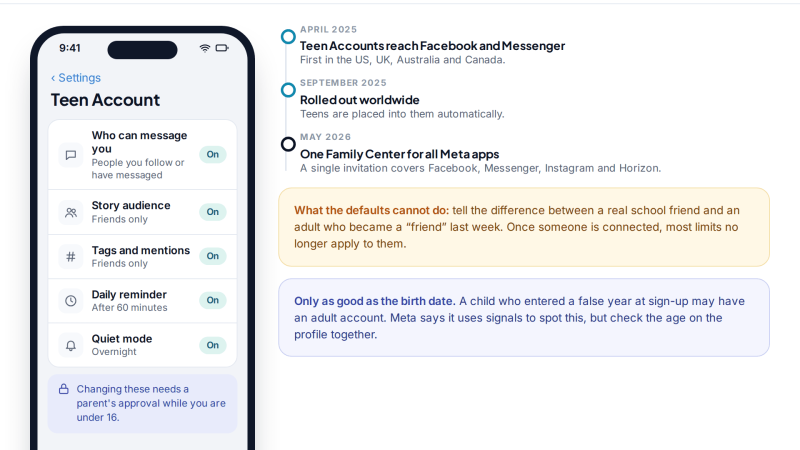
How to monitor your child's Facebook openly: what Teen Accounts switch on automatically, what Family Center supervision shows (and never…
Parental controls your child can see
Location, screen time limits, a web filter and alerts from notifications — free, and visible on your child's phone. Pair a phone in about ten minutes.
Android · Free to set up · Visible on your child's phone