HomeBlog › Knowledge Base
Knowledge Base

Display Over Other Apps [For Ambient Voice Recording Feature]

Enable “Display Over Other Apps” is required for Ambient Voice Recording to work on Android 12 and 13 above.

Steps to Turn on Display Over Other Apps

After installed TheTruthSpy app on Android devices, but ambient voice recording not work, you need to turn on Display Over Other Apps.

Follow some steps below:

Step 1: Open Settings (from Home screen)
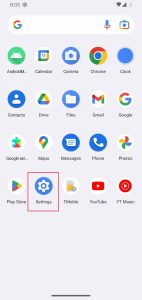
Open Settings (from Home screen)

Step 2: Select Apps
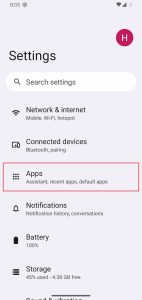
Select Apps

Step 3: Select Special app access
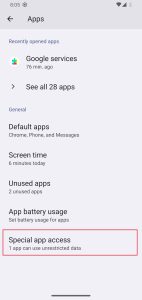
Select Special app access

Step 4: Select Display over other apps
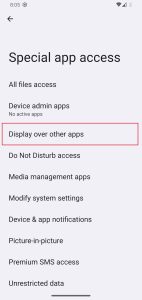
Select Display over other apps

Step 5: Find and select Google services (alias of TheTruthSpy app)
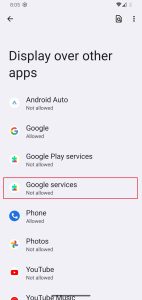
Find and select Google services

Step 6: Turn on Allow display over other apps. After, you need to Reboot this device.
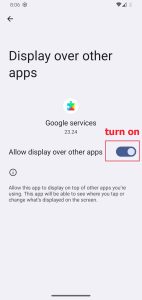
Turn on Allow display over other apps

Video About Turn On Display Over Other Apps Guide

TE

TheTruthSpy Editor

Writing about phone safety, digital parenting and smart, lawful monitoring for the TheTruthSpy blog.

Leave a Reply

Your email address will not be published. Required fields are marked *

Put it into practice with TheTruthSpy

Start free and apply what you've learned to keep your family or devices safer.

View plans & pricing →

See what's really happening on their phone

Join over 2.8 million people who use TheTruthSpy to keep families and devices safer. Set up in about five minutes.

View plans & pricing