
Facebook remains one of the world’s most widely used social platforms, connecting friends, families, classmates, and communities across the globe. With billions of users, it’s not unusual to wonder where someone is—especially if you’re concerned about a loved one’s safety or simply trying to reconnect.
While Facebook does not allow you to secretly track someone, there are legitimate and legal ways to identify a person’s location based on the features they choose to enable. This guide breaks down the most reliable methods you can use today.
1. Use Facebook’s “Nearby Friends” Feature (If Enabled)
Facebook offers a built‑in feature called Nearby Friends, which allows users to share their real‑time location with selected friends. This feature is optional and disabled by default, meaning the person must manually turn it on.
How it works
- Both you and the other person must enable location sharing.
- Facebook uses GPS data to show friends who are nearby.
- You can turn the feature on or off at any time.
How to activate Nearby Friends
- Open the Facebook app.
- Tap the Menu (three horizontal lines).
- Select Nearby Friends.
- Tap the gear icon and enable the feature.
This feature is available only in certain regions. For more details, you can check Facebook’s official documentation on location services.
2. Use Messenger Read Receipts & Location Metadata
Messenger automatically shows when someone has read your message (“Seen at…”). While this doesn’t reveal exact coordinates, it confirms the person was active at a specific time.
In some cases, older versions of Messenger or email notifications may include metadata such as “Sent from…”, which can reveal the city or general area where the message originated.
How to check location metadata
- Open Messenger on a computer.
- Select the message thread.
- Look for any location indicators or metadata.
- If a map icon appears, click it to view the approximate location.
This method is not always available, but when it is, it can provide surprisingly accurate clues.
3. Look for Location Clues in Posts, Tags & Check‑Ins
Many Facebook users voluntarily share their location through:
- Check‑ins
- Tagged locations
- Photo metadata
- Public posts
How to find location clues
- Search for the person’s profile.
- Browse their timeline.
- Look for posts with location tags or place names.
- Click the location to view it on a map.
Photos can also reveal landmarks or recognizable places. For example, a picture taken at a well‑known tourist spot can help you identify the city.
4. Use Messenger’s Live Location Sharing (With Permission)
Messenger includes a Live Location feature that allows users to share their real‑time location for up to 60 minutes.
How to share your location
- Open Messenger and select a contact.
- Tap the “+” icon.
- Choose Location.
- Select Send Current Location or Share Live Location.
This is one of the most accurate ways to know where someone is—but it requires their consent.
5. Review Their Past Posts for Location History
Even if someone doesn’t share their live location, their past posts may reveal:
- Cities they visited
- Events they attended
- Places they frequently check in
How to check
- Visit their profile.
- Scroll through older posts.
- Look for timestamps and location mentions.
- Compile the information to understand their movement history.
This method works only if the user publicly shares such details.
Bonus: Track Family Members Safely Using TheTruthSpy Parental Control
If you’re a parent wanting to ensure your child’s safety online, TheTruthSpy Parental Control offers a secure way to monitor app activity and location—with proper consent and setup.
How to use TheTruthSpy to locate family members
- Download TheTruthSpy Parental Control from website.
- Create an account.
- Install TheTruthSpy Kids on your child’s device.
- Pair the devices using the provided code.
- Enable location tracking and monitoring features.
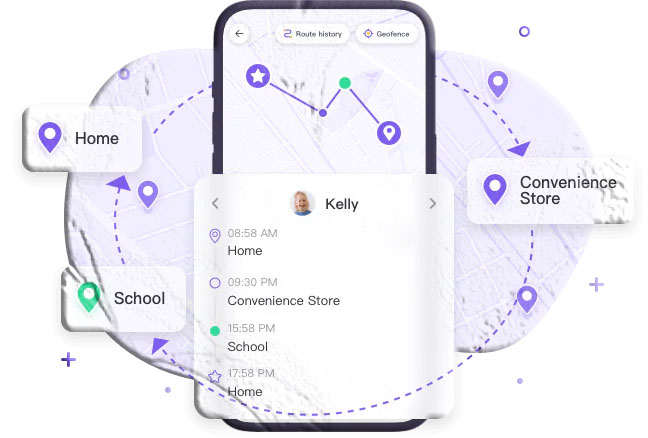
TheTruthSpy allows you to:
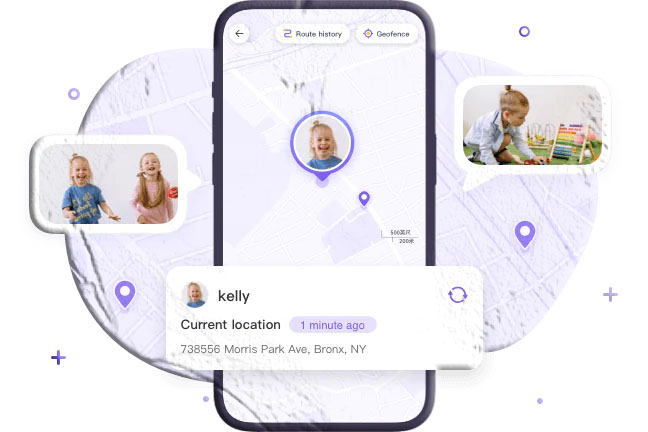
- View real‑time location
- Receive movement alerts
- Monitor app activity
- Track social media usage
This tool is designed for parental supervision and family safety—not for unauthorized tracking.
Conclusion
Finding someone’s location on Facebook is possible, but only through methods that the user has chosen to enable. Whether you rely on location tags, Messenger features, or parental control tools, it’s important to respect privacy and use these methods responsibly.
If you’re a parent, tools like TheTruthSpy can help you ensure your child’s safety across Facebook and other apps.
Frequently Asked Questions
1. Can I track someone on Facebook without them knowing?
No. Facebook does not allow secret tracking. All location‑sharing features require user permission.
2. Why can’t I see the Nearby Friends feature?
It may not be available in your region, or the person has not enabled it.
3. Does Messenger automatically share location?
No. Location sharing must be manually enabled by the user.
4. Can I find someone’s exact address on Facebook?
Only if they publicly share it. Facebook does not reveal private addresses.
5. Is using parental control apps legal?
Yes—when used with consent and for legitimate purposes such as child safety.